Home › Forums › Product Support Forums › Ajax Search Pro for WordPress Support › drag and drop will not work
- This topic has 9 replies, 2 voices, and was last updated 2 years, 6 months ago by
Ernest Marcinko.
-
AuthorPosts
-
November 23, 2023 at 11:16 pm #46152
aga2442
ParticipantI just purchased the plugin and just did the installation process. then I entered the purchase code and did the activation process.
I am now having a strange problem.
after creating a new search form, no drag and drop can be done in this form field.
i wonder if i need to do some preprocessing.
I am sure this problem will be fixed 🙂
my purpose for buying the plugin is to create a filter set instead of the standard search forms.
i actively use the wp job manager plugin developed by wordpress. the goal here: to make it easier for visitors to filter when searching for job postings.
how can i create a filter set for this?
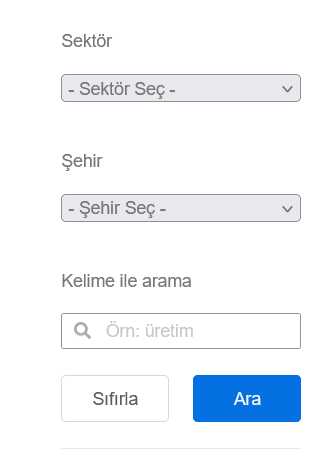
my goal is to offer multiple search / filtering fields in a form to visitors.
see the attached picture as an example.
waiting for your help.
-
This topic was modified 2 years, 6 months ago by
November 24, 2023 at 9:24 am #46158KeymasterHi!
Thank you for all the details it helps us a lot.
To create and get to know the filters, I recommend looking at this documentation. You will find sections there fo all types of filters you may need 🙂
November 24, 2023 at 9:26 am #46161ParticipantDid you look at the problem I mentioned?
The problem still persists.
November 24, 2023 at 9:42 am #46163KeymasterI’m sorry, I can only see a screenshot there. Where and how can I exactly replicate the issue?
November 24, 2023 at 9:43 am #46165Participanthttps://wp-dreams.com/wp-content/uploads/2023/11/23/aga2442/bandicam-2023-11-24-01-11-42-343.mp4
I have attached a video. you can see it.
November 24, 2023 at 9:58 am #46166KeymasterThank you, I see it now.
The issue is caused by this plugin. It loads up a script file on the Ajax Search Pro back-end and overrides the drag/drop UI field behavior on accident. The cause of the issue is this file. It should not be loaded on the plugin back-end, or they should rather use more specific DOM selectors to avoid the conflicts.
Turning off that plugin temporarily will resolve the issue.November 24, 2023 at 10:02 am #46167Participantdeactivating the plugin solved the problem.
but the problem is that this plugin is a plugin for the theme I use.
and when I create new filters or search forms I will use the data from the theme.
What precautions can I take so that this plugin doesn’t cause a problem later on?
and even now when I deactivated the plugin, a few problems have already appeared.
-
This reply was modified 2 years, 6 months ago by
November 24, 2023 at 10:18 am #46169KeymasterThe plugin author should make sure not to load it’s script on other plugin pages – that is a very bad practice, sometimes developers forget to check that. From Ajax Search Pro perspective we can’t really do anything to prevent that, as it addresses very generic selectors.
I suggest contacting their support to make sure they fix that, as many other plugins also use the same sortable feature (page builders etc..) and may cause further issues, which you may not even notice.
November 24, 2023 at 11:21 am #46172Participantplease help me 🙂
I am really having difficulty using your plugin because I have no experience with it.
As I mentioned in my first message, my goal is to create a filter set.
When I look at your documents page, there are very short short explanations.
my request from you; can you please prepare me 1 sample filter set?
I can create different structures by taking this as an example.
My aim is: to create a filter set on the wp job manager plugin.
current post type name: İlanlar or other job_listing
The subcategory or classification term is available as: job_listing_category.
I would be very grateful if you could please prepare a sample group for me.
my goal: to provide a display similar to this.
https://wp-dreams.com/wp-content/uploads/2023/11/23/aga2442/Ekran-goruntusu-2023-11-24-014613.png
November 27, 2023 at 9:24 am #46187KeymasterYou cannot access this content.
-
This topic was modified 2 years, 6 months ago by
-
AuthorPosts
- The topic ‘drag and drop will not work’ is closed to new replies.