ASP with custom blog page from divi 5
Home › Forums › Product Support Forums › Ajax Search Pro for WordPress Support › ASP with custom blog page from divi 5
- This topic has 10 replies, 2 voices, and was last updated 8 months, 2 weeks ago by
Mads Fischer.
-
AuthorPosts
-
October 18, 2025 at 9:17 am #55758Participant
Hi,
I am trying to create a search and filter grid similar to the one displayed on https://mdmentor.dk/ which I have tried to create using Divi Filtergrid plugin.
However, the plugin don’t have options for creating multiple search fields to each taxonomy and integrated ajax live search functions.Therefore I’ve bought ASP in hope this plugin can help me with a solution to create a similar blog grid but with search bars at the top of each taxonomy dropdowns. (See image and frontpage)
I work on the test page https://mdmentor.dk/testing/ with Divi 5 “builder”. First problem is the that I’am trying to connect a search bar shortcode with the class “asp_es_1” which i’ve inserted in the row of the custom blog. However the blog results don’t seem to be activate. (See image)
How would you approach this in the best way with your ASP plugin and the created blog from DIVI 5? Feel free to fiddle around with both the ASP plugin and the Divi 5 composer.
Thanks in advance!
Kind regards
Mads Fischer
-
This topic was modified 9 months ago by
October 18, 2025 at 3:22 pm #55770Ernest Marcinko
KeymasterHi,
Thank you very much for the details, it helped a lot!
You almost got it right. This is not yet officially fully supported (but it does work), that’s why there is no documentation for it yet.
To make it work both the column and the row has to have the class name. I have added the class to the column as well, now the search and filtering should start working as intended.
October 20, 2025 at 10:37 am #55790ParticipantHi Ernest,
Thanks for your useful reply!.
The search function is now visible on mdmentor.dk.I have a few more listed questions to the search function.
– I simply just want the search instance “[wd_asp id=3]” to display and search for only “konsulenter” on the website. (the term “Konsulenter” is within the taxonomy “Afdelinger”) I have tried to set this up in ASP “Categories & Taxonomy Terms” but that will only give me the options to choose which term to use, not just displaying the grid-results with “konsulenter” only. How to solve that one i ASP settings?
– Pop up: Is there any pop up feature, that allow me to display each profile post page directly in a pop up/modal, instead of being directed to the actual post page?
Feel free to do some editing,
Many thanks Ernest.
Kind regards
Mads Fischer
-
This reply was modified 9 months ago by
October 21, 2025 at 8:30 am #55806KeymasterHi Mads,
To restrict items to a specific category only, check this documentation for a step-by-step guide. It should do the trick 🙂
There is no pop-up feature, however there is a compact (slide out) search box feature. However most themes or page builders nowadays have a pop-up feature built-in, if yours have that feature too, then I recommend using that and placing the search box to the pop-up itself.
October 21, 2025 at 9:14 pm #55816ParticipantHi Ernest,
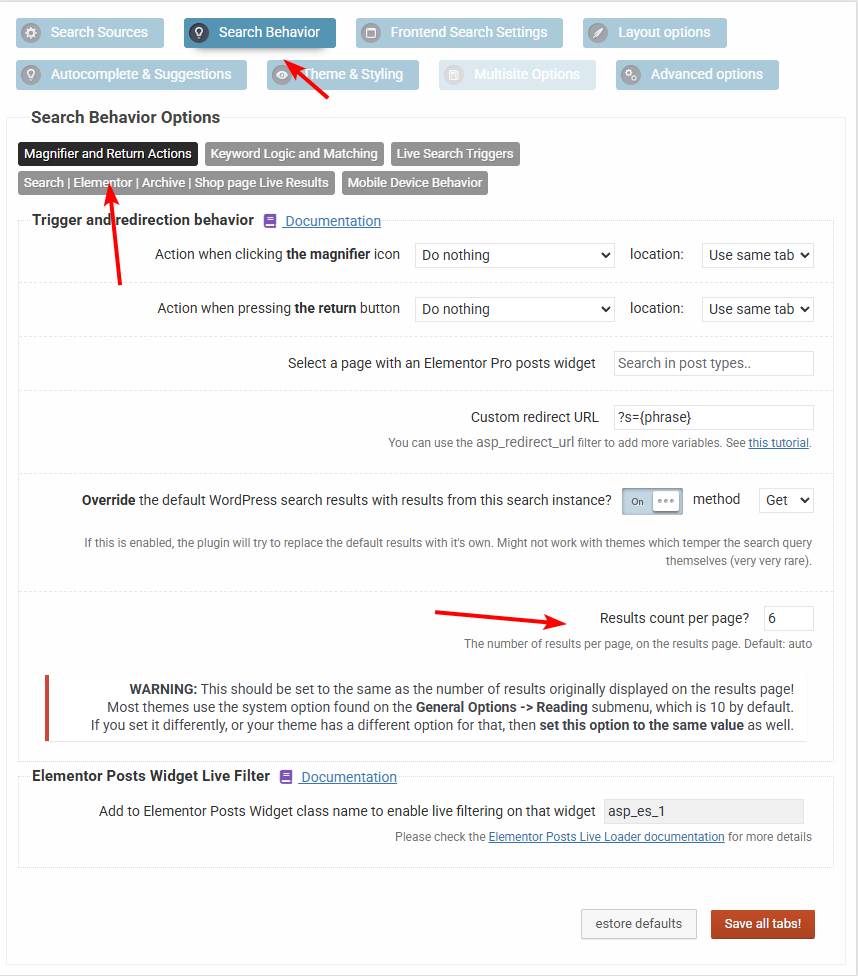
Thanks, I was able to restrict the terms.– Now I tried to add a limit of 6 posts inside the limits-tab of the ASP settings. But it’s not taking effect. How to make such a limit and then make a pagination?
– Can i create ordering on multiple search instances? I need 2 instances on the front page with each specific orderings. ATM one of them are set on: “menu order asc.”
– Is there a more efficient way to auto populate/refresh the results when entering the site? It slows it down quite a bit to reload the preset results.
Kind regards
Mads
October 22, 2025 at 8:23 am #55823KeymasterHi,
Now I tried to add a limit of 6 posts inside the limits-tab of the ASP settings. But it’s not taking effect. How to make such a limit and then make a pagination?
Instead of limiting that in the search settings, try within the loop settings, as that should be the override. If that doesn’t work, then you can try forcing it via this option. That will try to override anything else and force that count.Can i create ordering on multiple search instances? I need 2 instances on the front page with each specific orderings. ATM one of them are set on: “menu order asc.”
Yes of course. You can create as many as you want.Is there a more efficient way to auto populate/refresh the results when entering the site? It slows it down quite a bit to reload the preset results.
If you are using it with the divi loop, then it might be better to actually configure the loop to show the desired initial results and turn off the auto-populate to avoid unneccessary loading. When a user triggers a search the plugin will override those initial results either way, so it does not matter what items are displayed initially.October 22, 2025 at 12:11 pm #55830ParticipantHi Ernest,
Thanks for this, it helped.– Can you explain how I could potentially create another ordering in a new search instance? I cant see how, since all posts have already been Re-Ordered by a plugin “Post – Re-Order”. (se image) And therefore displayed customly on the website. How to solve that one?
Best regards
Mads
October 23, 2025 at 8:37 am #55844KeymasterDuring searching the ordering selected in the search settings is the one that is applied.
Is the issue that you want to display the posts initially by the ordering selected in the search settings? I’m not sure I follow why do you need a second search bar. Just want to make sure I understand the issue correctly 🙂
October 23, 2025 at 8:43 pm #55857ParticipantI will see if I can fix the ordering.
I’m not sure how to change the text that appears when “No results found” shows up after typing in the search field. Is there a specific file where I need to make this change?
-
This reply was modified 9 months ago by
October 24, 2025 at 8:53 am #55867KeymasterI’m not sure about that text as it is generated by divi somewhere, and I’m fairly new to divi 5 myself.
This is the only article I was able to find, which suggests a custom 404 page template, but I don’t know if that is the way, you may have to ask divi support for the specific location.
November 3, 2025 at 9:04 am #55943ParticipantThanks for this, I got it working with a plugin.
1) Do you have any suggestions to adding an pagination to the payout? I have tried with the plugin “WP-PageNavi” but its loading the whole url/site when changing page. – this instead of updating the page of the the ajax search layout. How to achieve this?
I contacted DIVI support about this but they refer me to “you” as the developer of the plugin.
The custom script is designed to rearrange Divi modules or rows once the page fully loads. However, it does not reinitialize when new results are loaded through AJAX, which explains why the filtered results remain even after clearing the search field.
Since this code is custom-built, it’s outside our support scope, and I can’t determine the exact changes needed. I recommend reaching out to the code author or developer who created it and asking them to adjust the script so it re-runs after each AJAX update to ensure the layout refreshes properly 👍2) A second problem is that when typing in the search box and/or when selecting filters, the results appear, which is fine. BUT when you reset/remove the search inputs, then its not returning to its default profile layout sorting sequence of the profiles. Please take a look at https://mdmentor.dk.
I hope you can sort this one out. 🙂
Feel free to do editing on the site.
Kind regards
Mads
-
This reply was modified 8 months, 2 weeks ago by
-
This topic was modified 9 months ago by
-
AuthorPosts

- You must be logged in to reply to this topic.