Home › Forums › Product Support Forums › Ajax Search Pro for WordPress Support › Customising results box › Reply To: Customising results box
 Ernest Marcinko
Hi,
All right!
My suggestion to “hide” the results is to reset the limit to the default 10, as 0 limit will only cause issues.
Instead, I suggest this custom CSS to simply “remove” them:
.asp_r .results {
   display: none !important;
}
This will keep the results counter and the more results text but hide the result elements.
There is an option to change the results top bar, you can do it over here.
If you want to apply custom styling, then use this CSS selector:
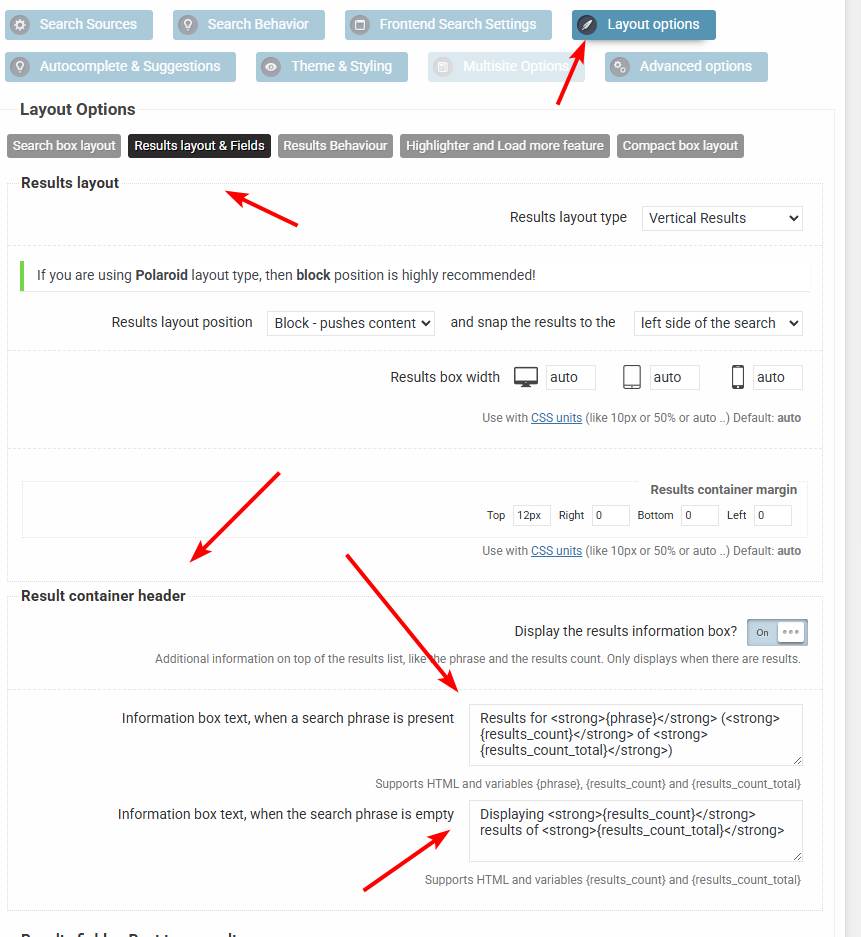
.asp_r .asp_results_top {
   // your rules here
}
I recommend using the !important modifier on all custom CSS rules, otherwise they may not take effect as the core rules are higher specificity to avoid conflicts with theme/other plugin styles.
The results page however is out of the plugin scope, it is all controlled by the theme. In block themes there is usally an option on the Loop/Query block to display pagination. I’m not too familiar with that, but it should be there somehwere. I don’t think there is a separate block for that.