One character searches using a custom filter with index table.
Home › Forums › Product Support Forums › Ajax Search Pro for WordPress Support › One character searches using a custom filter with index table.
- This topic has 5 replies, 2 voices, and was last updated 8 months, 3 weeks ago by
Ernest Marcinko.
-
AuthorPosts
-
October 30, 2025 at 12:48 pm #55918
Internet Direct
ParticipantGood morning.
I’m using a custom filtering system with your product and have the search set to an index table. I’m on a very fast server at WP Engine and have a quick question.
The search itself is very fast. I noticed last night though, when searching for a single letter or number or a string of characters such as “a b c d e f g”
There seems to be a 6-7 second delay. I’m assuming it’s searching through the entire index table?
It doesn’t seem to be doing this for two character searches.
This is my custom functions.php script. Is there any way I can eliminate one character searches or searches like I had above “a b c d e…”
/**
* Ajax Search Pro – Filter search results by language parameter.
* This function uses the plugin’s native ‘post_meta_filter’ argument to filter by a custom field.
*
* @link https://knowledgebase.ajaxsearchpro.com/hooks/filters/query-and-output/asp_query_args
*/add_filter( ‘asp_query_args’, function( $args ) {
// Get the ‘lang’ parameter from the URL, e.g., ?lang=en
$lang = isset( $_GET[‘lang’] ) ? sanitize_key( $_GET[‘lang’] ) : ”;// Proceed only if the lang parameter is one of the languages we want to filter by.
if ( in_array( $lang, [ ‘en’, ‘es’ ] ) ) {// — THE FIX IS HERE —
// Manually wrap the string value in single quotes for the raw SQL query.
// This is necessary because ASP appears to inject the value directly into the query.
$language_value = ( $lang == ‘en’ ) ? ‘”English”‘ : ‘”Spanish”‘;// 1. Define the rule using the structure required by Ajax Search Pro.
$language_rule = array(
‘key’ => ‘href_lang_language’, // The meta key to check.
‘value’ => $language_value, // The meta value to match (now with quotes)
‘operator’ => ‘=’, // The comparison operator.
);// 2. Add the rule to the ‘post_meta_filter’ array.
if ( ! isset($args[‘post_meta_filter’]) || ! is_array($args[‘post_meta_filter’]) ) {
$args[‘post_meta_filter’] = [];
}
$args[‘post_meta_filter’][] = $language_rule;}
return $args;
}, 99, 1 );// keep lang in query vars
add_filter( ‘query_vars’, function( $vars ){
$vars[] = ‘lang’;
return $vars;
} );October 30, 2025 at 2:48 pm #55922KeymasterHi,
It is more like due to it not using the index table for some reason. The number of characters
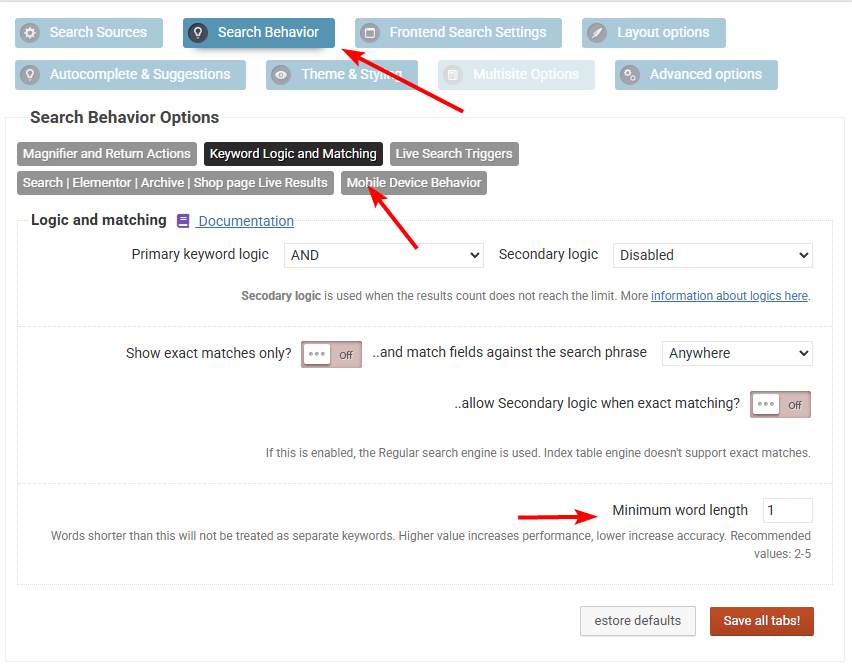
Can you please check if the minimum word length is set to 1 here.
October 30, 2025 at 3:42 pm #55930ParticipantThe minimum word length is 2.
I’ve noticed that a query such as this:
https://testdomain.com/?s=a (is fast)
and a filtered search query like this takes about 5-7 seconds:
https://testdomain.com/?s=d&lang=en&type=patients
Index table searching is on.
Thanks!
October 30, 2025 at 3:44 pm #55931KeymasterOh okay. How big is the index? Custom field based filtering can hurt the indexed search terribly, as it needs to make a subquery to fulfill the filter and it can’t be avoided in any way.
October 31, 2025 at 11:01 pm #55938ParticipantWe ended up just writing a small script that doesn’t allow WordPress to run queries on searches less than 3 characters. That solved it.
Thanks for your help.
Michael
November 2, 2025 at 8:15 am #55940KeymasterYou cannot access this content.
-
AuthorPosts
- You must be logged in to reply to this topic.