Home › Forums › Product Support Forums › Ajax Search Pro for WordPress Support › Checklist Field Displays as Array
- This topic has 9 replies, 2 voices, and was last updated 10 years, 8 months ago by
Ernest Marcinko.
-
AuthorPosts
-
August 22, 2015 at 11:20 pm #5602
neilgee
ParticipantHi,
I am using ACF for a custom field for a list, it is set up as a checkbox type.
I want to display those fields in the search so I used Advanced Description Field (default: {descriptionfield}) and set it up:{descriptionfield} – {my_checkbox_list}
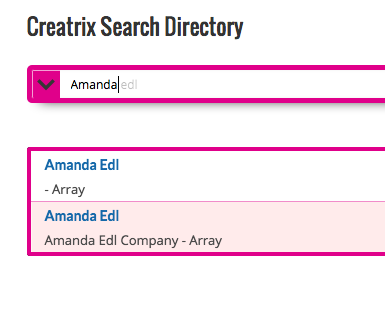
But when it displays it shows just Array – how can I show the array’s content?
( I have taken off current site – but have attached an image of how it displays)
 August 24, 2015 at 8:14 am #5610Keymaster
Hi!
I believe ACF runs a function through that array to display it, or uses some kind of code to parse through the array. It means that not the checkbox HTML is stored in the custom field, but some kind of array values, that are transformed into checkboxes.
You can ask the ACF author how the checkbox array is transformed into actual HTML checkboxes, then I might be able to suggest a customization or filter function to append the transformed code to the result list. It’s probably going to be some kind of function or a small snippet from the ACF plugin code.
August 24, 2015 at 8:50 am #5614ParticipantOk I started a thread – see what happens – http://support.advancedcustomfields.com/forums/topic/checkbox-list-displaying-as-an-array-in-search/
August 24, 2015 at 9:06 am #5617KeymasterNice! Let me know if they reply, and I will proceed from there.
August 26, 2015 at 9:42 am #5683ParticipantHi Ernest,
I got a function that can output the array –
[code]$checkboxes = get_field(‘my_checkbox_list’);
if( $checkboxes ){$checkbox_string = implode(‘, ‘, $checkboxes);
echo ‘ – ‘ . $checkbox_string;}[/code]
So now how can I hook into Search results.Thanks
Neil-
This reply was modified 10 years, 9 months ago by
August 26, 2015 at 10:49 am #5690KeymasterNice. First of all you need to change back the Advanced description field option to the default {descriptionfield} because we are doing a different solution.
Then, I put together a filter, which parses through each result and gets the ‘my_checkbox_list’ field as per suggested on ACF support forums. Then it’s appended to the description:
[php]
add_filter( ‘asp_results’, ‘asp_checkbox_to_results’, 1, 1 );asp_checkbox_to_results( $results ) {
foreach ($results as $k=>$v) {
// Get the field
$checkboxes = get_field(‘my_checkbox_list’);
// Append if exists
if( $checkboxes ){
$checkbox_string = implode(‘, ‘, $checkboxes);
$results[$k]->content .= " – " . $checkbox_string;
}
}return $results;
}
[/php]Hopefully it will work.
August 27, 2015 at 3:43 am #5692ParticipantHi,
No unfortunately didn’t work – so I set {descriptionfield} only in advanced desc. field and added function/action to functions.php but results did not show check list values – just the title field.-
This reply was modified 10 years, 9 months ago by
August 27, 2015 at 8:55 am #5694KeymasterHi!
If the normal description is showing, then the “if ( $checkboxes ) …” part of the code is not executed. I think the ACF get_field() function needs a post ID as well. Try this modification of their suggestion:
[php]
add_filter( ‘asp_results’, ‘asp_checkbox_to_results’, 1, 1 );asp_checkbox_to_results( $results ) {
foreach ($results as $k=>$v) {
// Get the field
$checkboxes = get_field(‘my_checkbox_list’, $v->id);
// Append if exists
if( $checkboxes ){
$checkbox_string = implode(‘, ‘, $checkboxes);
$results[$k]->content .= " – " . $checkbox_string;
}
}return $results;
}
[/php]-
This reply was modified 10 years, 9 months ago by
September 10, 2015 at 5:07 am #5845ParticipantApologies for the delay in getting back to you but this works great! – just had to prefix the function with function
Many thanks
September 10, 2015 at 10:28 am #5847KeymasterYou are welcome!
Indeed, I made a syntax error there.
For future reference the correct code:
[php]
add_filter( ‘asp_results’, ‘asp_checkbox_to_results’, 1, 1 );function asp_checkbox_to_results( $results ) {
foreach ($results as $k=>$v) {
// Get the field
$checkboxes = get_field(‘my_checkbox_list’, $v->id);
// Append if exists
if( $checkboxes ){
$checkbox_string = implode(‘, ‘, $checkboxes);
$results[$k]->content .= " – " . $checkbox_string;
}
}return $results;
}
[/php] -
This reply was modified 10 years, 9 months ago by
-
AuthorPosts
- You must be logged in to reply to this topic.