Minimum search string length to unclutter stats and save perfomance
Home › Forums › Product Support Forums › Ajax Search Pro for WordPress Support › Minimum search string length to unclutter stats and save perfomance
- This topic has 5 replies, 2 voices, and was last updated 6 months, 1 week ago by
onlineproduktioncontent_cLaa.
-
AuthorPosts
-
January 8, 2026 at 3:43 pm #56719Participant
Hi,
after checking the first stats on our test demo site, we became aware that the stats are cluttered by autotriggered searches ( i.e. there are stats entries for parts of words that were queried while users are typing their query, even for single letters. So if a user is typing foobar into the query, we have log entries for f, fo, foo, foob, fooba and foobar. This is not useful for stats, and is also a waste of queries)
So what we need to do is this:
1) set a minimum string length for the stats ( i.e. only log searches that have a length of N characters or more ) This should not be a runtime filter when DISPLAYING the stats, but a filter to not SAVE short queries at all, if possible.
2) set a minimum string lenght for triggering a search query ( i.e. while the user is typing , only start the search after N characters have been typed )
3) maybe set a small timeout so that the search is triggered only after a minimum amount of milliseconds. I.e. if a user is typing fast, the search is not triggered while he types, only if he pauses while typing (just a few milliseconds) and if minimum lenght is reached, a query is triggered.1 and 2 are important, since this is not only a stats problem, but also a performance issue, there is no point in making searches for one or two characters (at least in our content). We have a minimum word length of 2 charaters set up anyway. The values for 1 and 2 should be set independent from each other.
3 is not high priority, just a suggestion. We use algolia on other sites and there the search client can be configured for all three aspect.
But for Problem 1 and 2 I would be interested how and where to configure, I did not find anything in the gui.
Thanks,
UlrichJanuary 8, 2026 at 4:23 pm #56720Ernest Marcinko
KeymasterHi Ulrich,
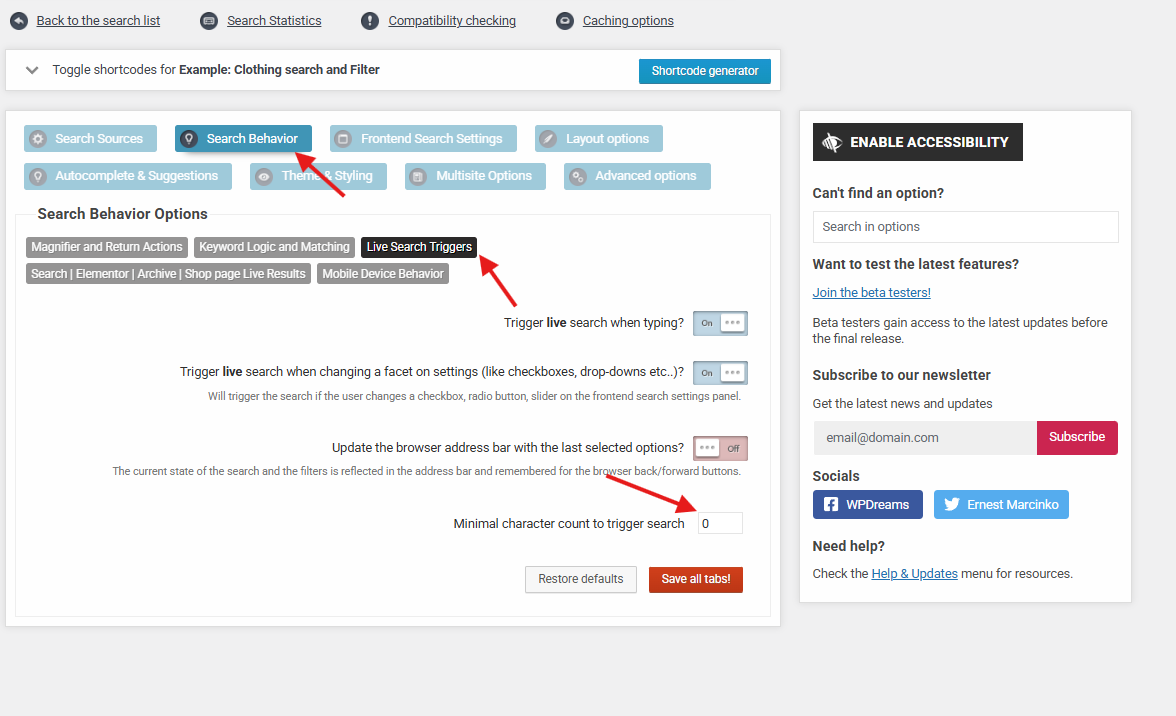
1&2. This can be adjusted. You can set the minimum number of characters to trigger the live search here. By default it’s 0. The statistics will respect the same value set there.
3. There is a 250ms delay, but it is hard coded unfortunately. I think I will add an option to adjust that, perhaps it will be useful for others too. I have made an issue request, this will likely be added in the upcoming version, as it’s not too complicated to implement.
January 12, 2026 at 2:48 pm #56738ParticipantThank you Ernest, that’s great. I was quite confident there would be a setting, but have overlooked it. So thanks for the hint/screenshot!!
Regarding the timeout – like I said this is probably not so important. There are already so many things to configure that it is difficult to decide what should be in the gui and what not … maybe a filter would do. But of course this is up to you 🙂Regards
UlrichJanuary 12, 2026 at 3:00 pm #56739Participant@ernest – actually there is a glitch :
I tried the setting you recommended. this setting not only affects the auto-triggered searches, but it also makes it impossible to actively search for words with fewer letters. So for example, if I have set the value to “3”, and I type two letters, no search is triggered automatically (correct!) but if i hit Enter or click on the submit button/looking glass, no manual search is possible.January 15, 2026 at 1:37 pm #56763KeymasterThank you for letting me know that, I confirm this is an issue. I have noted this on the issue tracker and it will be resolved in the upcoming version (very soon) by adding a separate option to control that.
January 15, 2026 at 4:50 pm #56766ParticipantFantastic, thanks!
-
AuthorPosts
- You must be logged in to reply to this topic.