This website uses cookies to personalize your experience. By using this website you agree to our cookie policy.

Compact box layout

Viewing 6 posts - 1 through 6 (of 6 total)
  • Author
    Posts
  • #56861
    Andi HuberAndi Huber
    Participant

    Hello,

    i want to include the compact layout search box here ( i licenced the PRO plugin today for that page): http://www.mannbackt.de
    (In the menu, right position).

    The thing is: I want it to open to the left and “overflow” the menu items when clicked. I tried many position variants from the preferences here (https://jmp.sh/m2BrOy6T). But no luck.

    Can you please tell me more about how i can achieve that?

    Thank you very much, BR Andreas

    #56872
    Ernest MarcinkoErnest Marcinko
    Keymaster

    Hi Andreas,

    Yes, of course!

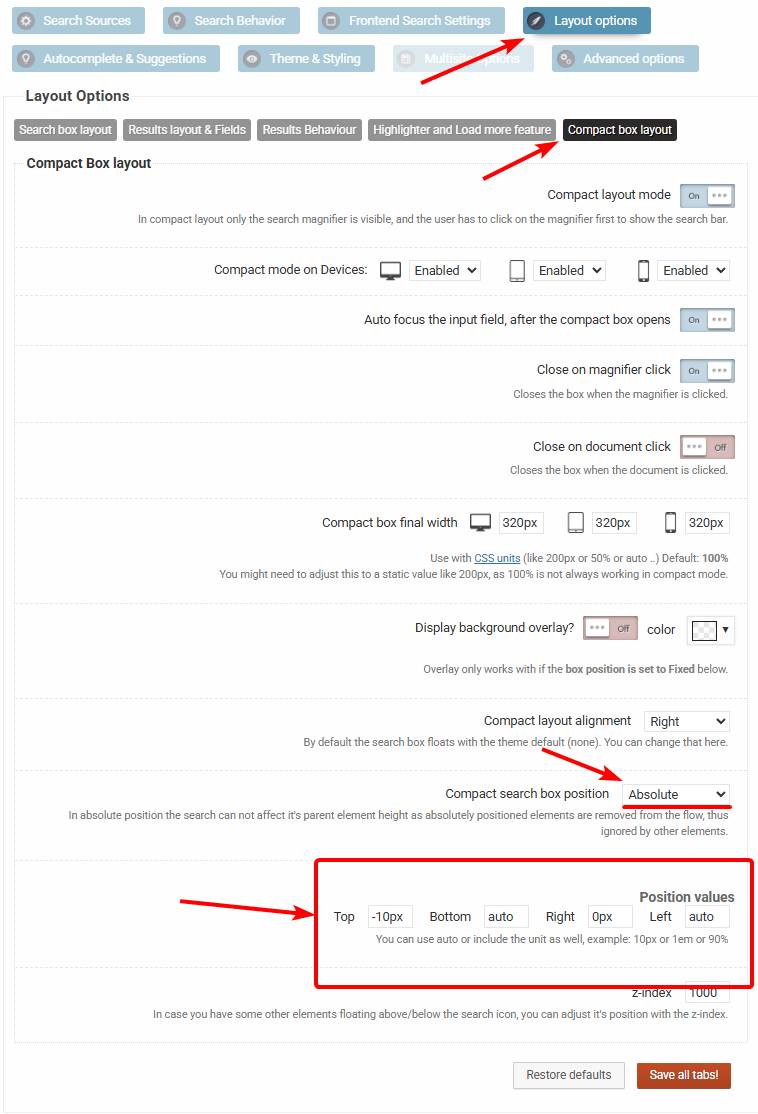
    This is the configuration you are looking for: https://wp-dreams.com/assets/support/2026-01-27_upKLD7awZt.jpg

    You might have to adjust the top value a bit, I’m not a 100% sure that the -10px is the correct alignment, but this should do the trick. In case you need help with it, you can add temporary back-end details and I will adjust it for you 🙂

    I hope this helps!

    #56876
    Andi HuberAndi Huber
    Participant

    Hello Ernest,

    thank you for your help. I was sure i tried all combinations with these values – but now it worked with your suggestion. GREAT!! 🙂

    Thank you very much!
    Best regards,
    Adnreas

    #56877
    Ernest MarcinkoErnest Marcinko
    Keymaster

    You cannot access this content.

    #56878
    Andi HuberAndi Huber
    Participant

    Yes you can close it – and i will give a good rating for sure in plugin repository :-).

    #56879
    Ernest MarcinkoErnest Marcinko
    Keymaster

    You cannot access this content.

Viewing 6 posts - 1 through 6 (of 6 total)
  • The topic ‘Compact box layout’ is closed to new replies.