Allow end user to change ordering
Home › Forums › Product Support Forums › Ajax Search Pro for WordPress Support › Allow end user to change ordering
- This topic has 1 reply, 2 voices, and was last updated 4 months ago by
Ernest Marcinko.
-
AuthorPosts
-
March 20, 2026 at 2:27 pm #57138
desarrollo_4Y4a
ParticipantI’d like to expose a dropdown to the end user to allow the possibility to apply a different order for the results shown. I’ve already set up a custom default order (title and post last update), but need to allow the user to change the order. I could not find the option to expose and show this on my elementor results page. Could you show me what needs to be done to allow this on the page where I have the search bar and the results?
March 20, 2026 at 2:52 pm #57141KeymasterHi!
While currently there is no out of the box filter for that, it is still possible to achieve it via a custom field filter + a bit of a custom code.
Follow the steps below:
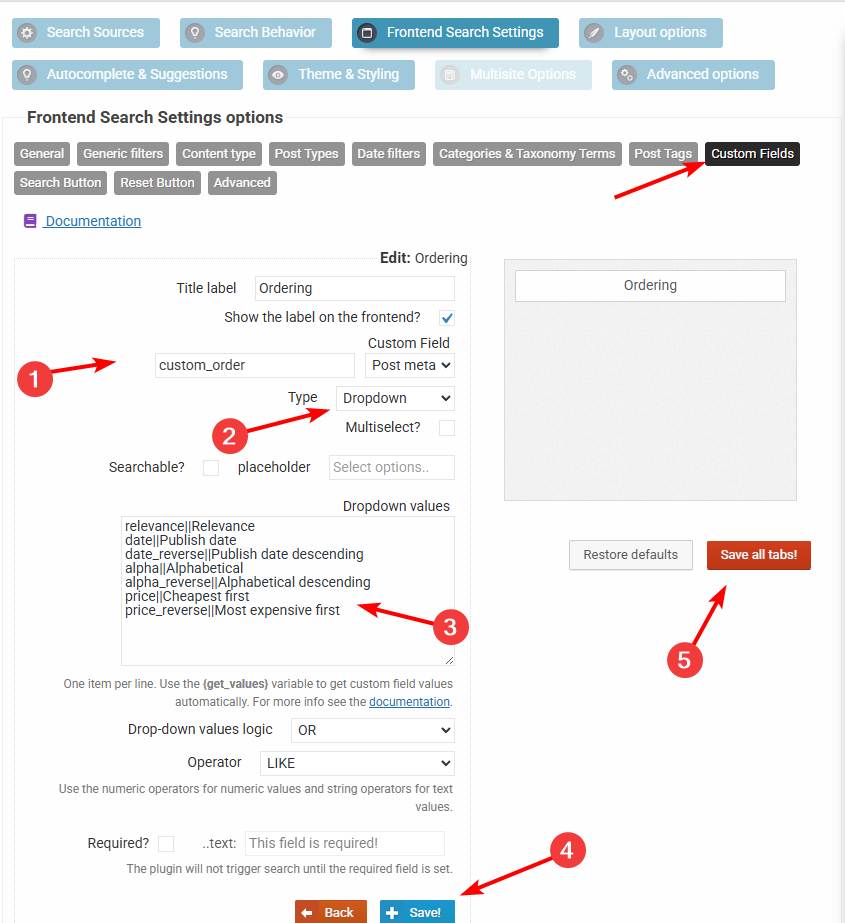
1. Create a drop-down custom field filter for a non-existint field
custom_orderwith these values (see this screenshot):relevance||Relevance date||Publish date date_reverse||Publish date descending alpha||Alphabetical alpha_reverse||Alphabetical descending price||Cheapest first price_reverse||Most expensive first2. Add this code via the Code Snippets plugin or to the functions.php file in your theme/child theme directory – make sure to have a full server back-up first for safety. For more details you can check the safe coding guidelines:
add_filter(
	'asp_query_args',
	function ( $args ) {
		// The values allowed in the the_ordering variable
		$allowed_orderings = array(
			'relevance',
			'id',
			'id_reverse',
			'date',
			'date_reverse',
			'alpha',
			'alpha_reverse',
			'price',
			'price_reverse',
		);

		$ordering = '';

		foreach ( $args['post_meta_filter'] as $k => $filter ) {
			if ( $filter['key'] === 'custom_order' ) {
				$ordering = $filter['value'];
				unset( $args['post_meta_filter'][$k] );
			}
		}

		if ( $ordering === '' || !in_array($ordering, $allowed_orderings, true) ) {
			return $args;
		}

		switch ( $ordering ) {
			case 'id':
				$args['post_primary_order'] = 'id DESC';
				break;
			case 'id_reverse':
				$args['post_primary_order'] = 'id ASC';
				break;
			case 'date':
				$args['post_primary_order'] = 'post_date DESC';
				break;
			case 'date_reverse':
				$args['post_primary_order'] = 'post_date ASC';
				break;
			case 'alpha':
				$args['post_primary_order'] = 'post_title ASC';
				break;
			case 'alpha_reverse':
				$args['post_primary_order'] = 'post_title DESC';
				break;
			case 'price':
				$args['post_primary_order']          = 'customfp ASC';
				$args['post_primary_order_metatype'] = 'numeric';
				$args['_post_primary_order_metakey'] = '_price';
				break;
			case 'price_reverse':
				$args['post_primary_order']          = 'customfp DESC';
				$args['post_primary_order_metatype'] = 'numeric';
				$args['_post_primary_order_metakey'] = '_price';
				break;
			case 'relevance':
			default:
				$args['post_primary_order'] = 'relevance DESC';
				break;
		}

		return $args;
	}
);
This will convert the custom field filter into a sorting filter. In case you need help with it, let me know 🙂
-
AuthorPosts
- You must be logged in to reply to this topic.