Ajax Search
Home › Forums › Product Support Forums › Ajax Search Pro for WordPress Support › Ajax Search
- This topic has 8 replies, 2 voices, and was last updated 1 month, 1 week ago by
Ernest Marcinko.
-
AuthorPosts
-
June 4, 2026 at 11:37 am #57587
Kelly Bone
ParticipantThe Search feature via Ajax does not respond to the settings input. We get very poor Search results. I’ve tried everything! If you respond via email please use [email protected], thanks!
June 4, 2026 at 8:28 pm #57589KeymasterHi,
Thank you for the details!
I have checked the website, but I can only find a search in the header, but that doesn’t have any search facets, only an input field, but that seems to work on my end.
Can you send me a link to a page where the search settings doesn’t work? Thank you!
All the best,
ErnestJune 5, 2026 at 12:37 pm #57597Participanthttps://savingpetsonepetatatime.com/?s=&asp_active=1&p_asid=1&p_asp_data=1&device=1&filters_initial=1&filters_changed=0&qtranslate_lang=0¤t_page_id=27 is one page that is wonky, but if you use the top nav search for any term you get similar wonkiness.
June 5, 2026 at 12:44 pm #57598ParticipantActually, now that I look at this more perhaps the problem is that nobody has ever wired up Ajax to the header Search instance. Right now it is set to “[wd_asp elements='search' ratio='100%' id=1]”
Maybe it should be “[wd_asp id=1]” instead? I am no expert and am jumping into this first time — somebody else worked on this and has handed off no input.
June 5, 2026 at 1:20 pm #57599KeymasterHi!
That is the search results page, it’s layout is not affected by the plugin, it’s coming from the theme itself. It looks like the theme is printing the whole content, or the excerpt legnth was changed.
I would recommend looking at the theme builder or theme settings for this. Ajax Search Pro has no effect on it’s layout.
All the best,
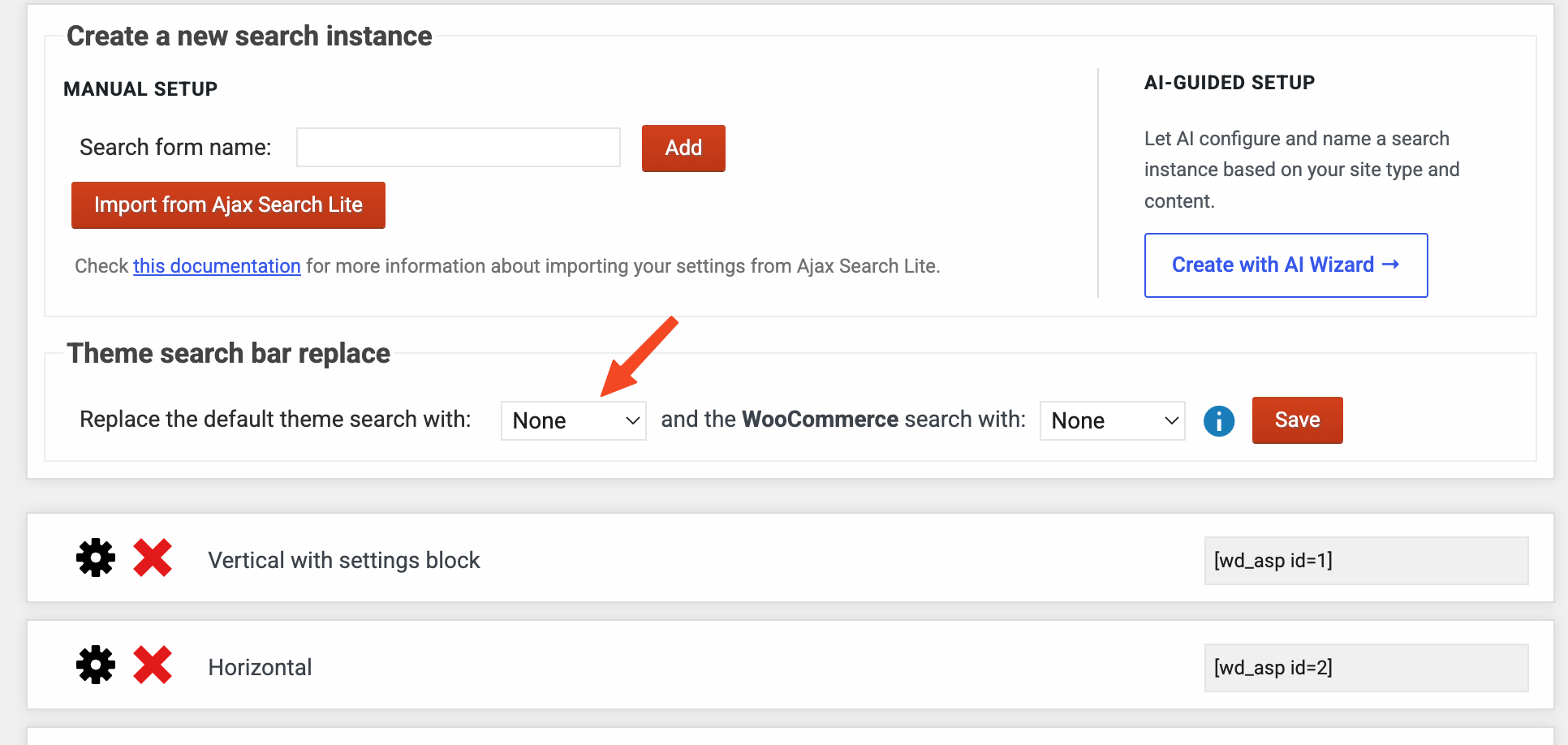
ErnestJune 5, 2026 at 5:56 pm #57602ParticipantWe did not know that Ajax required us to disable the theme search. We though Ajax setting would override. If I can share a screen grab you might be able to help me more with regard to what bits of which code go where?
Actually, I have attached a screen grab.
It shows where I created a new search instance, but I don’t really know what to do with that…
June 5, 2026 at 7:39 pm #57604KeymasterIf you don’t want to replace the theme default search bar, you don’t have to, you can just disable that.
In that case the first search instance that has a search override enabled will replace the results with it’s own on the results page. That keeps the original theme search, with override to the first search instance.
With that however the live search results will disappear as those need the Ajax Search Pro search bar container to function.
June 10, 2026 at 11:19 am #57619ParticipantWe are happy to pay you to do what we need done, or even just to give us instructions that an idiot like me can understand. I still do not know how to achieve the goal of having Ajax provide search results neatly when any user from any page uses the Search field presented. We have been having login issues, so now that’s a bit of a barrier too. Anyway [email protected] can be used as the primary email and do not require login?
June 11, 2026 at 7:28 am #57623KeymasterThank you for your offer, unfortuantely I am not available for custom jobs, working on the main plugin consumes ~14 hours a day.
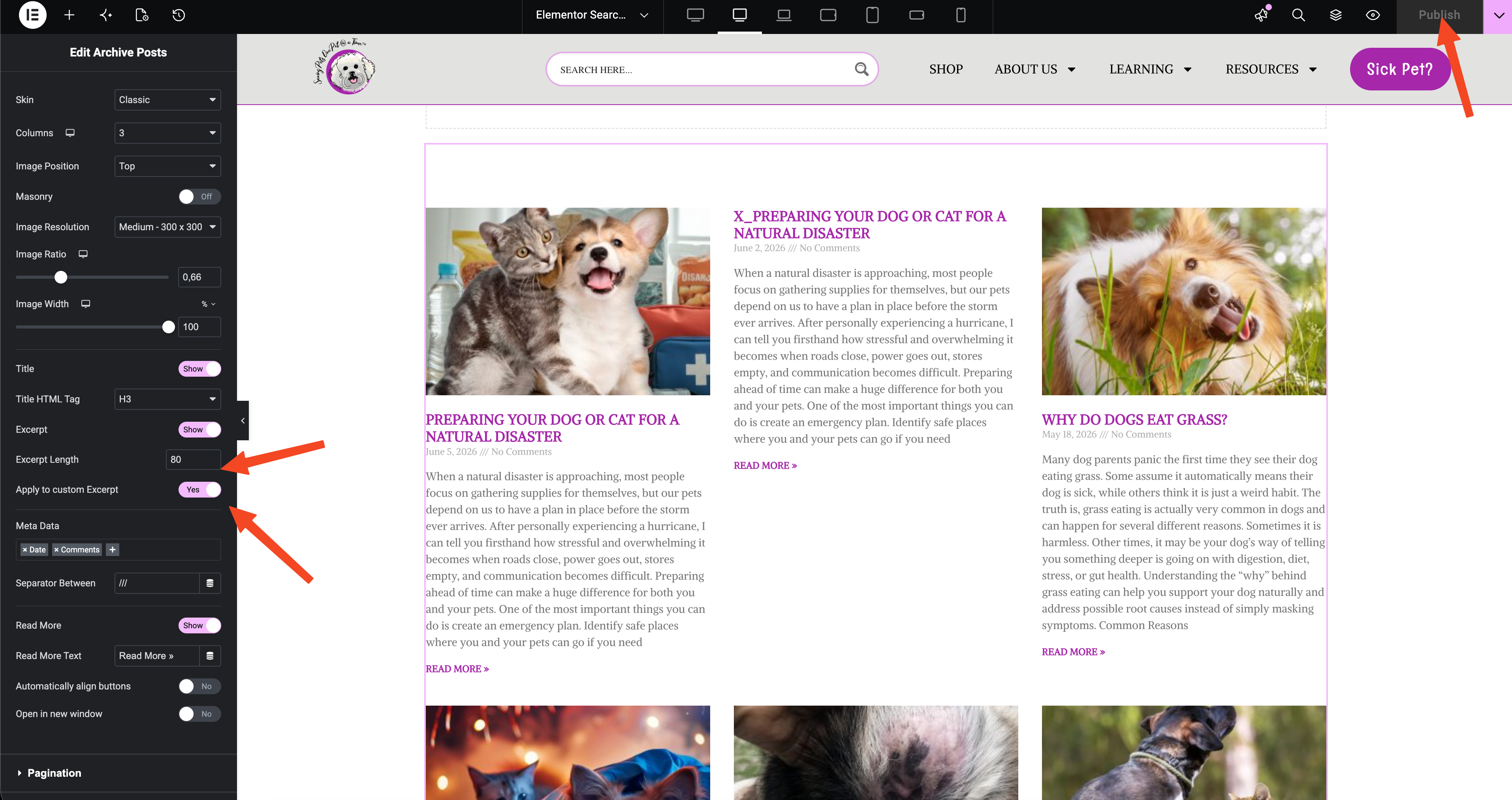
Lucky for you, your site uses Elementor, which makes this a lot easier. I have created a results page template for you in elementor, you can edit it via this link.
I have added a posts archive block, adjusted the excerpt legnth, now it seems to be all right.
-
AuthorPosts
- You must be logged in to reply to this topic.