
What is Rocket Loader?
Automatically optimizes your pages to minimize the number of network connections and ensure even third party resources won’t slow down page rendering.Cloudflare
![rocket.png.scaled500_1_[1]](https://wp-dreams.com/wp-content/uploads/2014/03/rocket.png.scaled500_1_1.png) Rocket loader from Cloudflare is definitely worth some time for every WordPress site owner. Proper configuration is however a little bit tricky, as there is only a limited access to the WordPress header.
Rocket loader from Cloudflare is definitely worth some time for every WordPress site owner. Proper configuration is however a little bit tricky, as there is only a limited access to the WordPress header.
How does it work?
First of all, you need a Cloudflare account. After you managed to set up your domains to run wiht cloudflare, there is an option to turn on Rocket Loader. This snippet will grab all of your javascript files and load them asynchronously.
Why is that good, you ask? Well, javascript loading by default is blocking, which means, that the files are loaded and executed one by one. This takes time. There is a way to define asynchronous javascript loading with the HTML 5 async and defer attribute, but that is entirely different from what rocket loader does. The async attribute ignores the order of the javascript files, and the defer doesn’t, but there are still incompatibilities from browser to OS. Rocket Loader however provides a platform, which works for each browser and OS the same way.
The script currently has two possible active states:
- Automatic – chooses most of your srcript files to load asynchronously
- Manual (not working) – you can chose which files to load asynchronously
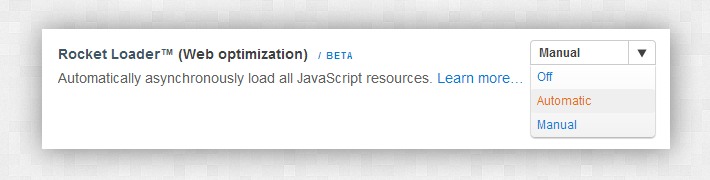
Automatic mode
If you enable automatic mode, you don’t have to do nothing else. Purge the cache in cloudflare, reload your page, and you should already experience a faster page load.
Don’t forget to check every javascript powered part of your site! Rocket Loader in some cases can cause issues with ceartain scripts, so always double check your site after loading it. But what should you do, if you want to load some of your assets non-asynchronously, or some of the scripts are not working with rocket loader? That’s what the manual mode is for.
How to control which scripts to ignore in automatic mode?
This thing is almsot broken, but here is the SOLUTION! On the cloudflare documentation page it is stated that the script tag must be in the following state to ignore rocket script auto mode:
<script data-cfasync="false" src="/javascript.js"></script>
That would be ok, but it won’t ignore the script if the type=’text/javascript’ attribute is present.
The problem is, that in WordPress we don’t have direct access to all javascript declarations, it’s only possible to modify the script url by using the clean_url filter. That’s not enough. We must also remove thetype attribute from the scripts. How should we do that?
Well, we must find the action that fires before the scripts are outputted, and the one that fires after the scripts are outputted:
- wp_print_scripts – this one fires before the scripts are printed
- wp_print_head_scripts – this one fires after the scripts are printed
Problem solved! All we need to do now is capture the output and replace the type attributes on scripts which we don’t want to use with rocket loader.
If you put this code into the themes function.php file, it will add the proper async attribues to each file, and you can also define the files to ignore as well:
function rocket_loader_attributes_start() {
    ob_start();
}

function rocket_loader_attributes_end() {
    $script_out = ob_get_clean();
    $script_out = str_replace(
      "type='text/javascript' src='{rocket-ignore}",
      'data-cfasync="false"'." src='",
      $script_out);
    print $script_out;
}

function rocket_loader_attributes_mark($url) {
    // Set up which scripts/strings to ignore
    $ignore = array (
        'script1.js'
    );
    //matches only the script file name
    preg_match('/(.*)\?/', $url, $_url);
    if (isset($_url[1]) && substr($_url[1], -3)=='.js') {
      foreach($ignore as $s) {
         if (strpos($_url[1], $s)!==false)
           return "{rocket-ignore}$url";
      }
      return "$url' data-cfasync='true";
    }

    return "$url";

}
if (!is_admin()) {
  add_filter( 'clean_url', 'rocket_loader_attributes_mark', 11, 1);
  add_action( 'wp_print_scripts', 'rocket_loader_attributes_start');
  add_action( 'print_head_scripts', 'rocket_loader_attributes_end');
}
By editing the $ignore array, you can can manually add the script files/strings you want to ignore from Rocket Loader. I’m using this handy snippet on few sites, and it’s working nicely.