
Recently I had trouble configuring my contact-form 7 plugin, because all of the email sent from it went to my gmail spam folder.
Luckily there is a very easy workaround for this issue. Usually the contact form configuration looks like this:
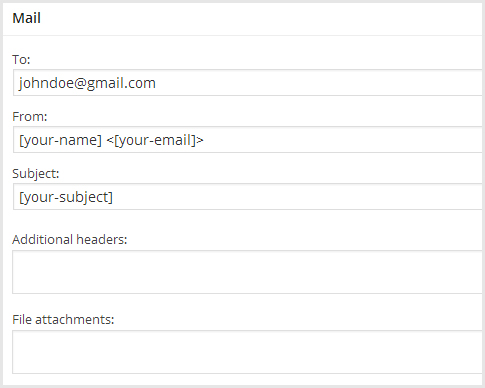
But this is no-go, because the FROM header field will most likely differ from your domain name, and the mail ends up in the spam folder. You can test it with a random email address, but you probably get a similar message in your email header:
Received-SPF: softfail (google.com: domain of transitioning ***@domain.com does not designate X.Y.Z.N as permitted sender)
However I got my SPF MX record configured correctly, I still got a similar error message. Here is a tutorial how to make sure you have the right configuration.
Solution
I figured, if I change the FROM field to match the TO field and add a Reply-to header, it should solve the issue, and it did! All I changed was:
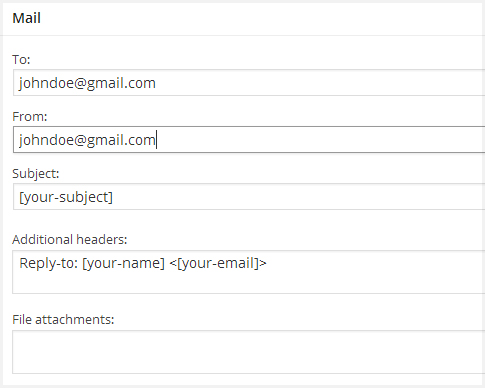
I added the reply-to fields to additional headers:
Reply-to: [your-name] <[your-email]>
Of course you need to change it to your custom form fields, if you have any.