Yesterday @kriesi posted a nice codrops article about Modal Windows with CSS3 created by Manoela Ilic.
I was thinking, this is a nice idea, how about converting it to jQuery, make it a bit more abstract and adding callbacks.
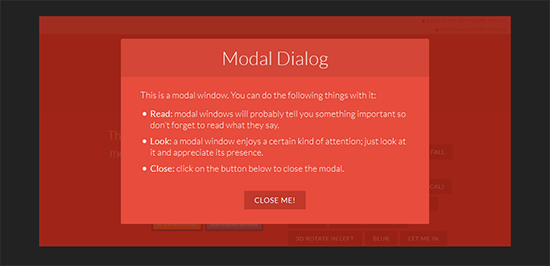
Why with jQuery?
The standard version is great, but it stands for an example, motivation. My Idea was, to create something from this great article, that can be used right away.
The thing lacking from the original is the callback methods. It’s great for a static modal windows, but it’s hard to access the actually opened modal and it’s content for creating a little more exciting thing.
The structure
Please read the original codrops article to understand the idea behind this. What you will need is some kind of knowledge of css3 and jquery of course. The best way to understand this is to download the source code and study it for a couple of minutes.
Implementation
The downloadable version is well documented, but needs some further explanation. If you are familiar with jQuery, then this is going to be an easy ride for you.
First of all you need to load the neccessary scripts and styles in your header. I divided them into required and optional groups, since some of the assets are used only for better demonstration.
The required scripts/styles: (add them to the <head>)
<!-- Required scripts and styles -->
    <link rel="stylesheet" type="text/css" href="css/default.css" />
    <link rel="stylesheet" type="text/css" href="css/component.css" />
    <script src="//ajax.googleapis.com/ajax/libs/jquery/1.10.1/jquery.min.js"></script>
    <script src="js/jquery.modalEffects.js"></script>
<!-- end of required scripts/styles -->
Without these the plugin will not work…
The optional scripts/styles:
<!-- Optional scripts/styles for better layout -->
    <script src="js/modernizr.custom.js"></script>
    <!-- classie.js by @desandro: https://github.com/desandro/classie -->
    <script src="js/classie.js"></script>

    <!-- for the blur effect -->
    <!-- by @derSchepp https://github.com/Schepp/CSS-Filters-Polyfill -->
    <script>
        // this is important for IEs
        var polyfilter_scriptpath = '/js/';
    </script>

    <script src="js/cssParser.js"></script>
    <script src="js/css-filters-polyfill.js"></script>
<!-- end of optional scripts/styles -->
Modernizr, classie, polyfiller, cssparser etc… Most of these are only for the better layout except for polyfill, which helps with the blur effect.
Standard modalEffects plugin declaration
<script>
(function($){
  $(document).ready(function() {
   $('.md-trigger').modalEffects({
       overlaySelector: '.md-overlay',
       closeSelector: '.md-close',
       classAddAfterOpen: 'md-show',
       modalAttr: 'data-modal',
       perspectiveClass: 'md-perspective',
       perspectiveSetClass: 'md-setperspective',
       afterOpen: function(button, modal) {

       },
       afterClose: function(button, modal) {

       }
   });
  });
})(jQuery);
</script>
This is a well known plugin loading structure. You can put this code in the header, footer or anywhere on the page, since it loads only after the document fires the “ready” event.
A quick explanation of the parameters:
- overlaySelector – the selector for the overlay element, which is loaded after clicking the trigger
- closeSelector – the button or element selector for the element which will trigger the “closing” of the modal window
- classAddAfterOpen – this class is added to the modal window when the open trigger is fired
- modalAttr – this is the attribute, which the trigger element must contain. It holds the ID of the modal window to show.
- perspectiveClass – if the document must get a perspective, this is added to it
- perspectiveSetClass – if the trigger element has this class, then the ‘perspectiveClass’ will be set to the document element
- afterOpen, afterClose – callback methods, with the actual button and the actual modal parameter.
The HTML structure was not changed at all. I only added a few lines to the css files, but nothing has been changed.
I hope, that some of you may find this useful!