Selected items on initial load, large loader
Home › Forums › Product Support Forums › Ajax Search Pro for WordPress Support › Selected items on initial load, large loader
- This topic has 9 replies, 2 voices, and was last updated 3 months, 3 weeks ago by
Ernest Marcinko.
-
AuthorPosts
-
February 22, 2026 at 9:39 am #57035
milena_u6jm
ParticipantHey Ernest.
Wondering how we could curate what is shown on the initial load. I have found the options for prepopluate with newest or random, but is there a way we could preset a certain bunch of items to show for this?
The other question I had, was is there a way to show a large placeholder/loading animation in the results area – currently the only sign that things are happening is the spinner in the searchbar, we would like to make something much larger.
Thanks.
February 23, 2026 at 2:40 pm #57038KeymasterHi!
I’m afraid selecting the items manually is not possible – the only possiblities are either newest, random or results for a search phrase.
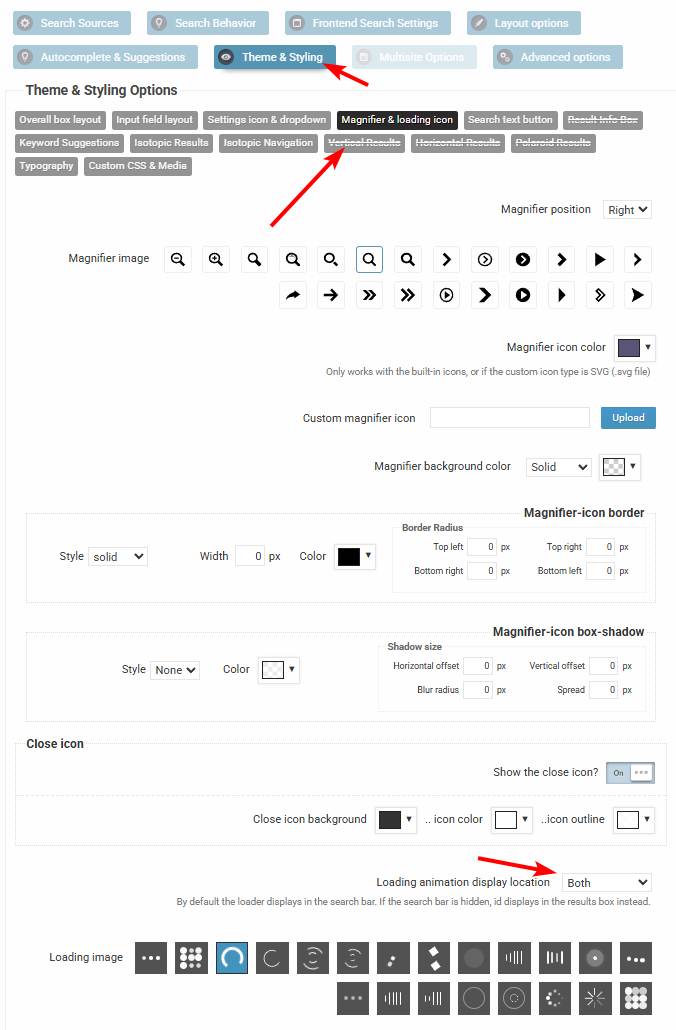
It is however possible to enable a loader in the results area, you can do that here.
March 25, 2026 at 6:11 am #57158ParticipantHey Ernest!
Thanks for that info.
We are trying to work with the “Latest Results” option. However, after adding some new media that is defintely “newer” as far as the uploaded date goes, we noticed that the index wasnt showing these items first. I confirmed that the item is in the index if I search for its title. And then I changed the option to “Random Results” and saved, but I still get the same results as before, so something is a bit buggy..
Have we got a setting wrong in there somewhere that I should check?
Please let me know.
March 25, 2026 at 9:44 am #57161KeymasterMay I take a look at this somewhere? Can you please also add temporary back-end and (s)FTP details? I will do a debugging session to see what exactly is happening.
I tried to replicate the issue locally, but it works okay on my end. I suspect it is a specific configuration or a conflict of some sort.
March 25, 2026 at 11:01 pm #57163ParticipantPrivate details are listed here, thanks:
https://wp-dreams.com/forums/topic/setting-up-pre-filters-for-an-index/March 27, 2026 at 12:39 pm #57174KeymasterThank you!
The ordering seems to be by latest, although I don’t know which items should be displyed exactly – as both the filter and the index restrictions apply to that. Can you please point out which item is among the latest that should be displayed? As there is over 6k images, but only 360 are eligible for the search because of the index restrictions.
March 29, 2026 at 6:09 am #57179ParticipantYou cannot access this content.
March 30, 2026 at 7:05 am #57183KeymasterThanks!
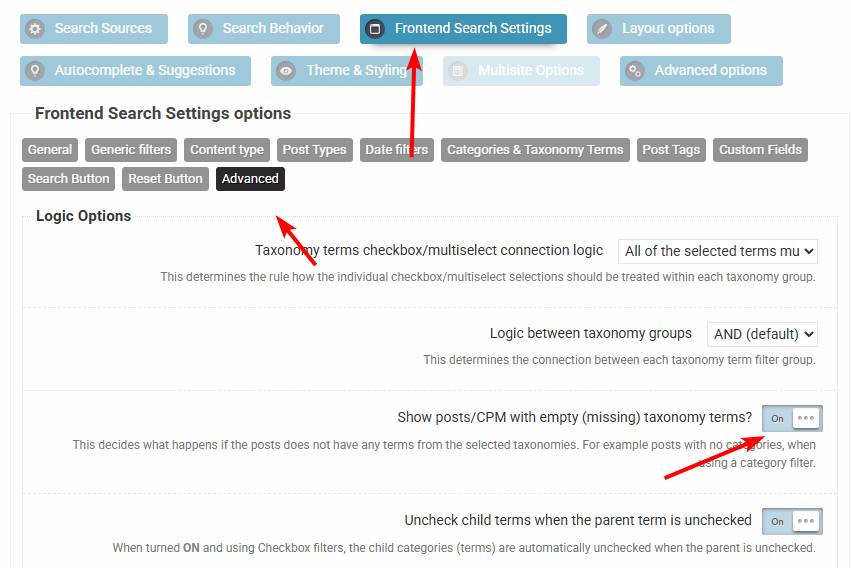
I suspect the item is likely not within any of the categories (Artist name media) in the filter. Can you please try with either adding the item to any of the filter or you can enable this option. That should resolve the issue.
March 31, 2026 at 9:30 am #57199ParticipantYou cannot access this content.
March 31, 2026 at 10:51 am #57200KeymasterNo worries, it is easy to forget, there are lots of settings. Asking for help is completely fine, I usually notice these things quicker as I know where and what to look for 🙂
-
AuthorPosts
- You must be logged in to reply to this topic.