Setting up pre-filters for an index
Home › Forums › Product Support Forums › Ajax Search Pro for WordPress Support › Setting up pre-filters for an index
- This topic has 19 replies, 2 voices, and was last updated 4 months, 2 weeks ago by
Ernest Marcinko.
-
AuthorPosts
-
December 15, 2025 at 9:31 am #56521
milena_u6jm
ParticipantThis ticket has been created by our developer, can you please include [email protected] in all the replies.
First ticket is some indexing issues, outline is below….
Website is for an art gallery
– We made a custom integration with Filemaker to update the wordpress site
– All artworks are bought into WP as media items with a bunch of ACF fields, price, size_width, size_height, available/sold, related artist(post id) etc…Task 1 – Search page using ASP
– Create an index of artworks (media/attachments) items, but only if they have the ACF data field “available” as true.
– This is basically things that havent sold.– We have made this index, but whats the best way to add a pre-filter to the index that removes all artworks that have the “available” as false. We have tried multiple times with LLM code, but cant work it out.
– We can build a filter to manually remove the items that dont match our criteria, but this is clunky.
– After we have cleaned up the index, we are finding that a whole bunch of artworks are constantly re-added within 10mins that are showing in the index, they come into the index in 25 item blocks. We have tried to block this, but doesn’t seem to help and we constantly have 25-50 items that shouldn’t be within the index.Would love some adivce here, which are the right hooks to use.
Thanks team.
Seamus
-
This topic was modified 7 months ago by
December 15, 2025 at 2:47 pm #56522KeymasterHi Seamus,
Thank you for the details, it helps me understand the issue better.
You are looking for this hook:
apply_filters('asp_index_post', WP_Post $post, array $args);In your case, the final code will look something like this:
add_filter('asp_index_post', function( $post ) {
	if ( $post === null ) {
		return $post;
	}
	$meta_key = 'available';

	if ( function_exists('get_field') ) {
		$available = get_field( $meta_key, $post->ID, true ); // ACF support
	} else {
		$available = get_post_meta( $post->ID, $meta_key, true );
	}

	if ( $available ) {
		return $post;
	}

	return null;
}, 10, 1);
Basically whenever the hooked function returns null, the post is skipped from the index. In the code above a check is made on the “available” custom field. If it is true, then the post is returned, otherwise null. It may need some testing to make sure the field values are that, but based on your description I assumed this solution.
December 18, 2025 at 1:41 pm #56601ParticipantThanks Ernest for your help!
I have added the following code but its not getting the desired results.
add_filter('asp_index_post', function( $post ) {
    if ( $post === null ) {
        return $post;
    }

    // Only apply this filter to attachments (media)
    if ( $post->post_type !== 'attachment' ) {
        return $post;
    }

    $meta_key = 'available';

    if ( function_exists('get_field') ) {
        $available = get_field( $meta_key, $post->ID, false ); // ACF support
    } else {
        $available = get_post_meta( $post->ID, $meta_key, true );
    }

    // Check if the field exists and is truthy (1, "1", true, "yes", etc.)
    if ( !empty($available) && $available !== '0' && $available !== 0 ) {
        return $post;
    }

    return null;
}, 10, 1);
When I run the logic to just list results, I get 717 items, which seems right. But when I delete and re-index, its only return 74 items.
Anything we can try here? I’ve add some login info to the ticket if that helps.
Let me know, thanks.
Seamus
December 20, 2025 at 10:43 am #56617KeymasterHi Seamus,
It depends on what is the exact value stored in the field. If it’s a boolean, or a conversion of boolean to string “true” or “false”, then your code will not work, as this check fails:
    // Check if the field exists and is truthy (1, "1", true, "yes", etc.)
    if ( !empty($available) && $available !== '0' && $available !== 0 ) {
        return $post;
    }
Assuming the value can be a boolean string, then try the one below, it covers all possible type coercions:
    if ( $available !== 'false' && $available ) {
        return $post;
    }
January 5, 2026 at 1:22 pm #56675ParticipantHey Ernest,
Hope you had a good break!
So back on this now, here is my current snippet:
add_filter('asp_index_post', function( $post ) {
    if ( $post === null ) {
        return $post;
    }

    // Only apply this filter to attachments (media)
    if ( $post->post_type !== 'attachment' ) {
        return $post;
    }

    $meta_key = 'available';

    if ( function_exists('get_field') ) {
        $available = get_field( $meta_key, $post->ID, false ); // ACF support
    } else {
        $available = get_post_meta( $post->ID, $meta_key, true );
    }

    // Check if the field exists and is truthy (1, "1", true, "yes", etc.)
    if ($available === true || $available == '1') {
        return $post;
    }

    return null;
}, 10, 1);
But its only returning 25 results. When re-creating the index, it also seems to run slowly, then go from like 10% to completed instantly, which feels a bit out, like its getting stopped?
When I run this logic against the database in a script, I get 370 results, which is the correct amount of results:
if ($total_media > 0) {
	foreach ($media_ids as $id) {
		/**
		 * 2. Check the ACF field 'available'.
		 * ACF usually stores booleans as '1' (true) and '0' (false) in the DB.
		 * get_field() handles the logic correctly.
		 */
		$is_available = get_field('available', $id);

		if ($is_available === true || $is_available == '1') {
			$available_count++;
		} else {
			$unavailable_count++;
		}
	}
}
So I think the available logic is right, but something else is happening?
Let me know, thanks.
January 5, 2026 at 4:39 pm #56677KeymasterInteresting, I double checked the code, but I don’t see an issue why.
Do you have access to the database? There is an option “_asp_index_ignore” in the wp_options table, which holds the IDs of ignored posts. If you have access to the database, then can you check it’s value?
January 6, 2026 at 12:12 am #56683ParticipantOK, so have attached two lists for you, one is the data from the ignore list, and the other is a report with the available media ids. These look ok, the avialables are newer ids, and the ingores are all older.
But there’s one thing that looks wrong… The ignore list is only 1153 entries. There are 7700 media items, and with only 370 avialables, shouldnt the ignore list be closer to 7300?
I deleted the ignore list, and rebuild the index, comes back with the same amount again.
January 6, 2026 at 9:05 pm #56696KeymasterOkay, so the exclusions do work – or to some extent they do for sure, the code gets there.
Next thing to figure out, that are all 7700 items queued to index? If they are of a different mime type, then it’s not included.
Is there a way I can access the website and this custom code to edit? Maybe I can try to debug it via some verbose outputting to see where it fails or what exactly is happening under the hood.
January 6, 2026 at 10:00 pm #56700ParticipantYeah, does seem to be kinda working, but not all the way we would like!
I’ve just re-added the user details from the private part of this post, the custom code is in a snippet called “ASP – Pre index filter to only grab available works”
Thanks Ernest!
January 7, 2026 at 2:25 am #56706ParticipantAhhhh, think I found something…
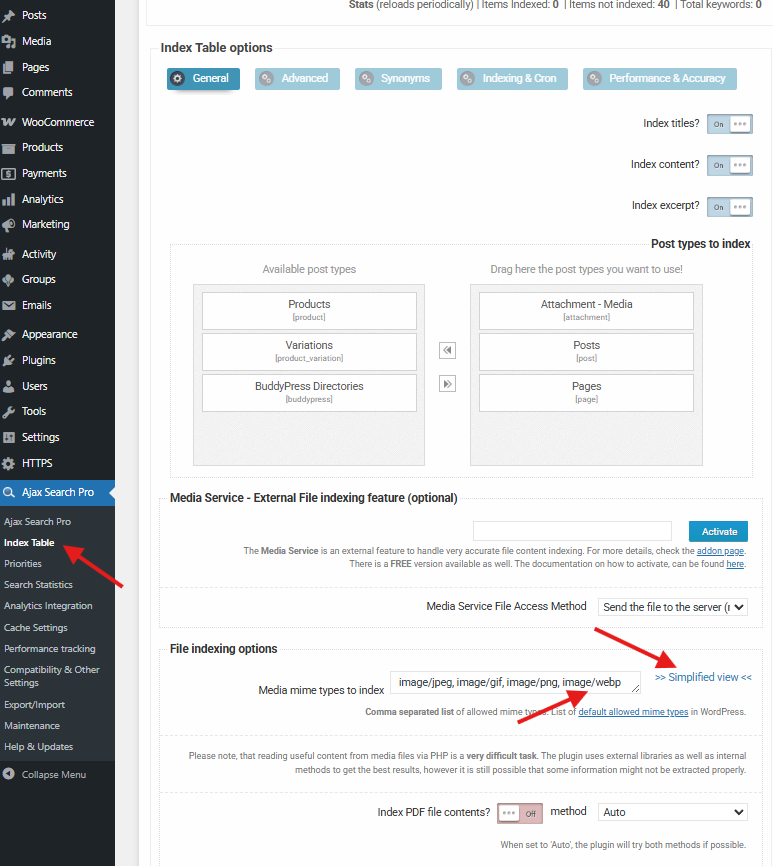
Would it have to do with the fact most of my media library is WebP images?? How can I add these as an allowed mime type?
I ran a report off the index and noticed the 25 are all jpgs, no one WebP was in there. Then I checked my available works list, only 25 are JPG, the rest are WebP.
WebP is an accepted WordPress MIME type, but I’m guessing we need to get a code tweak to get it into ASP?
Let me know, thanks Ernest!
-
This reply was modified 6 months, 2 weeks ago by
January 7, 2026 at 7:45 pm #56713KeymasterGreat!
You can enter the wepb mime type manually here, it is:
image/webp
No need for a code tweak for this 🙂January 8, 2026 at 1:12 am #56716ParticipantGreat, that solved the WebP part, thanks!
But still hitting limits….
Upon more investigation, I believe the issue is the asp_index_ignore is just too large as is hitting the max packet limit of 16mb. I have contacted the host, but they wont increase this over 16mb, which seems to be a standard security level. We are indexing 5500 items. Does that sound right to you?
Is there another way to pre-filter the index that doesnt include the creation of the ignore list?
January 12, 2026 at 8:25 am #56727KeymasterOkay, I think we will have to look for a different approach here. I tried multiple ways, but without the ignore list it’s not possible with this code.
There are two other hooks that might work, but that is to directly change the query that calculates the items. Let me get back to you a bit later, I have to test a couple of ways to see if any of them works safely.
January 14, 2026 at 11:45 pm #56761ParticipantOK, can you please let me know, really need to get this one completed ASAP. Thanks Ernest.
January 19, 2026 at 8:38 pm #56793KeymasterI have very good news, I managed to find a solution, which hooks into the query to check the field existence and value. Use this snippet only:
add_filter(
	'asp/index/database/get_posts_to_index/query/add_where',
	function ( $add_where ) {
		global $wpdb;
		return $add_where . " AND (
		 ( post.post_type='attachment' AND EXISTS(SELECT 1 FROM $wpdb->postmeta WHERE post_id=post.ID AND meta_key='available' AND meta_value=1) )
		 OR post.post_type <> 'attachment'
		)";
	}
);
This will exclude everything during the query, so the exclusion field is not populated with so many items, they don’t even get queued at all.
-
This reply was modified 6 months ago by
-
This topic was modified 7 months ago by
-
AuthorPosts
- You must be logged in to reply to this topic.