Home › Forums › Product Support Forums › Ajax Search Pro for WordPress Support › Question about Results page › Reply To: Question about Results page
 Ernest Marcinko
We are working on a complete back-end refactor. It will follow the search statistics UI. With that rework there will be a new way to create filters, that will also include sorting possibilities.
There is still a way via converting a custom field filter to an ordering filter via a bit of custom code. Follow the steps below:
1. Create a drop-down custom field filter for a non-existint field custom_order with these values (see this screenshot):
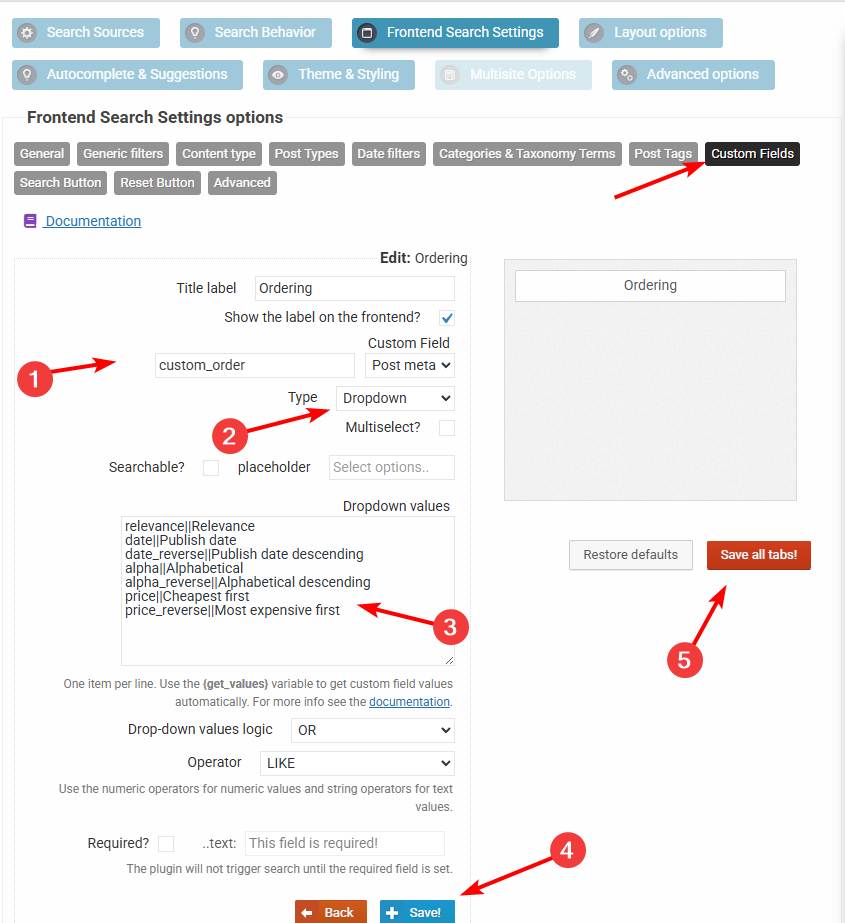
relevance||Relevance
date||Publish date
date_reverse||Publish date descending
alpha||Alphabetical
alpha_reverse||Alphabetical descending
price||Cheapest first
price_reverse||Most expensive first
2. Add this code via the Code Snippets plugin or to the functions.php file in your theme/child theme directory – make sure to have a full server back-up first for safety. For more details you can check the safe coding guidelines:
add_filter(
	'asp_query_args',
	function ( $args ) {
		// The values allowed in the the_ordering variable
		$allowed_orderings = array(
			'relevance',
			'id',
			'id_reverse',
			'date',
			'date_reverse',
			'alpha',
			'alpha_reverse',
			'price',
			'price_reverse',
		);

		$ordering = '';

		foreach ( $args['post_meta_filter'] as $k => $filter ) {
			if ( $filter['key'] === 'custom_order' ) {
				$ordering = $filter['value'];
				unset( $args['post_meta_filter'][$k] );
			}
		}

		if ( $ordering === '' || !in_array($ordering, $allowed_orderings, true) ) {
			return $args;
		}

		switch ( $ordering ) {
			case 'id':
				$args['post_primary_order'] = 'id DESC';
				break;
			case 'id_reverse':
				$args['post_primary_order'] = 'id ASC';
				break;
			case 'date':
				$args['post_primary_order'] = 'post_date DESC';
				break;
			case 'date_reverse':
				$args['post_primary_order'] = 'post_date ASC';
				break;
			case 'alpha':
				$args['post_primary_order'] = 'post_title ASC';
				break;
			case 'alpha_reverse':
				$args['post_primary_order'] = 'post_title DESC';
				break;
			case 'price':
				$args['post_primary_order']          = 'customfp ASC';
				$args['post_primary_order_metatype'] = 'numeric';
				$args['_post_primary_order_metakey'] = '_price';
				break;
			case 'price_reverse':
				$args['post_primary_order']          = 'customfp DESC';
				$args['post_primary_order_metatype'] = 'numeric';
				$args['_post_primary_order_metakey'] = '_price';
				break;
			case 'relevance':
			default:
				$args['post_primary_order'] = 'relevance DESC';
				break;
		}

		return $args;
	}
);
This will convert the custom field filter into a sorting filter.