Question about Results page
Home › Forums › Product Support Forums › Ajax Search Pro for WordPress Support › Question about Results page
- This topic has 15 replies, 2 voices, and was last updated 4 months, 1 week ago by
ross_Ktz3.
-
AuthorPosts
-
February 23, 2026 at 3:58 pm #57039Participant
Hi there, love your search product and the level of detail. One question is that we like have a search page like this: https://www.ranzcr.com/search-results/ We have your search plugin in the header which is great but would like a more standard results page with filter and pagination. Not just appearing below the search. However the examples provided dont provide anything like this. Results pop up / appear rather than integrated onto the page, if that makes sense? Am I missing something. FYI I use Elementor and Loop Grid for these. But the results differ from header as using Elastic Search. Thanks Ross
February 24, 2026 at 8:23 am #57043Ernest Marcinko
KeymasterHi Ross,
Thank you very much for your kind words, I really appreciate it!
You are looking for the loop grid integration feature, but as I was checking the results page I see that you have already successfully connected the search to the Loop Grid.
February 24, 2026 at 8:29 am #57044ParticipantHi Ernest, it is using Elastic search for results page with Elementor Grid. I was wondering if there was a way to connect the Index table engine, instead of the WP or Elastic Search database so results are consitent between the navigation search and the results page?
Thanks
Ross
February 24, 2026 at 8:47 am #57045KeymasterHi Ross,
It does that automatically, whenever the integration is enabled.
For example, if I search for “test”, then I get these page results in the drop-down. When I hit enter, I get redirected, and the results are the same on the results page.
Some differences can be expected, usually when a non-post type is returned in the drop-down, or if a post type is not fully supported in the grid, but generally it should be very similar.
February 24, 2026 at 8:54 am #57046Participantcan you guide me in the right direction to adding sort to this page?
February 24, 2026 at 8:59 am #57047ParticipantAlso search number, having issues showing how many results based on search
February 25, 2026 at 12:24 pm #57048KeymasterHi!
can you guide me in the right direction to adding sort to this page?
I’m afraid a sorting filter is not yet possible via Ajax Search Pro. You can set the results primary and the secondary sorting on the back-end, but there is no filter for it yet for the front-end.
Also search number, having issues showing how many results based on search
I assume you mean this number? That shows the remaining results (as it is used with the load-more results feature), not the total results count. While it can’t be changed, it is possible to disable it with a few lines of custom CSS code:
.asp_showmore span {
   display: none !important;
}
February 26, 2026 at 8:14 am #57050ParticipantThank you! Any clue when a sort filter will be added?
February 26, 2026 at 11:50 am #57052KeymasterWe are working on a complete back-end refactor. It will follow the search statistics UI. With that rework there will be a new way to create filters, that will also include sorting possibilities.
There is still a way via converting a custom field filter to an ordering filter via a bit of custom code. Follow the steps below:
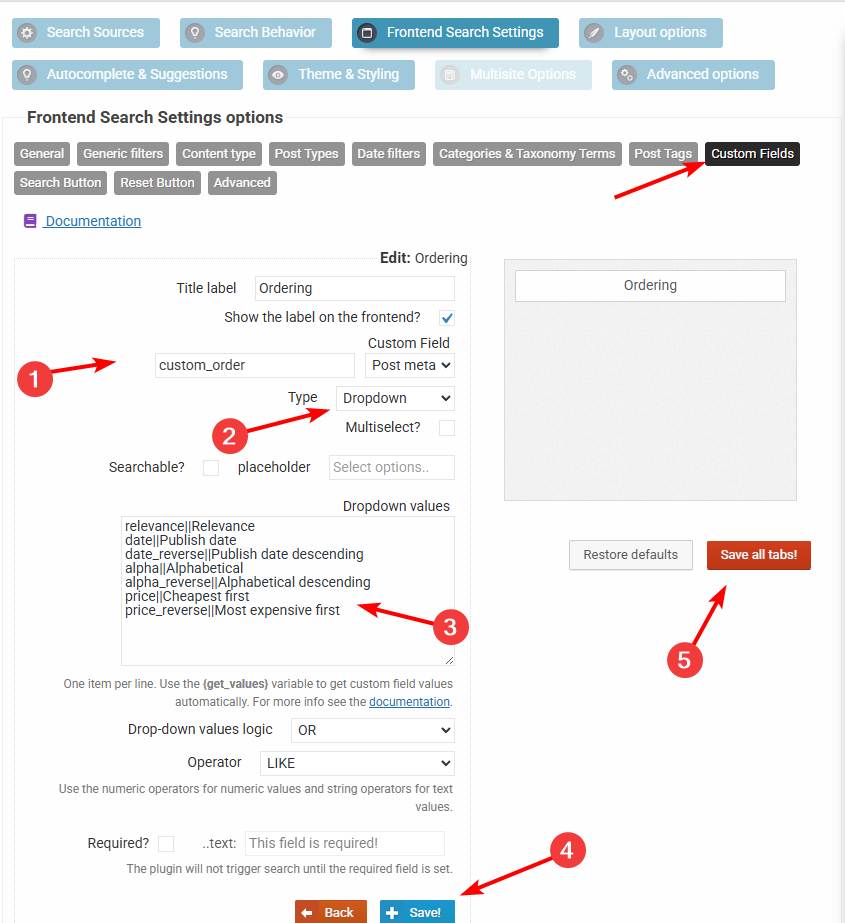
1. Create a drop-down custom field filter for a non-existint field
custom_orderwith these values (see this screenshot):relevance||Relevance date||Publish date date_reverse||Publish date descending alpha||Alphabetical alpha_reverse||Alphabetical descending price||Cheapest first price_reverse||Most expensive first2. Add this code via the Code Snippets plugin or to the functions.php file in your theme/child theme directory – make sure to have a full server back-up first for safety. For more details you can check the safe coding guidelines:
add_filter(
	'asp_query_args',
	function ( $args ) {
		// The values allowed in the the_ordering variable
		$allowed_orderings = array(
			'relevance',
			'id',
			'id_reverse',
			'date',
			'date_reverse',
			'alpha',
			'alpha_reverse',
			'price',
			'price_reverse',
		);

		$ordering = '';

		foreach ( $args['post_meta_filter'] as $k => $filter ) {
			if ( $filter['key'] === 'custom_order' ) {
				$ordering = $filter['value'];
				unset( $args['post_meta_filter'][$k] );
			}
		}

		if ( $ordering === '' || !in_array($ordering, $allowed_orderings, true) ) {
			return $args;
		}

		switch ( $ordering ) {
			case 'id':
				$args['post_primary_order'] = 'id DESC';
				break;
			case 'id_reverse':
				$args['post_primary_order'] = 'id ASC';
				break;
			case 'date':
				$args['post_primary_order'] = 'post_date DESC';
				break;
			case 'date_reverse':
				$args['post_primary_order'] = 'post_date ASC';
				break;
			case 'alpha':
				$args['post_primary_order'] = 'post_title ASC';
				break;
			case 'alpha_reverse':
				$args['post_primary_order'] = 'post_title DESC';
				break;
			case 'price':
				$args['post_primary_order']          = 'customfp ASC';
				$args['post_primary_order_metatype'] = 'numeric';
				$args['_post_primary_order_metakey'] = '_price';
				break;
			case 'price_reverse':
				$args['post_primary_order']          = 'customfp DESC';
				$args['post_primary_order_metatype'] = 'numeric';
				$args['_post_primary_order_metakey'] = '_price';
				break;
			case 'relevance':
			default:
				$args['post_primary_order'] = 'relevance DESC';
				break;
		}

		return $args;
	}
);
This will convert the custom field filter into a sorting filter.
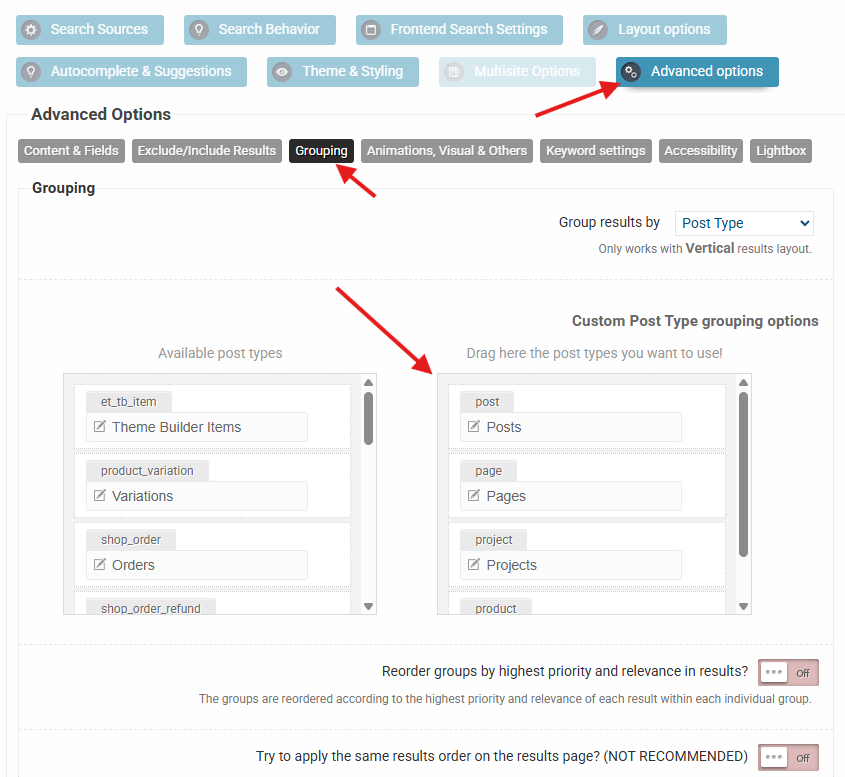
March 11, 2026 at 10:31 am #57107ParticipantHi Ernest, I followed this for group order: https://documentation.ajaxsearchpro.com/general-settings/result-ordering#primary-and-secondary-main-ordering
However, once applied I am still getting groups of pages first, then posts second. See here for search ‘Digital Health’: https://drive.google.com/file/d/1KoLrc9pxGRysrRAFCTgkZqHK0BCDEC6i/view?usp=sharing
I changed order here: https://drive.google.com/file/d/11nxHoffzRQPP3K1-Z4OlAR4WE5Pzh55r/view?usp=sharing
Any idea why posts follows pages, when order should be Pages, Documents, Events, Posts?
Thanks
Ross
March 11, 2026 at 10:53 am #57108KeymasterHi Ross,
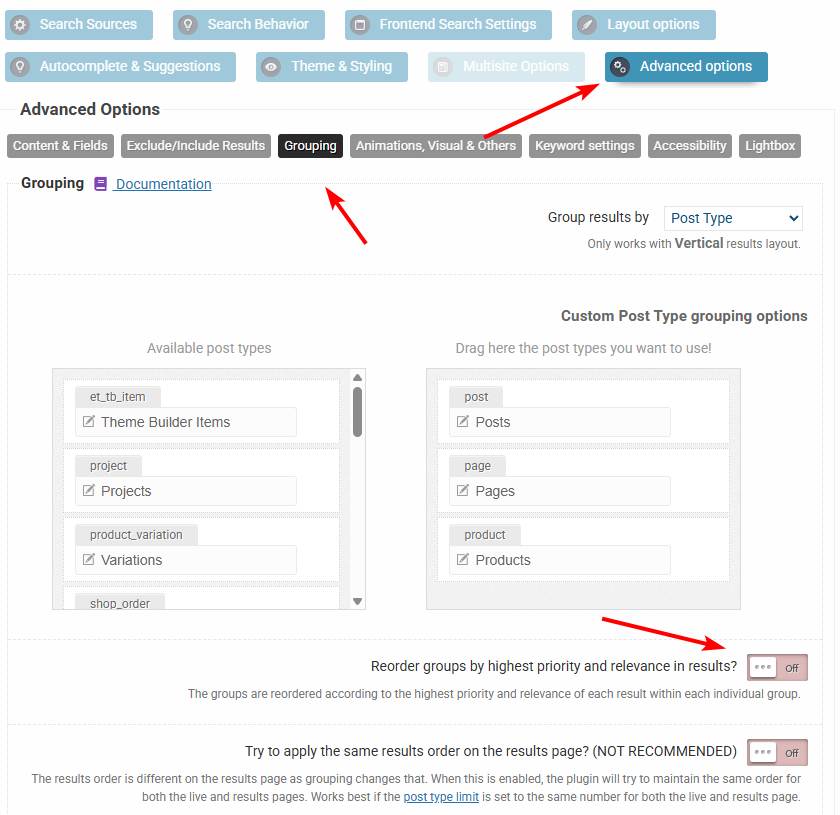
Sure! When grouping is enabled, then the order is determined by the order of items here. If you change that to the desired order, then it should resolve the issue 🙂
March 12, 2026 at 2:27 am #57109ParticipantHmmm I already have that: https://drive.google.com/file/d/1PX5Tx03M3hOpCTv5_pSx-dIFlngABdPg/view?usp=sharing
March 12, 2026 at 9:59 am #57110KeymasterOkay. Can you check if this option is disabled? That will affect the ordering by rearranging the groups by relevance, so make sure it is turned off.
March 12, 2026 at 10:02 am #57111ParticipantPerfect! That worked! Thanks for your help!
March 12, 2026 at 10:03 am #57112KeymasterYou cannot access this content.
-
AuthorPosts



- The topic ‘Question about Results page’ is closed to new replies.