Tutorial level: Medium
Requirements
- Knowledge of: PHP, HTML, CSS
- Basic knowledge of WordPress actions and filters
- BBPress and WordPress 3.5+
- BBPress actions list, here is one
Tutorial Content
- Creating a custom field in the bbpress topic form
- Processing & Saving the custom field values
- Displaying custom values in the content
As some of you may noticed, our support forum’s new ticket form has some custom fields included. I have searched through the web for tutorials/plugins before creating the new support form, but unfortunately there is almost nothing out there. I knew I will have to code a lot, even if I find some tutorials. Actually, this is not hard at all, since bbpress has a bunch of actions and filters integrated, which helps us to modify the look and feel of it, without actually touching the bbpress code.
Creating a custom field in the bbpress topic form
Open up your themes functions.php file, or create a new plugin to start from scratch. In the bbpress default template I have allocated an action called ‘bbp_theme_before_topic_form_content‘. We will create a function, which displays the new input fields and hook it to that action, so the new input field will display right after the title, before the reply content textarea.
add_action ( 'bbp_theme_before_topic_form_content', 'bbp_extra_fields');
function bbp_extra_fields() {
   $value = get_post_meta( bbp_get_topic_id(), 'bbp_extra_field1', true);
   echo '<label for="bbp_extra_field1">Extra Field 1</label><br>';
   echo "<input type='text' name='bbp_extra_field1' value='".$value."'>";

   $value = get_post_meta( bbp_get_topic_id(), 'bbp_extra_field2', true);
   echo '<label for="bbp_extra_field1">Extra Field 2</label><br>';
   echo "<input type='text' name='bbp_extra_field2' value='".$value."'>";
}
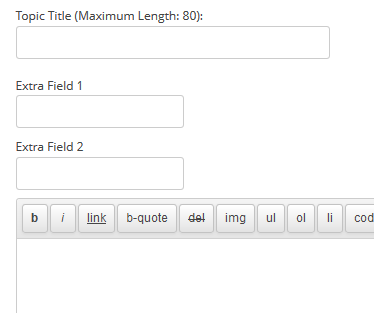
As you can see, there is an extra $value variable involved for getting the default values, however it is not set yet. We will do it in the next step.
Basically you can add as many fields as you want. You can even use select boxes, hidden fields and anything you want to.
Processing & Saving the custom field values
Ok, we have the fields displayed on the new topic form, but they are useless to us, since we cannot save the values. No worries, just a few lines, and the custom values are persistent.
BBPress offers actions before&after saving/editing new topics. These actions are:
do_action( ‘bbp_new_topic’, $topic_id, $forum_id, $anonymous_data, $topic_author ); and
do_action( ‘bbp_edit_topic’, $topic_id, $forum_id, $anonymous_data, $topic_author );
We need to create function, which saves the values after saving and hook that function to these 2 actions.
add_action ( 'bbp_new_topic', 'bbp_save_extra_fields', 10, 1 );
add_action ( 'bbp_edit_topic', 'bbp_save_extra_fields', 10, 1 );

function bbp_save_extra_fields($topic_id=0) {
  if (isset($_POST) && $_POST['bbp_extra_field1']!='')
    update_post_meta( $topic_id, 'bbp_extra_field1', $_POST['bbp_extra_field1'] );
  if (isset($_POST) && $_POST['bbp_extra_field1']!='')
    update_post_meta( $topic_id, 'bbp_extra_field1', $_POST['bbp_extra_field2'] );
}
As you can see, our function accepts only 1 parameter, the topic id, saves the values into a new post meta and it’s done. We can access these values anywhere on the forums if we know the topic id!
Displaying custom values in the content
I’m pretty sure, that you want to display the newly created fields somwhere. You can do it several ways, I will show you the best one. The ‘bbp_template_before_replies_loop‘ action runs before the topic replies are displayed, this is just what we need. This actions has no parameters whatsoever, and we need the topic id to display the data, which is stored in the database. No worries, bbpress offers the bbp_get_topic_id() function inside the post loop.
add_action('bbp_template_before_replies_loop', 'bbp_show_extra_fields');
function bbp_show_extra_fields() {
  $topic_id = bbp_get_topic_id();
  $value1 = get_post_meta( $topic_id, 'bbp_extra_field1', true);
  $value2 = get_post_meta( $topic_id, 'bbp_extra_field2', true);
  echo "Field 1: ".$value1."<br>";
  echo "Field 2: ".$value2."<br>";
}
After adding all of these lines to the functions.php, create a new topic, and you should see the contents just below the title!
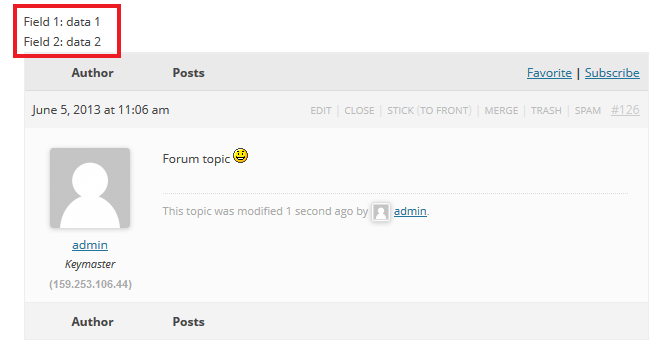
I hope you enjoyed this tutorial! If you have questions, feel free to ask in the comment section.