Add Sort by that filter by date newest or oldest
Home › Forums › Product Support Forums › Ajax Search Pro for WordPress Support › Add Sort by that filter by date newest or oldest
- This topic has 2 replies, 2 voices, and was last updated 4 months ago by
purchases_Ctxh.
-
AuthorPosts
-
March 20, 2026 at 10:03 pm #57147Participant
I was able to add the post/category drop down, but I would also like a ‘Sort by’ that has dates newest and oldest options (based on the publish dates) – I read the documentation, but it isn’t clear to me how to implement this.
March 21, 2026 at 1:50 pm #57149Ernest Marcinko
KeymasterHi,
While currently there is no out of the box filter for that, it is still possible to achieve it via a custom field filter + a bit of a custom code.
Follow the steps below:
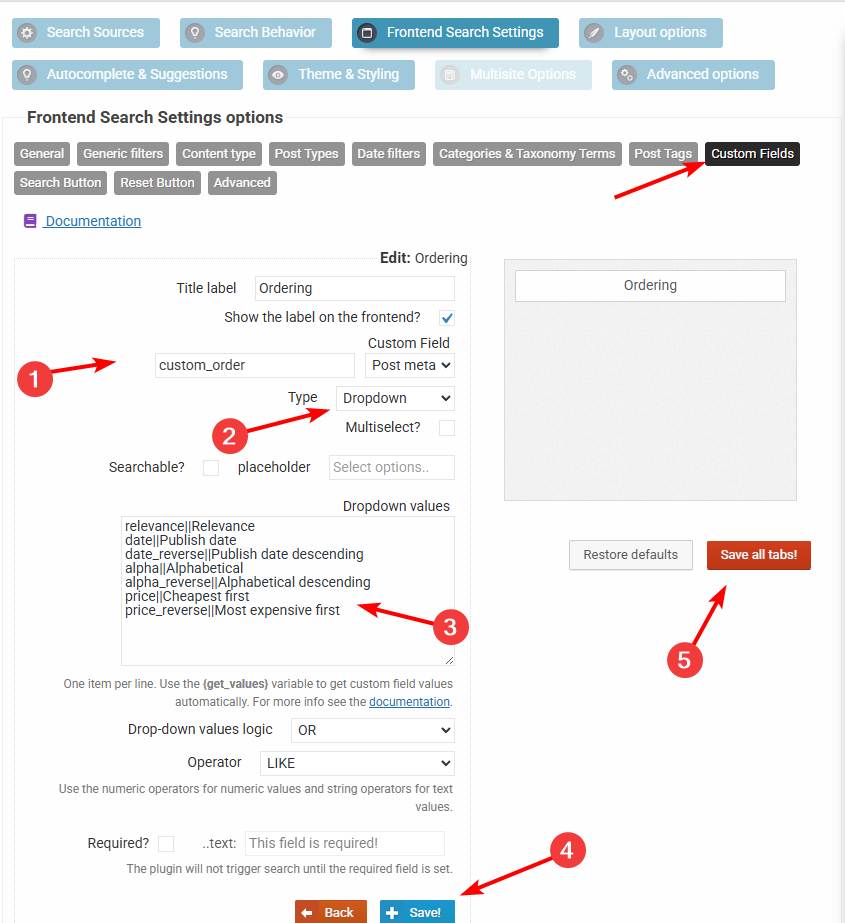
1. Create a drop-down custom field filter for a non-existint field
custom_orderwith these values (see this screenshot):date||Date ASC date_reverse||Date DESC2. Add this code via the Code Snippets plugin or to the functions.php file in your theme/child theme directory – make sure to have a full server back-up first for safety. For more details you can check the safe coding guidelines:
add_filter(
	'asp_query_args',
	function ( $args ) {
		// The values allowed in the the_ordering variable
		$allowed_orderings = array(
			'relevance',
			'id',
			'id_reverse',
			'date',
			'date_reverse',
			'alpha',
			'alpha_reverse',
			'price',
			'price_reverse',
		);

		$ordering = '';

		foreach ( $args['post_meta_filter'] as $k => $filter ) {
			if ( $filter['key'] === 'custom_order' ) {
				$ordering = $filter['value'];
				unset( $args['post_meta_filter'][$k] );
			}
		}

		if ( $ordering === '' || !in_array($ordering, $allowed_orderings, true) ) {
			return $args;
		}

		switch ( $ordering ) {
			case 'id':
				$args['post_primary_order'] = 'id DESC';
				break;
			case 'id_reverse':
				$args['post_primary_order'] = 'id ASC';
				break;
			case 'date':
				$args['post_primary_order'] = 'post_date DESC';
				break;
			case 'date_reverse':
				$args['post_primary_order'] = 'post_date ASC';
				break;
			case 'alpha':
				$args['post_primary_order'] = 'post_title ASC';
				break;
			case 'alpha_reverse':
				$args['post_primary_order'] = 'post_title DESC';
				break;
			case 'price':
				$args['post_primary_order']          = 'customfp ASC';
				$args['post_primary_order_metatype'] = 'numeric';
				$args['_post_primary_order_metakey'] = '_price';
				break;
			case 'price_reverse':
				$args['post_primary_order']          = 'customfp DESC';
				$args['post_primary_order_metatype'] = 'numeric';
				$args['_post_primary_order_metakey'] = '_price';
				break;
			case 'relevance':
			default:
				$args['post_primary_order'] = 'relevance DESC';
				break;
		}

		return $args;
	}
);
This will convert the custom field filter into a sorting filter. In case you need help with it, let me know 🙂
March 22, 2026 at 10:21 pm #57150ParticipantThank you – I have added this to the functions and plugin – I switched from post category search to a custom post type / taxonomy approach. I noticed that I don’t have a multi-select dropdown option though – only multi-select/search option. Is there a way to apply a multi-select dropdown? Also, will/can the default view be to show all assets initially?
I also noticed that the main category doesn’t seem to filter back after selecting the sub-category. I only have one item in place now, but I would expect that to show for both the parent and sub selected.-
This reply was modified 4 months ago by
-
This reply was modified 4 months ago by
-
AuthorPosts
- You must be logged in to reply to this topic.