Directorist
Home › Forums › Product Support Forums › Ajax Search Pro for WordPress Support › Directorist
- This topic has 12 replies, 2 voices, and was last updated 3 months, 1 week ago by
Ernest Marcinko.
-
AuthorPosts
-
April 4, 2026 at 4:06 am #57202
forde_XRbu
ParticipantI am trying to set up Ajax Search with Directorist.
1 – I want to have (3) different search engines for (3) different types of Directories
ex. Agencies ONLY search directory listings within that directoryI can get it to search within my Directories, but cannot get it to LIMIT within the specific directory that I want ex. ‘agencies’. Instead, it searches within ALL of my directories. See attached images in the Dropbox, it should make it a bit clearer in case you are not familiar with Directorist.
I have been testing the shortcodes here – https://profectio.com/mediamarketplace/search/?preview=true
*** I also have a directory set up for brands – Pepsi, Corby Spirit and Wine, Unilever (those companies/listings) should not be visible in the search return since they are not ‘agencies
April 4, 2026 at 6:57 am #57207KeymasterHi,
Thanks for the details, it helps a lot!
It looks like these criteria are taxonomy temrs, so you can limit them via taxonomy based inclusions.
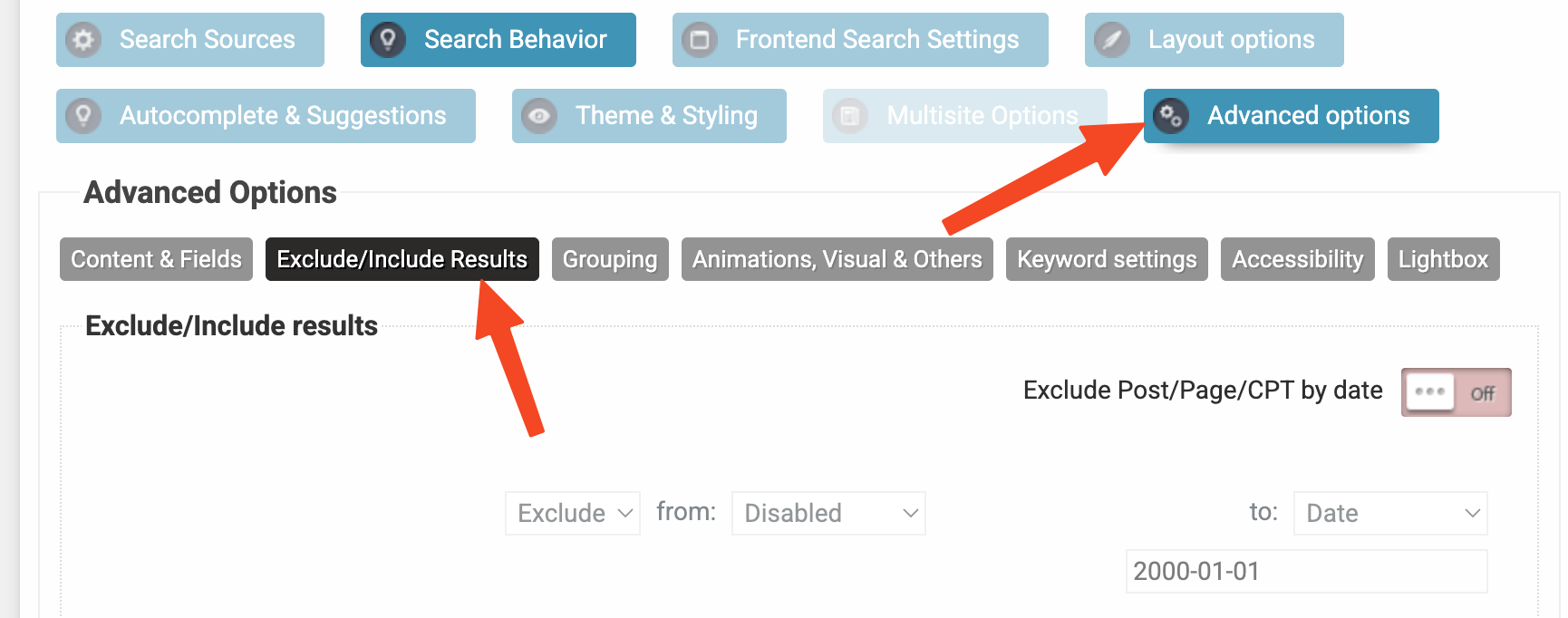
1. Go to the Advanced -> Exclude Include results option on the search instance settings
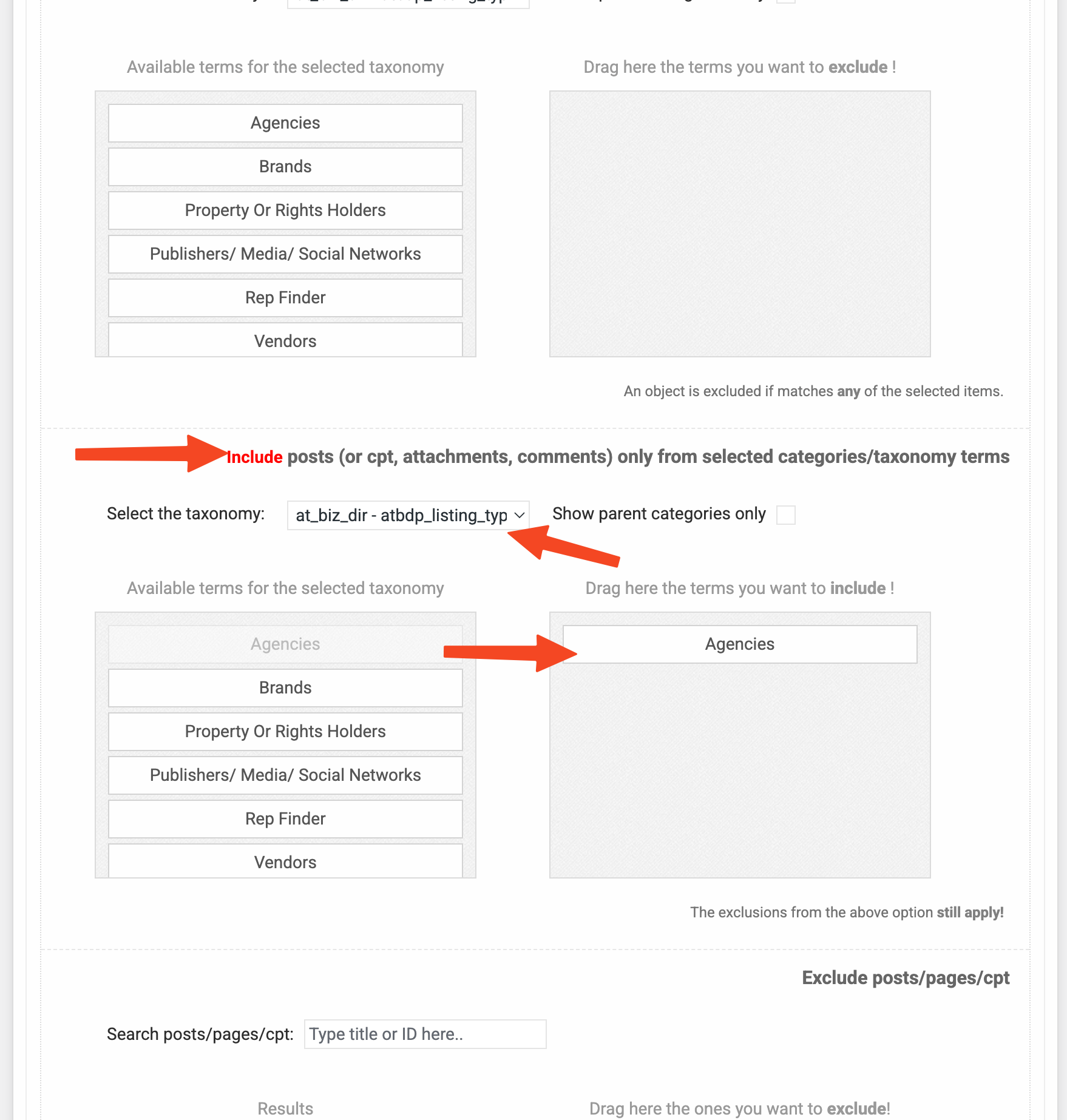
2. Then scroll down to Include posts (or cpt, attachments, comments) only from selected categories/taxonomy terms option to include items from specific taxonomy term only
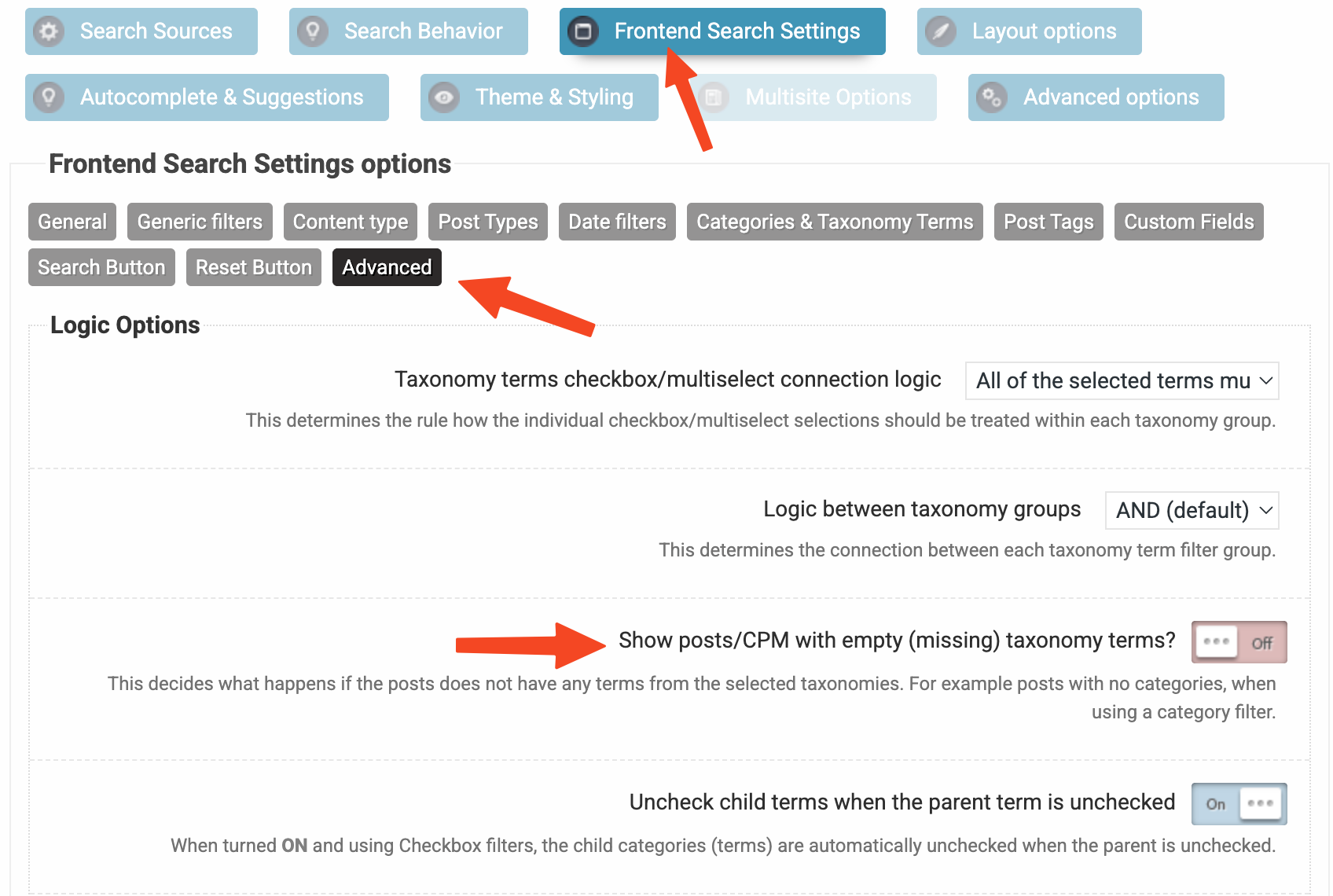
3. If you want to also exclude anything that is not associated with any terms from that same taxonomy then make sure this is turned offApril 5, 2026 at 7:06 pm #57212ParticipantThanks Ernest!!! Ok, so ‘exclusion’ is the way to make it display how I want – https://profectio.com/mediamarketplace/search/
1 – NEXT – Advance Search
I figured out how to search within Locations, Categories & Tags, but how can I search within the custom fields – ex https://www.dropbox.com/scl/fi/15xwwe9g5h6m66zqhfxxr/Screen-Shot-2026-04-05-at-1.50.14-PM.png?rlkey=jvtm7h1f463ei54cchs4gh722&dl=0 (these are ones I set up within Directorist)I tried, but under
– Frontend Search Settings
— Custom Fields = I do not see an option to pull from the Directorist custom fields2 – Claimed Listings. The video should be clear as to the problem https://www.dropbox.com/scl/fi/6gg5hgy3ykf5wduimwibh/PXL_20260405_184332135.mp4?rlkey=jwxaj5r938dhzmaet9omyo8uv&dl=0
For some reason, the search results give a different URL ->https://profectio.com/dcl_claim_listing/pattison-outdoor/ (wrong) vs https://profectio.com/directory/pattison-outdoor/
* This only occurs with ‘claimed’ listings with this search engine and not this one https://profectio.com/agencies/I fixed it with a URL redirect. Did I mess up the AJP settings?
For reference – https://directorist.com/docs/claim-listing/
This is the folder I shared before – https://www.dropbox.com/scl/fo/9ncodtwn237aevtlxkx41/AIXbrV1K7rr28F3aOraCIC4?rlkey=xrefig3hq1tnzt6hha7dqk5qp&dl=0
April 8, 2026 at 8:52 pm #57245ParticipantErnest – Can you extend the refund time frame on my purchase. I made a purchase on April 3rd, and you limit refunds to be claimed within 7-days.
Unfortunately, I have not heard back on my above ticket in 3-days (which is critical time I’d use to test my specific use case)If not, then I’d need to start the refund process.
April 8, 2026 at 9:10 pm #57246KeymasterSure!
I am very sorry for no response, it almost never happens with me. Unfortunately I was only able to respond to some minor issue tickets as there was a family medical emergency, I will be back on friday though. I should have let you know, sorry about that.
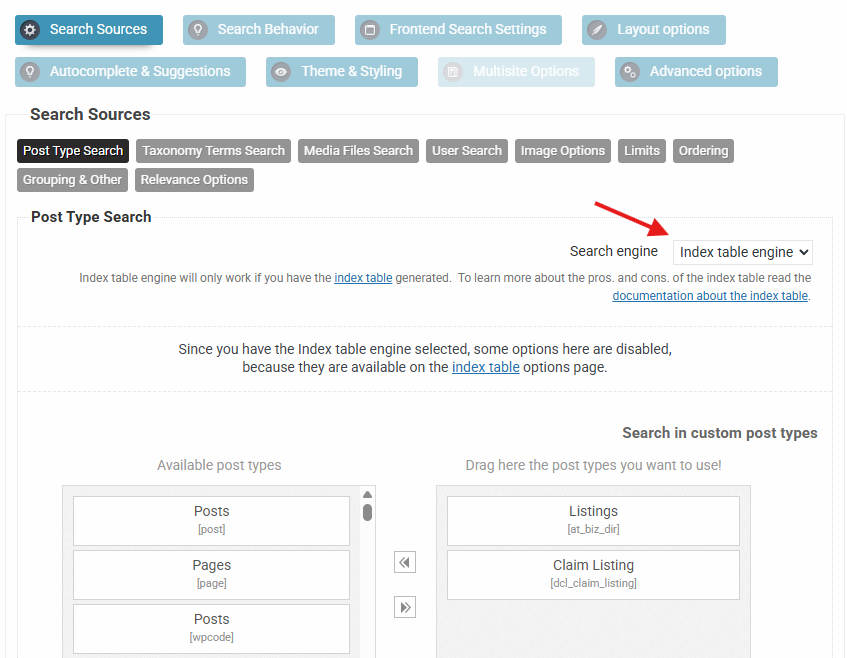
I am not sure about the custom fields, if they don’t pop-up in the custom fields search list, then there is a chance that they are not wordpress custom fields, but data that might be stored in a different table or something similar to that. Often times the field names are just very hard to find, but sometimes they are indeed stored outside the metadata table. Generally that is not searchable by any plugin, as the data has to be accessible through code fields. If that is the case, then the only chance is to fetch them through an API to the index, however that needs some investigation, which I can’t do at the moment. In case you are aware of a programmatical API for the plugin, please let me know where I can find it and I will look into it as soon as I get back to the office.
The URL issue is much simpler in my opinion. The search requests all URLs to post types through wordpress to always get the correct link. Sometimes some plugins however doesn’t hook into that filter and a generic URL is returned – or there is a different reason in relation to that one. URL redirect is a very acceptable solution. If they have an API, then this can be also resolved via a small custom code snippet to fetch the correct URLs.
I will get back to you on friday if that is okay, if not then I will initiate a refund, whichever fits you better. Just let me know.
April 8, 2026 at 9:24 pm #57247ParticipantFAMILY FIRST 🙂
‘programmatical API’- not to my knowledge
search requests all URLs – ok, my non-technical head is spinning, so I’ll have to re-read your explanation a few times for it to make sense to me. ha ha
I asked Claude – it looks like the custom fields are here, I’ll take a poke around again.
Go take care of the fam – talk later this week.
April 10, 2026 at 8:56 am #57257KeymasterHi!
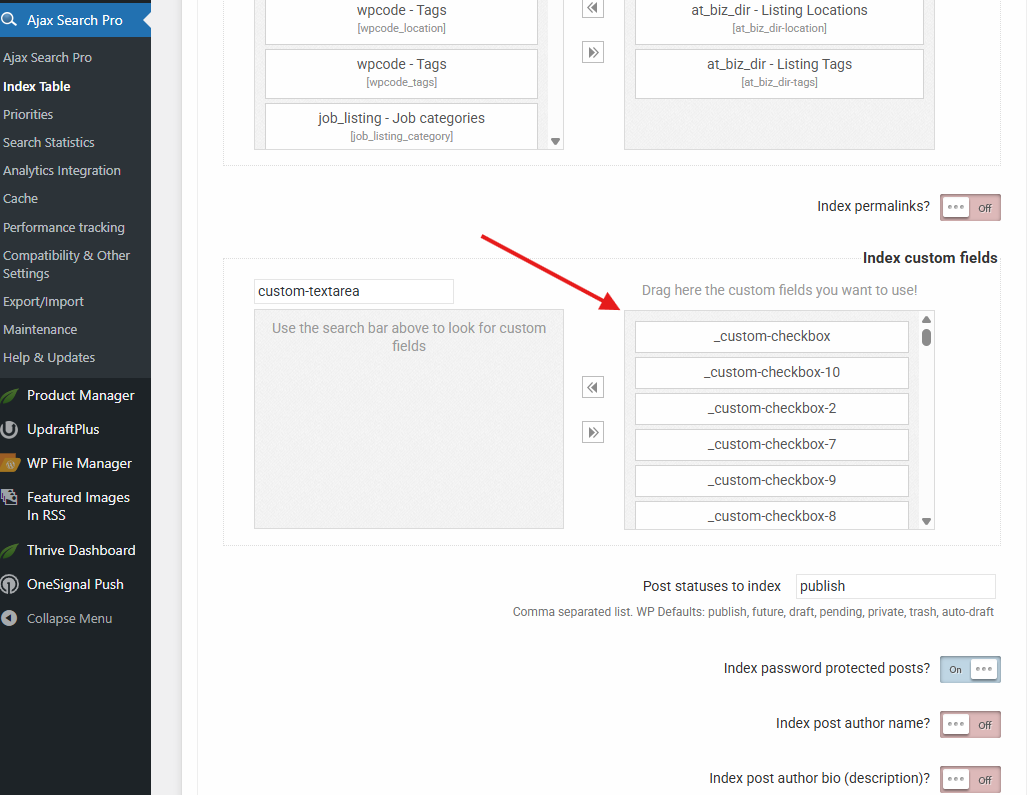
I am back. After some looking around and examining the source code I have found the custom fields. They have a very generic title scheme, basically all custom made text, checkbox and other fields are stored as “_custom-checkbox-1”, “_custom-text-1” etc.. so it was not trivial to find them. It is impossible to tell which one is which, but it does not matter much, I selected everything I could find for indexing.
The keyword count went up greatly, the values are nicely stored in the fields, so they are searchable.Now in case you create more search engines, then make sure to select the index table engine, and you are good to go.
April 10, 2026 at 10:16 am #57260ParticipantIn theory, I think I get it, but
1. How do I know what custom field (1-20) links up to the ones I created in Directorist
— Yes, I try each one and write down the corresponding number to figure it out ‘manually’ BUT
2. There is no further drop-down, so I can then update the value label (dropdown, checkbox, etc)GOAL
1 – Search within specific directories [check/ accomplished] – using the restriction
2. Search by Listing Categories; Locations; Tags [seems to be there]
3. Search by Custom Fields – Not sure if it is working bc I can not customize what attribute it is searching based onApril 10, 2026 at 11:12 am #57261ParticipantUPDATE!! I downloaded the database, and that is how I determined which custom labels matched the data in each field.
https://www.dropbox.com/scl/fi/9kicj4jgiohl9vt12q12g/GOAL.png?rlkey=h3iiz5nlf149a2dq4josqozm2&dl=0 This is Directorist out of the box, and what I’m trying to replicate
Ok, once this is all figured out, you will have a live, up-to-date example to sell to all Directorist users.
I have a few more things, and this will be 100% what I need from AJP.
Take a look…
April 10, 2026 at 3:01 pm #57268KeymasterI see, I guess they have some sort of a list to which field goes to which label.
Searching these shouldn’t be an issue. However I don’t know if this type of structure is usable for meta-type filtering, as each value is also associated to a separate field (as far as I can tell), and that’s something I have not seen before in the past 15 years. So for example instead of having a single “languages” field to store the languages for each post, there is multiple completely separate fields scattered like “_checkbox-1”, “_checkbox-2” which signify which languages the given post is associated to. So if you were to make a checkbox filter for that, it’s very problematic, as each checkbox should also be attached to a different meta key, which is not how meta filters work.
Normally you make a filter for the “languages” field and filter plugins will fetch the values for that field across the database and generate a checkbox filter for it. But here every checkbox is tied to a different field and a different value, which is something no plugin search/filter can deal with.
Their out of the box solution is likely coded to this exact structure.April 10, 2026 at 4:05 pm #57275ParticipantAt the time, this was the best solution I found.
Do you foresee any problems (from the user’s pov) if I continue with Directorist? (assuming I go through the pain of setting it up so as much data as possible can be found)Is there another directory product (s) you prefer using/ see as a the best option?
April 10, 2026 at 9:10 pm #57277ParticipantI messed up somehow (I did it in a few other instances as well) – the name of my directories is showing in search results in [wd_asp id=2]
https://www.dropbox.com/scl/fi/sh9ls5ehxi0oh1p45gpz2/Screen-Shot-2026-04-10-at-5.04.18-PM.png?rlkey=rpqgcqpgbptnuh106b69uolkj&dl=0
Where it should be clear, like in [wd_asp id=1]Looks like you have a dead link on your site – https://documentation.ajaxsearchpro.com/index_table.html
-
This reply was modified 3 months, 1 week ago by
April 12, 2026 at 12:26 am #57280KeymasterDirectorist is a pretty solid solution in my opinion, I am not aware of any other one, although I am no expert in this field. The only downside is that filtering by the custom fields is problematic due to the separate fields, but aside from that everything should be okay.
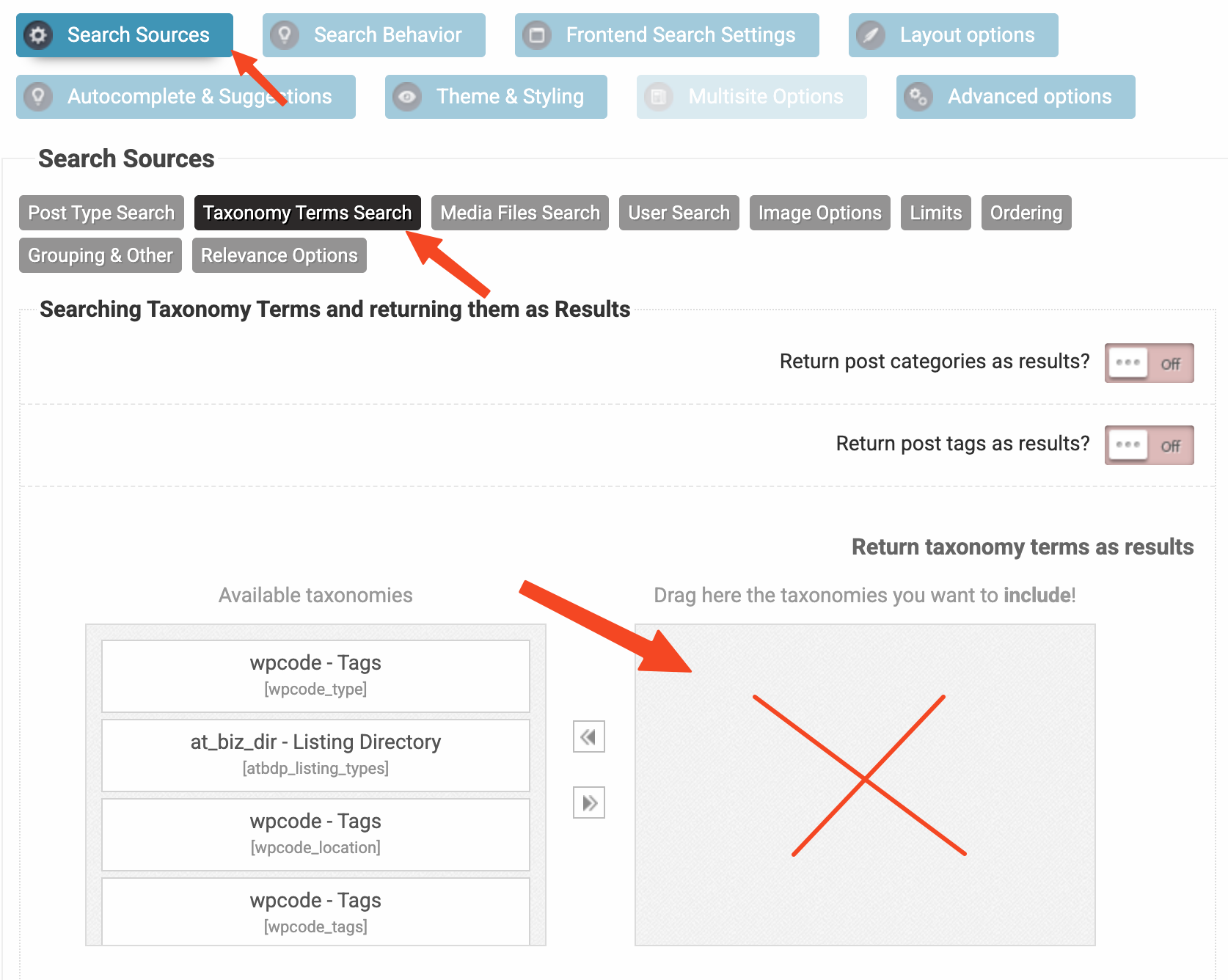
The names issue I assume is likely due to some taxonomy terms being selected to be returned as results. Make sure that nothing is selected here. Those settings are to return the actual taxonomy terms as results, which is likely not something you are looking for.
-
This reply was modified 3 months, 1 week ago by
-
AuthorPosts



- You must be logged in to reply to this topic.