Filters Checkboxes display option
Home › Forums › Product Support Forums › Ajax Search Pro for WordPress Support › Filters Checkboxes display option
- This topic has 4 replies, 2 voices, and was last updated 5 months, 1 week ago by
Steve Strutt.
-
AuthorPosts
-
February 3, 2026 at 10:26 pm #56911Participant
Hi Ernest, the filter display checkboxes option is broken for hierarchical taxonomies when the default of unchecked is selected.
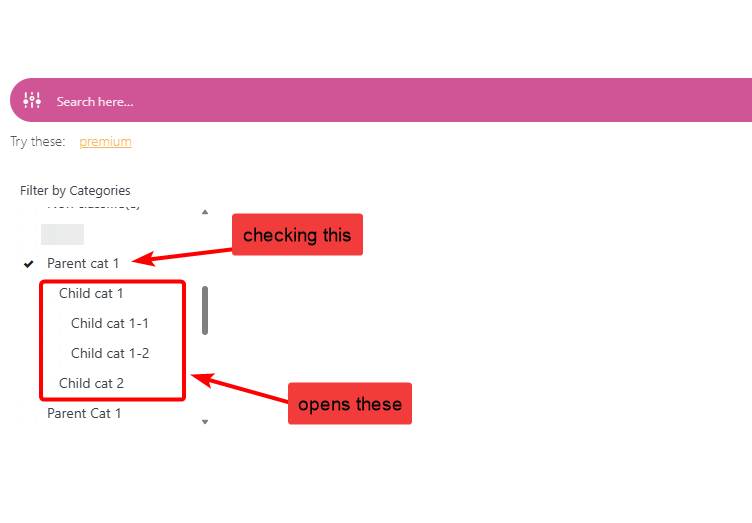
The screenshot CheckboxExpanded below shows the issue. The default state for the checkbox option is set to unchecked. This works for the top level of the hierarchy, with the top level terms being displayed unchecked. But when selecting a term which is a sub-category, the next level of the hierarchy is opened with all the terms in that level checked and the top level term is also checked. I expected it to open with none of the terms checked, as per the unchecked option. If I try to uncheck the top level term to remove the checkmarks, the whole sub-level of the hierarchy closes and its not possible to select a term in the lower level of the hierarchy.
The problem looks like there is no handling of the hierarchy. A click either in the checkbox or on the term, both checks or unchecks the term and opens and closes the next level of the hierarchy. The way I have seen this working elsewhere is the opening of the sub-category is triggered by clicking the term, or a + icon or similar, the checkbox is only checked if it is explicitly clicked.
Resolving this may also resolve my other problem with the checkbox option. All my other filters are multi-select. Which means initially, they are all closeed and the selection dialog only opens when the filter is selected. Visually, this looks good as I am currently using multi-select for the hierarchical taxonomy. Nice clean rows of filter boxes.
But when the checkbox option is used on a filter, it is permanently open, and all the other filter boxes are displaced by it. What I was expecting was that when I selected the filter box, the checkbox selection dialog would open up the same way as the multi-select does. See the FilterBoxes screenshot below.
A fix to support hierachical taxonomies and opening and closing of the levels, would also enable the checkbox open to be opened and closed without requiring it to be open all the time.
Currently I’m using the multi-select option, but with 250 terms in the taxonomy my users are complaining that it is hard to scroll through the 250 to find the specific one they are looking for. The prior system did have support to unfold and fold the hierarchical. They are not liking the difference.
Regards Steve
February 4, 2026 at 1:18 pm #56918Ernest Marcinko
KeymasterHi Steve!
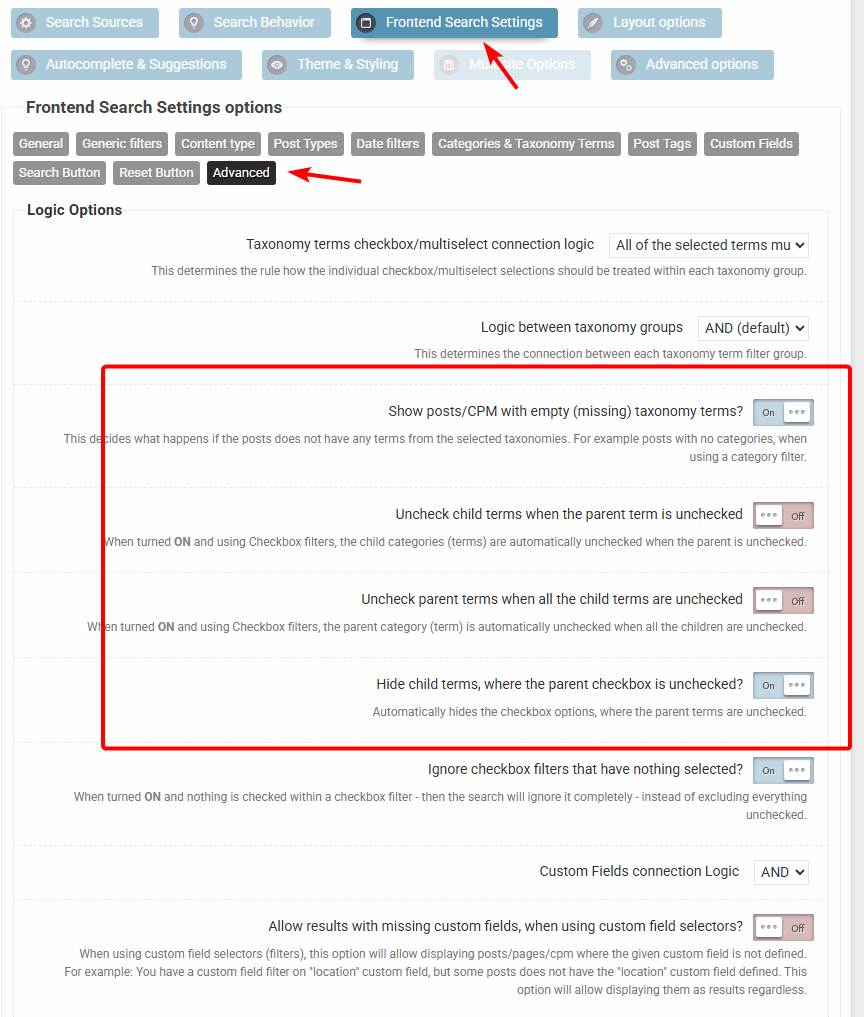
Can you please try this exact setup: https://wp-dreams.com/assets/support/2026-02-04_mPiYj8I7ag.jpg
If I understand correctly, then the checkbox initial states are “unchecked”, but checking any of them will check all the sub-categories, which is something you don’t want.
The configuration above should do exactly that (if all checkboxes are unchecked by default). Checking a parent category will open all the descendants, including sub-sub.. etc. descendant to display the whole tree – without checking them, like so: https://wp-dreams.com/assets/support/2026-02-04_qMxBwiBrGa.jpg
However this is still not the best UI for sure. I’m hoping to rework this whole section to a much better general output, with more possibilities of customization. I’m already working on implementing a new options interface based on the new search statistics UI. It is likely that the current search instances stay as “legacy” and a completely new UI for new search instances will be used instead. That means no possibility to migrate the old ones (but still use them) for a clear separation of the re-design.
-
This reply was modified 5 months, 2 weeks ago by
February 4, 2026 at 9:14 pm #56920ParticipantAh, I didn’t find that configuration page. The Display Modes diaglog, could do with a reference to it. As it really influences how the checkboxes work. The single option on the Display Modes dialog to change the default to unchecked, tricked me into thinking that this was the only option.
The settings, as you suggested, with ‘All the selected terms must match, exclude unselected’ did not work. See the discussion below for screenshots 4, 5 and 6. The behaviour I am after is when ‘At least one selected terms should match’.
Currently, I am using ‘Multiselect with search’, checking a child term, the taxonomy returns only those records with the child term assigned. If the parent is selected, the hierarchy includes all records under that term, whether they have the parent assigned or any of the child-terms. Records do not need to be tagged with the parent term, only the child term. WordPress returning the superset, of all child terms and any with the parent term. In my taxonomy, using multiselect or dropdown, and selecting the parent term ‘High Wycombe (outer)’ search returns 10,057 hits. As expected, being a superset of the parent and all the children. The parent term ‘High Wycombe (outer)’ is only tagged explicitly by 375 records. The superset of this and all the children is 10,057.
The Checkbox display mode option does not quite work in the same way. To get the superset of 10.0157, am using the checkbox option ‘At least one selected terms should match’ The result is in screenshot SearchResults1 below. Selecting the checkbox ‘High Wycombe (outer), sub-terms are opened unchecked and 10,057 results are returned. All good.
The way the Checkbox selection is implemented, if one of the child options is selected, the result stays as 10,057, because at this stage both parent and child are selected and WordPress returns the superset. As in SearchResults2. But if I uncheck the parent ‘High Wycombe (outer)’, I get the right number of hits for the child, 255, as only the child-term ‘Abbey Grounds’ is selected. But the hierarchy closes up and there is no indication of which child term was selected. As in SearchResults3. The selected child term could be anywhere in the nested hierarchy. If the user wants to uncheck it, they have to remember where it was and which parent it was under.
A solution to the loss of visibility of the selected child terms, is to leave the subcatergory open if a child is selected and the parent unselected. My preferable solution, would be not to check the parent when it is first clicked, but to just open the child-terms under it. Another issue is that in the selection UI, there is no differentiation between a term that does have children and a term that does not have children. In other solutions, parents with children have a + icon to similar to open the sub-terms without checking the parent. The icon indicating that they can drill down further. The current checkbox support does not allow this.
If I use the checkbox mode ‘All the selected terms must match, exclude unselected’ the results are completely unexpected. Selecting ‘High Wycombe (outer)’ only returns those records which are explicitly tagged with HW (outer). As per SearchResults4, 1942 hits. I had expected the superset. Also its not clear where the 1942 hits are arrived at, the parent only assigned explictly to 375 records. To get the superset, it looks like I have to check the parent and all the children. Which seems to get to the expected 10,000+.
Selecting the first child, Abbey Ground, results in SearchResults5 of 2184. Summing the bad result of 1942 with the child. As per the behaviour shown in SearchResults4, this is not unexpected. But should still be the superset of 10,057.
Where it gets really weird, is unchecking the parent HW (outer), the sub-terms are closed (this is not the right behaviour, as per the above, it should stay open), but very weirdly, the result is 1699 as in SearchResults6. This looks to be the parent minus the child, 1942 – 255. Which is completely the wrong behaviour. Something is broken with ‘All the selected terms must match, exclude unselected’.
In my implementation I interpret the URL search terms and display the terms selected. These appear at the bottom on each screenshot. So its possible to see what terms ASP thinks are selected. These appear as expected. The results returned when using ‘All the selected terms must match, exclude unselected’ certainly do not match the terms when a parent is selected.
-
This reply was modified 5 months, 2 weeks ago by
February 4, 2026 at 9:15 pm #56925ParticipantScreenshots 5 and 6.
February 10, 2026 at 9:54 pm #56965ParticipantLooking forward to the new options interface. Let me know when there is anything to test.
As I’m primarily using multi-select with search, for the same look and feel across all filters, my preference would be to enhance that to handle hierarchical taxonomies with opening and closing sub-categories.
-
This reply was modified 5 months, 2 weeks ago by
-
AuthorPosts
- You must be logged in to reply to this topic.