Populating the Dropdown Select List configuration
Home › Forums › Product Support Forums › Ajax Search Pro for WordPress Support › Populating the Dropdown Select List configuration
- This topic has 14 replies, 2 voices, and was last updated 6 months, 1 week ago by
Ernest Marcinko.
-
AuthorPosts
-
December 16, 2025 at 8:24 pm #56546
contact_01dA
ParticipantHello,
What an incredible plugin! We’ve been using it in our upper-right search area (disabled for now on the dev site). Now we’d like to create a search widget which displays the contents of our custom field fave_arch along with the count. The attachment shows a different plugin that shows an example of such a drop-down select list (though that plugin has its own issues, eg commas break the click-through links).
We are using the Houzez real estate theme with Elementor. Within Houzez, using their custom field builder, we created the custom field fave_architect1535512093f5b860e1d563f7
We would like to query our listings matching status active to retrieve the field fave_architect1535512093f5b860e1d563f7 in the dropdown.
I see so many options, and have been trying to wrangle it to our specs. I’ve gotten close but there is something I’m missing – could you help?
The page with the configuration I’ve been working on is https://dev.architectureforsale.com/s1/
The cpanel directory privacy login credentials (for the login page which appears when you first navigate to the admin url) are the same as the login credentials provided above.
Thank you for any help and guidance,
ScottDecember 16, 2025 at 8:53 pm #56548ParticipantYou cannot access this content.
December 17, 2025 at 3:06 pm #56560KeymasterHi,
Thank you very much for all the details, it helps me a lot!
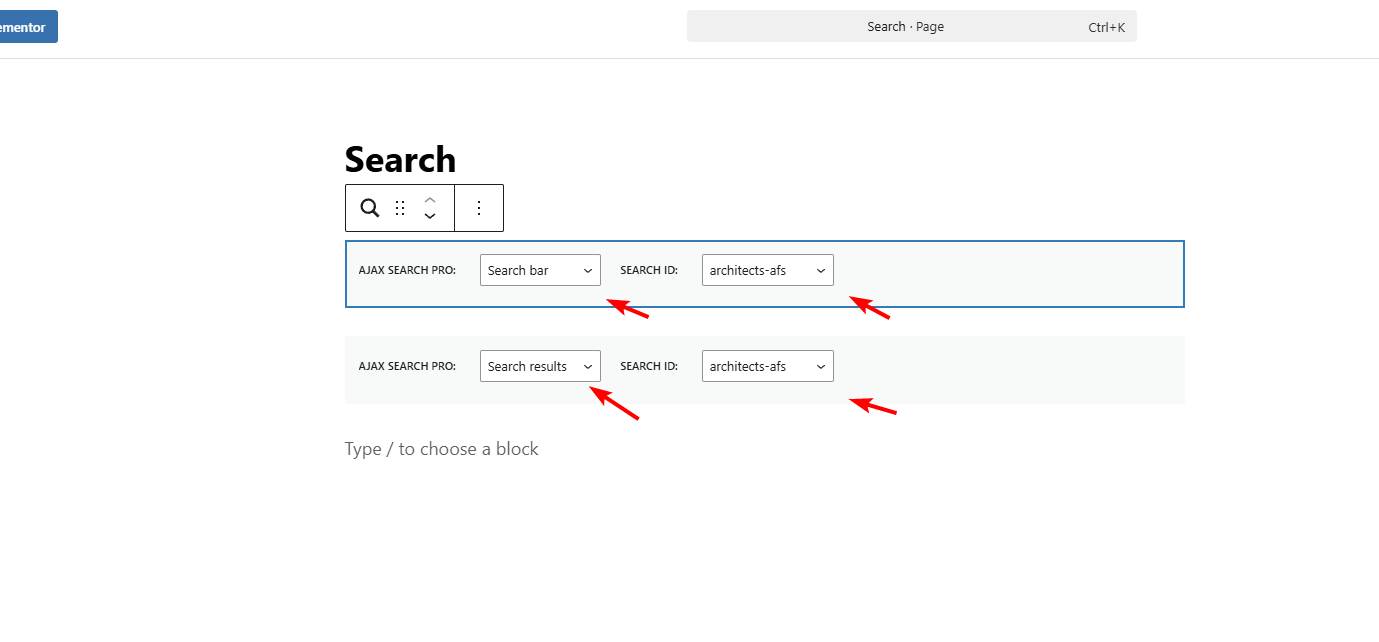
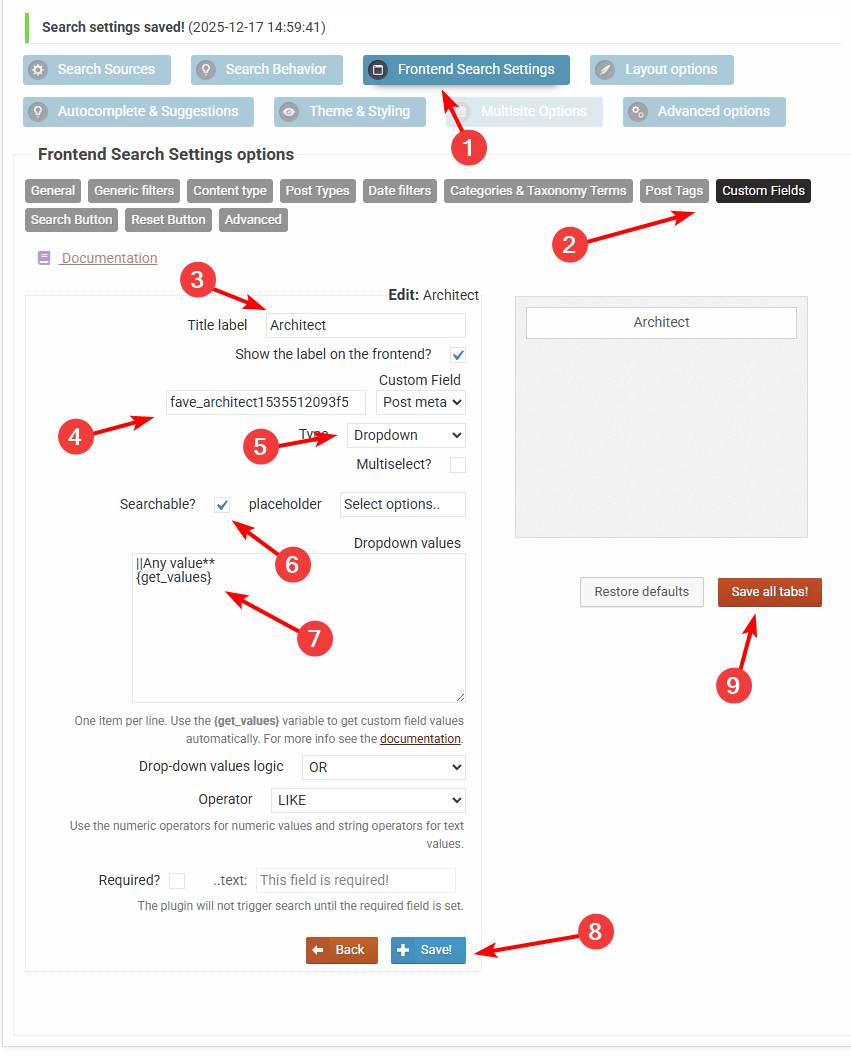
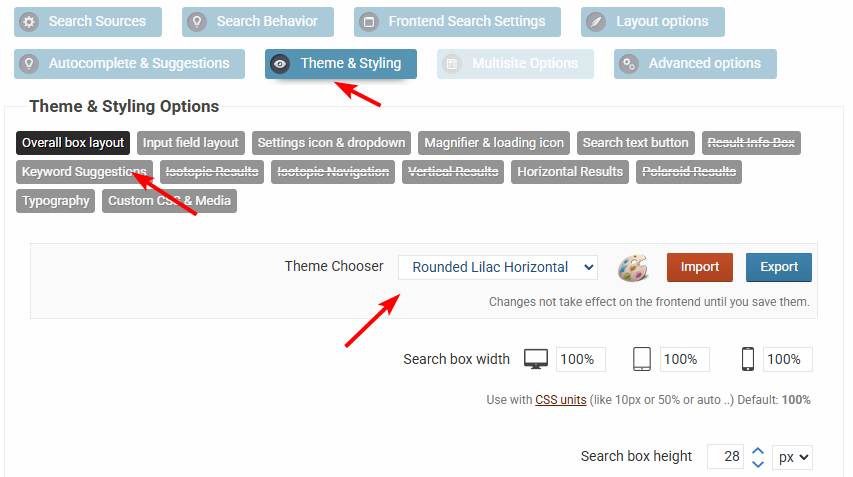
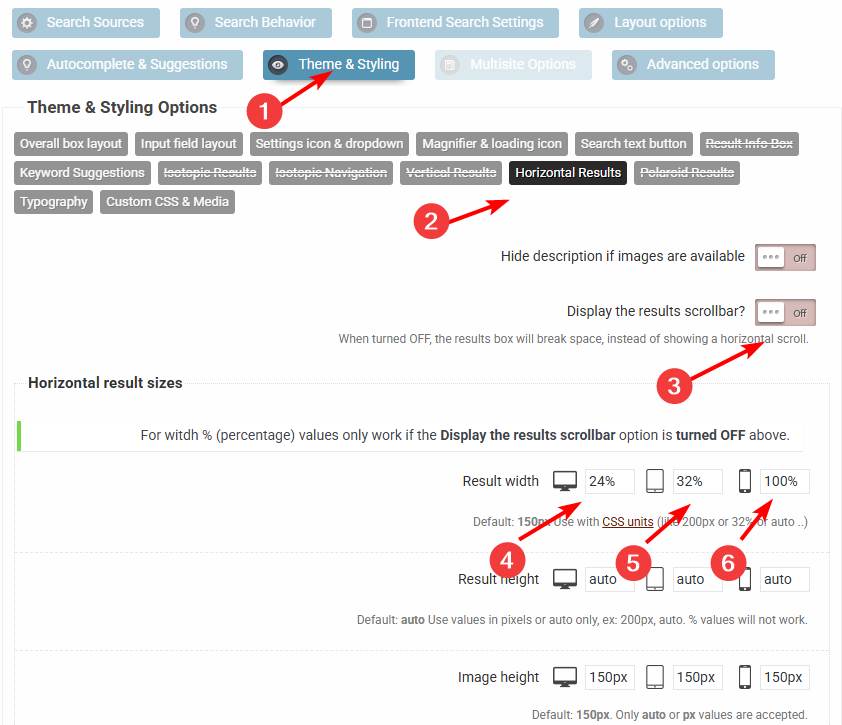
All right, I did a few adjustments for you on the architects-afs search instance, which I think fits better for your use case, as well as made a filter on the custom field too. Here is a step by step guide on what I did exactly:
– First on the page I noticed that you want the settings and the results, so I changed the order (so the filters are on top), by using the search and the result blocks.
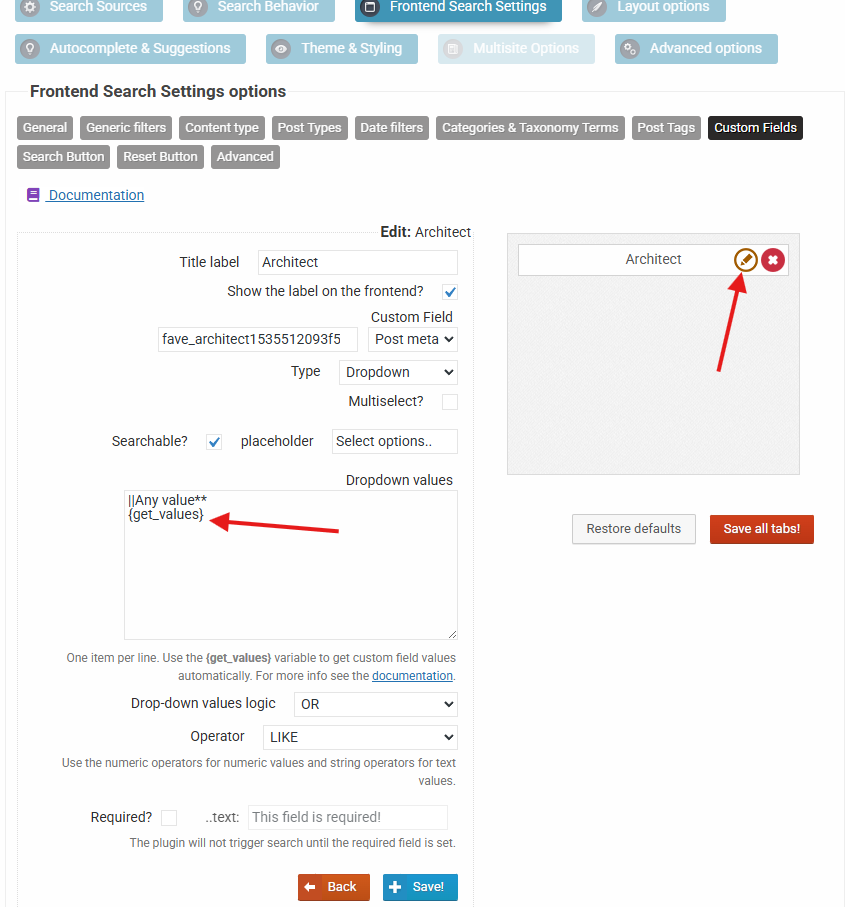
– Then I made the custom field filter like so
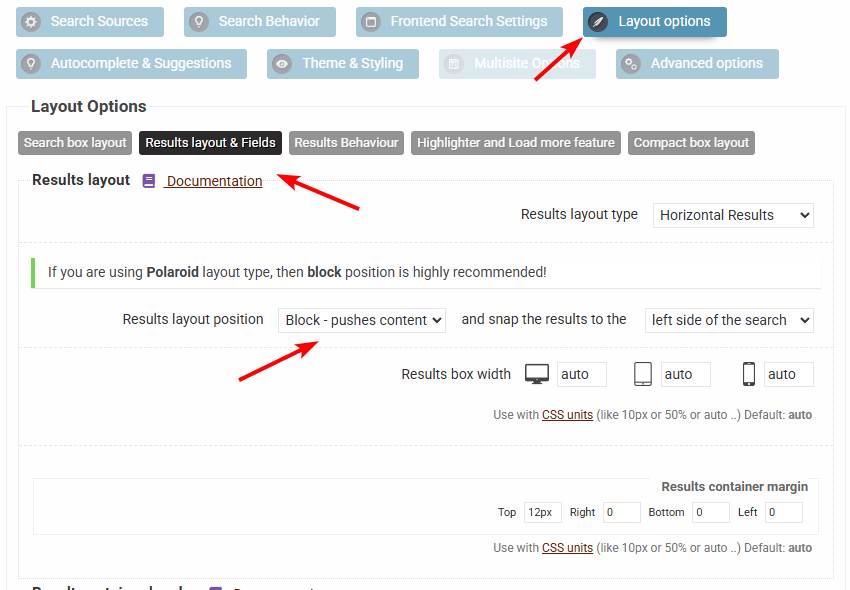
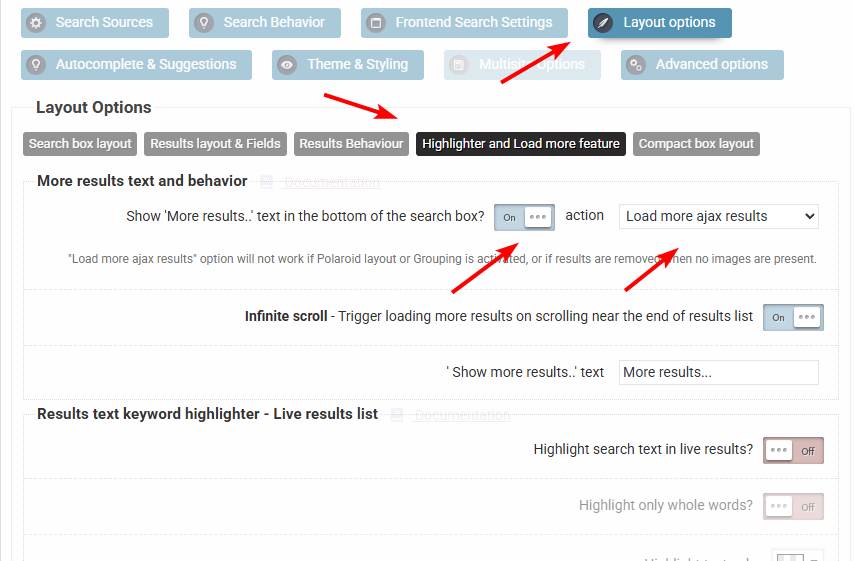
– For a better output, I changed the basic theme to a horizontal layout, then turned off the scrollbar and adjusted the item widths by device, then changed the whole results layout to a block, then also enabled automated load more feature for an automated results loadingI think it fits better for your use case overall. I hope this helps!
December 17, 2025 at 9:05 pm #56578ParticipantHi Ernest – holy moly that is beautiful, thank you! I may have another question or two after I explore your updated configs, but overall it looks like exactly what we wanted!
Best,
ScottDecember 18, 2025 at 11:16 am #56590KeymasterYou are welcome Scott!
December 18, 2025 at 10:21 pm #56604ParticipantYou cannot access this content.
December 18, 2025 at 11:34 pm #56607ParticipantYou cannot access this content.
December 20, 2025 at 10:56 am #56619KeymasterNo worries, I am more than happy to help!
ah, I think the key may be in this section? (this screenshot from our live site, where I’m exploring the plugin options so as not to disturb anything you may be working on in the dev site)
Yes, that is the section for the custom field filter I made for the architects.In the dropdown, we’d like to see only the CalDaily labeled/type listings’ associated architects, and many Sold/afs listings are appearing. I’ve tried Advanced->Include/Exclude, but this doesn’t seem to have any effect. At the end of the current dropdown, even after the above step, “XY Architects” (as example) is still showing, even thought it is Sold and not a CalDaily listing. However when that architect is clicked, No Results appears, which is correct, I just need to figure out how to exclude XY Architects (and any other Sold or afs listings) from the dropdown entirely. A couple iterations I’ve tried on the dev site are screenshotted here.The way that it works at the moment is, if you open the filter settings, then you will see the value is set to {get_fields}, which means it will grab the values automatically from the database. It accepts an “exclude” argument, where you can specify a comma separated list of values to exclude from the automatically fetched list, like so:
{get_values exclude="value1, value2"}The index is updated automatically whenever a post is added, updated, deleted etc.. The dropdown value is however not affected by the index, as it is pulled directly from the database. Any existing value that exists in the database should be there. In case you have any type of cache active, it may delay that a bit, but it is always directly fetched from the database itself.
December 20, 2025 at 5:40 pm #56633ParticipantYou cannot access this content.
December 20, 2025 at 5:48 pm #56637ParticipantYou cannot access this content.
December 22, 2025 at 10:12 am #56643Keymasterregarding excludes, I’ve tried the attached, but perhaps I’ve got the format/field wrong? My goal is to exclude any Sold status and/or any “afs” labeled listings.
I see. Is that “sold” status a category or a taxonomy of some sort? If so, then it explains why the sold items still appear, as changing the category of the property will not remove that dealer from the databse.
It may still be possible programmatically in some way. Let me know, and I will try to look for a custom code snippet or similar if possible.December 22, 2025 at 7:08 pm #56648ParticipantYou cannot access this content.
January 6, 2026 at 8:59 pm #56695KeymasterIt is not related to the index, the filter labels are fetched through wordpress directly.
You can exclude those listings from the results via the exclusion options (I see you already did that), however that will not affect the filter labels.
The only possible resolution here is to implement this feature I’m afraid. I have made a issue request, dated to version 4.28.1 release.
I will likely add two attributes to the {get_values} variable, so it respects taxonomy term exclusions. It is very likely this is going to be implemented, I have already checked the code and it should be possible to implement.January 15, 2026 at 1:51 am #56762ParticipantYou cannot access this content.
January 15, 2026 at 1:54 pm #56764KeymasterThank you for the feedback Scott 🙂 Either way I will try to implement a term based restriction feature for the drop-down values for the upcoming release.
I will close this topic soon if you don’t mind. Feel free to rate the plugin (if you haven’t already) on the wordpress plugin repository, it helps me greatly.
-
AuthorPosts
- You must be logged in to reply to this topic.