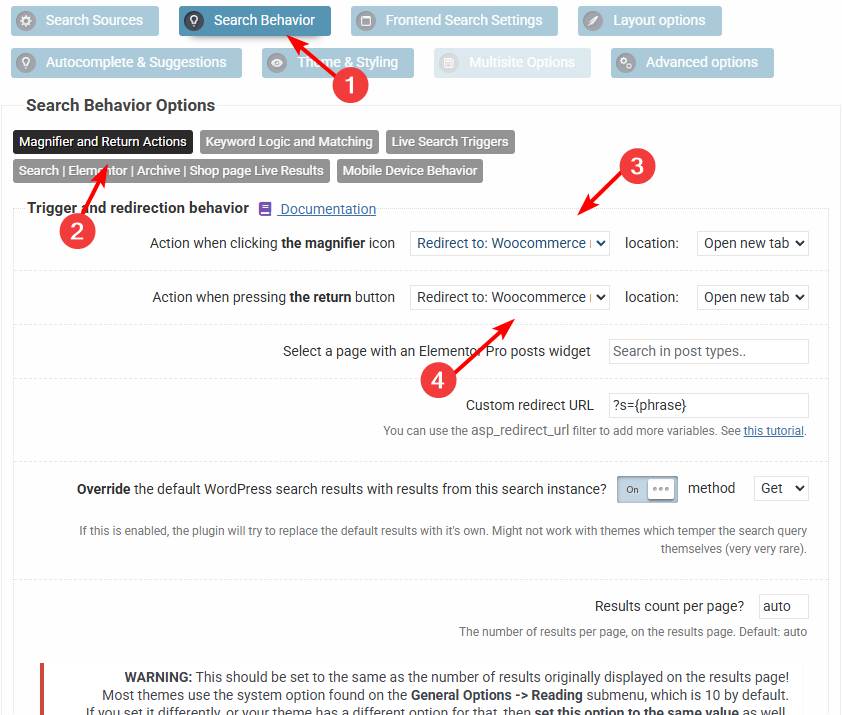
Just brought the plugin and cant use it on my theme Just brought the plugin and cant use it on my theme Home › Forums › Product Support Forums › Ajax Search Pro for WordPress Support › Just brought the plugin and cant use it on my theme This topic has 20 replies, 2 voices, and was last updated 6 months ago by Ernest Marcinko. Viewing 6 posts - 16 through 21 (of 21 total) ← 1 2 Author Posts May 4, 2025 at 6:45 am #53897 info_LJ2UParticipant Btw its still broken in mobile view. Can you please have a look on it? thank you, Irwan May 5, 2025 at 8:00 am #53900 info_LJ2UParticipant You cannot access this content. May 5, 2025 at 10:08 am #53903 Ernest MarcinkoKeymaster Sure! I have made the same file for mobile, after clearing the cache it should show up. Please note that I can’t guarantee anything here, as this is a theme related issue. May 7, 2025 at 2:57 am #53934 info_LJ2UParticipant It works. thank you January 23, 2026 at 3:27 am #56824 info_LJ2UParticipant Hello How to change the look of search items display.. for example if i search ” kursi tamu ” in the search bar. it will displayed https://suburfurniture.com/?s=kursi+tamu&asp_active=1&p_asid=1&p_asp_data=1&device=1&filters_initial=1&filters_changed=0&qtranslate_lang=0&woo_currency=IDR¤t_page_id=3020527 I want to display in rows like: https://suburfurniture.com/?s=kursi+tamu&post_type=product so the view is much better for online store. how to change it? i have attached the screen shot as reference YES.jpg I want like this No.jpg currentlya like this regards Irwan January 23, 2026 at 1:45 pm #56837 Ernest MarcinkoKeymaster Sure, no problem! All you need to change is this to redirect to the WooCommerce results page. After that the plugin will redirect to the correct destination. Author Posts Viewing 6 posts - 16 through 21 (of 21 total) ← 1 2 You must be logged in to reply to this topic. Log In Username: Password: Keep me signed in Log In
.

 .
.