WP/ Search not populating
Home › Forums › Product Support Forums › Ajax Search Pro for WordPress Support › WP/ Search not populating
- This topic has 28 replies, 2 voices, and was last updated 2 months, 2 weeks ago by
Ernest Marcinko.
-
AuthorPosts
-
November 27, 2025 at 12:34 am #56295
opusuno_qeTz
ParticipantHi ernest,
I hope this is easy… In the past when the default WP search wasn’t working I would assign it to the one setup using your plugin and it just works. But on this site: https://capriolas.com it’s not populating? Using GeneratePress .. Is there something I’m missing?
November 27, 2025 at 11:25 am #56315KeymasterHi,
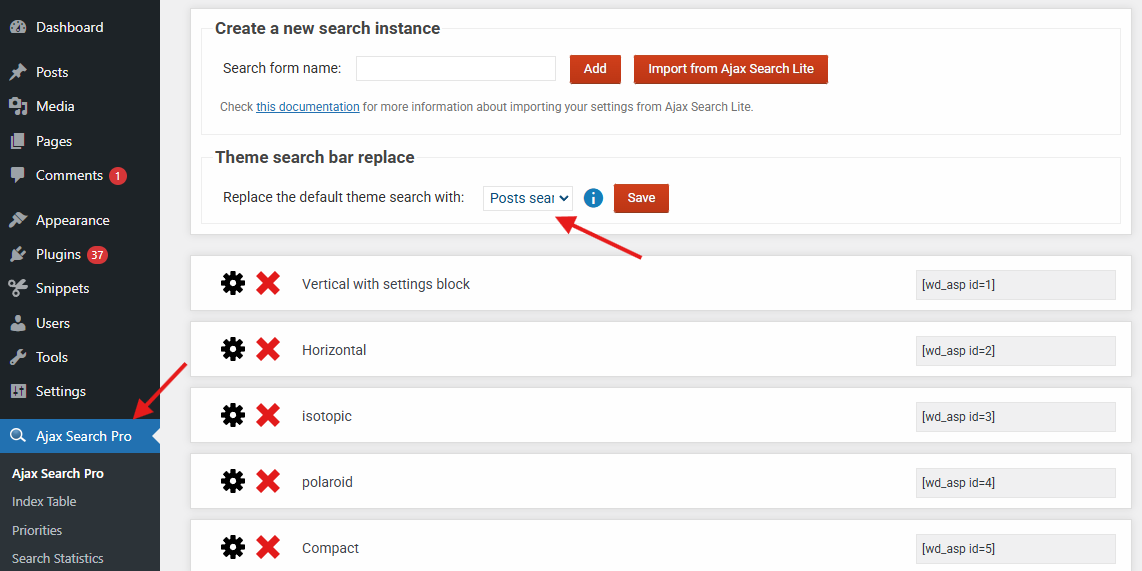
I suspect the search override may not be enabled, please make sure it’s turned on, that should resolve the issue.
November 28, 2025 at 3:11 pm #56338ParticipantThank you Ernest. Progress… That gives me a result.
But how do I now get the products/images to display?
It shows only the text of the category or the tag.
Sorry to be a pest.. I must be missing this in the settings.
November 29, 2025 at 2:20 pm #56348KeymasterI assume you are using WooCommerce?
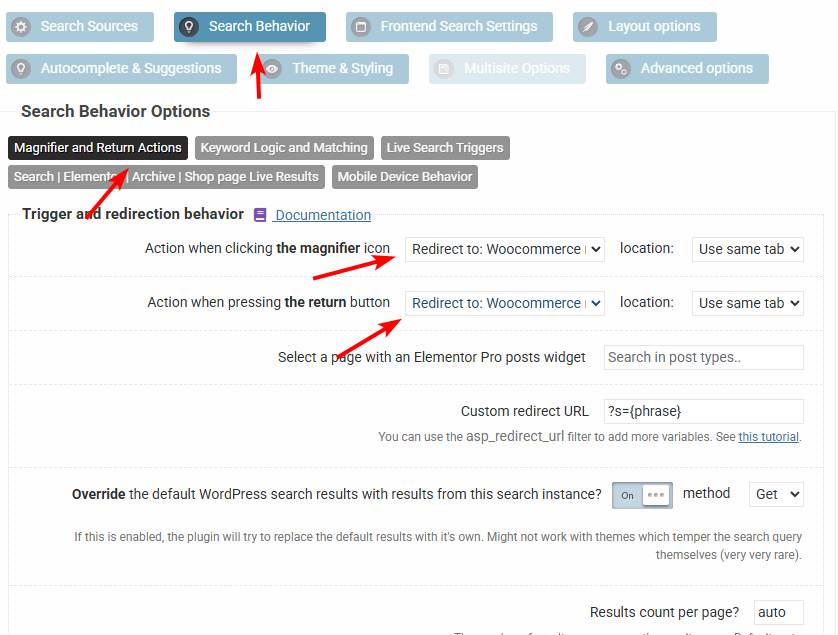
In that case make sure the redirection is set to the WooCommerce results page. It should be set to that by default, but rather check it, it would explain the problem.
November 29, 2025 at 3:47 pm #56353ParticipantYeah. That’s how it is. Same result.. weird. In the GP customizer it shows use image in archive too.
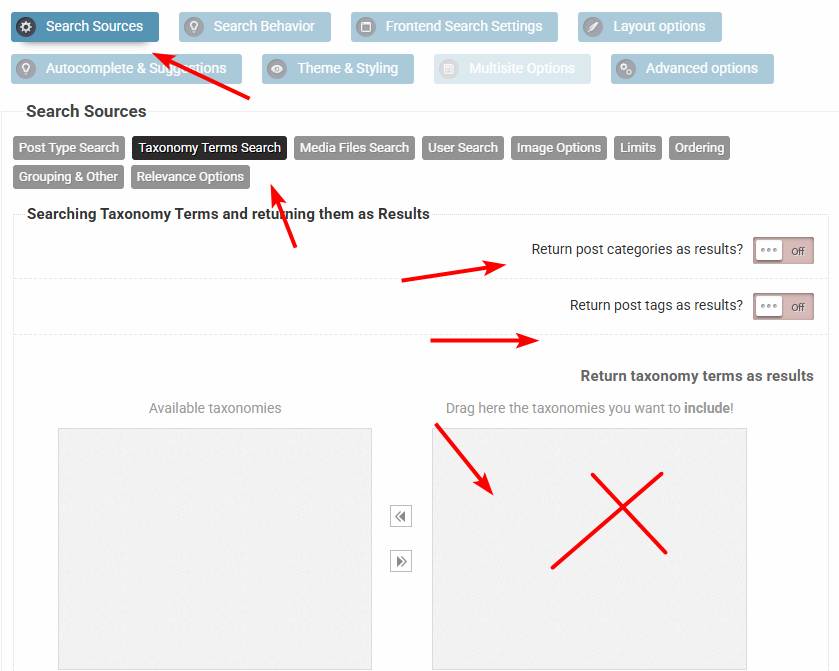
December 1, 2025 at 1:39 pm #56363KeymasterCan you please make sure that taxonomy terms are not selected to be as results here?
From what I can see there are product categories as results, which you probably don’t need there.
December 1, 2025 at 7:12 pm #56383ParticipantSame settings. Weird. At least it’s populating with something..
December 2, 2025 at 10:55 am #56387KeymasterDo you see a different results page layout when the Ajax Search Pro plugin is disabled?
December 3, 2025 at 7:54 pm #56407ParticipantYes. It displays the product images and descriptions when AjaxSearch is disabled. See screenshot
December 4, 2025 at 9:35 am #56417KeymasterOkay!
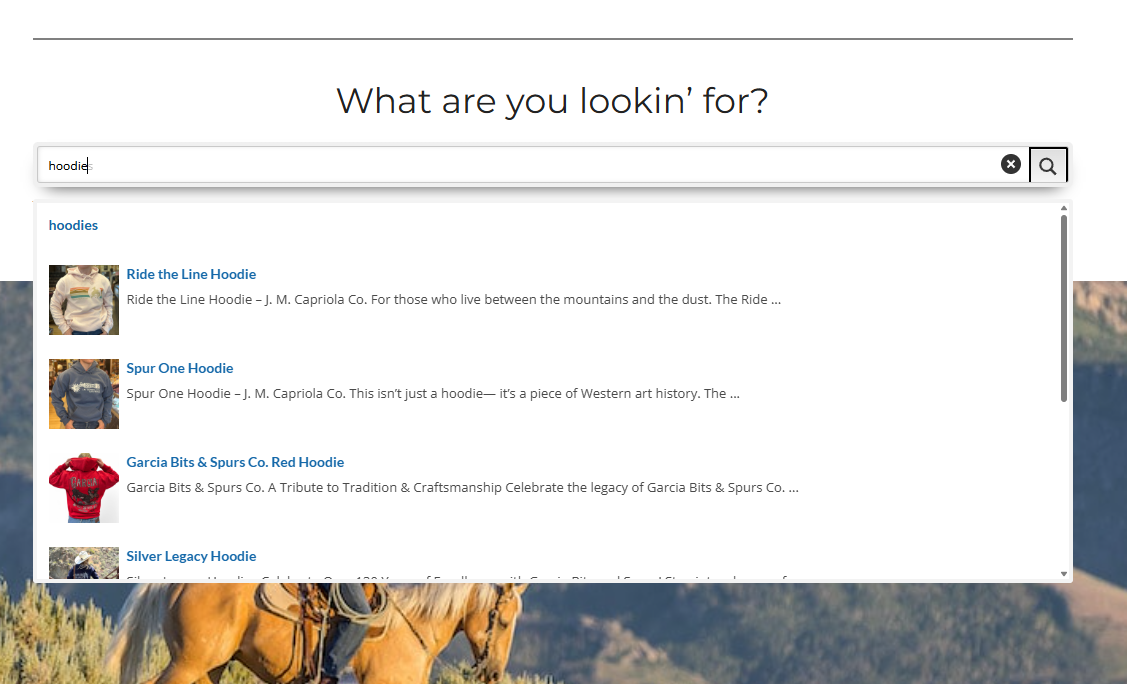
When I do a search via the plugin search box, I’m getting the correct results page though. I assume the native search bar is not redirecting to the woocommerce results page, but the default one.
December 7, 2025 at 9:35 pm #56452ParticipantThat might be the case.. I don’t know why since it selected to use WC
December 8, 2025 at 2:39 pm #56470KeymasterOkay, that’s probably the case then.
Looks like that native search is within a modal of some sort. You can try enabling the automatic override, if it uses a hook, then it should be possible to replace with the Ajax Search Pro search automatically.
If that does nothing, then look for the theme customizer. Modern themes usually have an editor where you can change the search box – or at least adjust the location to the WooCommerce results page.
December 9, 2025 at 7:24 pm #56475ParticipantI don’t think it’s that.. GeneratePress is either on or off
It’s a little frustrating. Mainly since my client is whining about it..
It works perfectly embedded in the home page. Just not in the primary navigation. Modal.
Is there someway to make the embedded on still work and just use the Navigation default?
I notice when this is returned No Results Found == https://capriolas.com/?s=sweater
But when I simply reload the same page it works?
December 12, 2025 at 12:42 pm #56498KeymasterWell, it is outside of Ajax Search Pro, but I will try to help. The only issue with the embedded search is that it’s not having the “post_type=product” argument, which is the trigger for WooCommerce to capture and display it’s product results page.
Maybe you can set up a .htaccess redirection, or a programmatical redirection so the post type argument is added.
Even simpler might be to add an extra hidden input to the modal search with the post type argument, so it’s autoamtically captured by the woocommerce results page. That might be the simplest possible solution in my opinion.
December 12, 2025 at 9:46 pm #56515ParticipantAre you suggesting a function in the child theme? Thanks for the help.
-
AuthorPosts

- You must be logged in to reply to this topic.