
Forum Replies Created
-
AuthorPosts
-
Ernest Marcinko
KeymasterNo problem. The query is built dinamically respecting the options you choose on the backend. The file you are looking for is the plugins/ajax-search-pro/includes/search_content.class.php. The significant lines are 186-230. You will see a part of a huge query there.
What I think you should try first is to eleminate the non-published posts from not being searched. I still think the problem is related to that. So, try to edit the line 220:
($wpdb->posts.post_status='publish' $searchin) AND
to
($wpdb->posts.post_status='publish' OR 1) AND
Save the file, refresh your browser on the frontend and do a search. I’m almost sure, that you will see results from the custom post type 🙂
KeymasterHi!
Yes the settings will remain (altough they might seem differently on the settings page, but the database will contain the changed values)
KeymasterOkay, thank you, it looks ok.
Can you attach the SQL export file of the posts table (or a few records containing these posts of these post types)? I think there is something differently stored in the database and the search is missing them 🙂KeymasterHi!
It’s most likely due to a jquery ui javascript confict. My suggestion is, that you should switch the template temporarly to default and see if you can use the controls. If not, then it’s probably another plugin causing it. Well, there are so many plugins, that I’m unable to tell which could cause it, so the best option here is to temporary deactivate some of them (or all of them), configure the search, and activate them back.
This issue happened once before a long time ago, it was an outdated free plugin causing the problem, but I cannot recall which one exactly. Anyways, temporary deactivating some plugins or swicthing the template should definitely help 🙂
Let me know!
Best,
ErnestKeymasterHi!
From the responses it appears to me, that the search is only searching the standard posts right now (for some reason). Are you sure, that you have configured it correctly? Please check the “Search in custom post types” option on the general options tab, and that you have corretly selected which post types do you want to search.
From the ajax call’s post head
set_intitle=None&set_incontent=None&set_inexcerpt=None&
set_inposts=None&set_inpages=None&set_inbpgroups=None&
set_inbpusers=None&customset%5B%5D=themenreihe&
customset%5B%5D=veranstaltung&customset%5B%5D=themenreihe&
customset%5B%5D=veranstaltung&categoryset%5B%5D=7&
categoryset%5B%5D=1&categoryset%5B%5D=6&categoryset%5B%5D=5
I’m guessing you have seelected the “verastaltung” and the “themenreihe” post type?
If so, then could you please check the status of these posts? (are they published, drafts, thrashed or anything else)All I can think of is that the status of the post types is maybe different from “published”, thus the SQL query is ignoring them from the results. I’m not sure 🙂
Let me know!
KeymasterHi!
Thank you for noticing me about this error, the fixed search file is already being under verification on codecanyon. I’ve applied this fix on your server, thank you for the ftp access! It should work fine now, let me know.
I’ve attached a copy of the fixed search to this post, in case you need it.
Best,
Ernest-
This reply was modified 12 years, 4 months ago by
February 25, 2014 at 3:03 pm in reply to: https/ssl certificate problems, because of css files of yours #1159KeymasterThere is no option to disable shortcodes from content (unfortunately no filter is available in WordPress for that 🙁 )
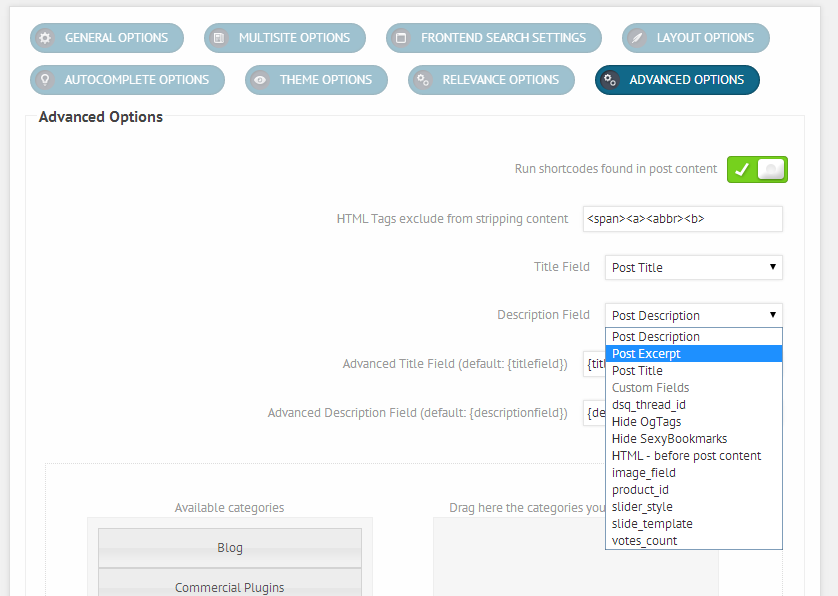
However, there are some things you can do:- Enable “Run shortcodes found in post content” on the “Advanced options tab”
- or Exclude the posts or pages from the search, that has shortcodes: “Exclude Posts by ID’s (comma separated post ID-s)” on the “Advanced options” tab
- or, probably the best solution is to change the description field from post content to post excerpt:
 February 25, 2014 at 1:49 pm in reply to: https/ssl certificate problems, because of css files of yours #1135Keymaster
Dear Sebastian!
You can DELETE those files, because they are not loaded in the header. The reason you see the icons from my server, because the style1-8.css files are not writeable, and the default values are not changing when you save the search, trust me. The style1-8.css files are generated from the style.css.php when you save the corresponding search on the backend. It doesn’t matter what is in those files, they get overwritten if they are chmodded properly with your site url with the https tags and so.
Once again, please enable the Force inline styles on the Compatibility options tab (http://i.imgur.com/K6uolR5.png) and you can delete the style1-8.css files from your server. This way the styles wont load from the unwriteable css files, but will load in an inline safe stylesheet, and all the icons/images/png and gifs will load from your server. That is the safest option for an ssl enabled website.
Also if you have a cache plugin enabled, don’t forget to clear the cache after changing the search options.
Here is the search with the deleted style.css files in case you don’t want to delete them manually from your server via ftp.
February 25, 2014 at 1:31 pm in reply to: https/ssl certificate problems, because of css files of yours #1130KeymasterOkay, it seems like this is because the css files are not writeable on your server, I’m 100% sure. The style1-8 css should be dynamically written when the search is saved. Those are the default values. Try to chmod the ajax-search-pro/css and the ajax-searhc-pro/cache folder AND all of its contents to 777 if possible.
You can also enable the Force inline styles on the Compatibility options tab, it should solve the issue right away: http://i.imgur.com/K6uolR5.png
-
This reply was modified 12 years, 5 months ago by
February 25, 2014 at 12:39 pm in reply to: https/ssl certificate problems, because of css files of yours #1121KeymasterYou should see the file now 🙂
February 25, 2014 at 12:19 pm in reply to: https/ssl certificate problems, because of css files of yours #1116KeymasterIndeed, sorry. Just ported the site to a new template/wp version will fix this in a minute.
February 25, 2014 at 12:16 pm in reply to: https/ssl certificate problems, because of css files of yours #1114KeymasterHi!
I’ve managed to enable ssl on my test environment, installed the search and fixed the bad css/script tags with “http” urls.
I’m attaching the fixed version to this post, all you need to do is uninstall/reinstall the plugin, or overwrite the files via ftp (that’s better/safer).
After overwriting, please open up each search instance you have created so far and save them again, to overwrite the existing css files, or to be sure you can delete them all and make new ones.
Sorry for the inconvinience!
Best,
Ernest-
This reply was modified 12 years, 5 months ago by
February 25, 2014 at 11:25 am in reply to: https/ssl certificate problems, because of css files of yours #1113KeymasterHi!
Thank you for noticing! Previous version were 100% compatible, but when developing new versions I sometimes forget to check the ssl compatible urls 🙂 Unfortunately I don’t have an ssl enabled test environment, but I will start fixing these now.
Will get back to you as soon as I manage to fix these issues!
Thanks,
ErnestKeymasterHi!
Yes, if you have temporary login details you can send them by mail, if you prefer that more secure: ernest.marcinko [-a-t-] wp-dreams.com
I have a few questions though:
- Is it not working on different keywords, or you type in the same keyword and sometimes it gives results, sometimes it doesnt?
- When you get no results, does the ajax “spinner” keeps spinning?
- Can you please check the url you provided? It gives me this error: http://i.imgur.com/b7aB7gB.png
Thank you!
KeymasterThanks!
The widget should work fine now. I also recommend to use the Relevannsi plugin, to enhance the search results more, you can download it here: Relevannsi
It cooperates well with the the search plugin!
-
This reply was modified 12 years, 4 months ago by
-
AuthorPosts

