This website uses cookies to personalize your experience. By using this website you agree to our cookie policy.

Forum Replies Created

Viewing 15 posts - 301 through 315 (of 18,413 total)
  • Author
    Posts
  • in reply to: Populating the Dropdown Select List configuration #56643
    Ernest MarcinkoErnest Marcinko
    Keymaster

    regarding excludes, I’ve tried the attached, but perhaps I’ve got the format/field wrong? My goal is to exclude any Sold status and/or any “afs” labeled listings.

    I see. Is that “sold” status a category or a taxonomy of some sort? If so, then it explains why the sold items still appear, as changing the category of the property will not remove that dealer from the databse.
    It may still be possible programmatically in some way. Let me know, and I will try to look for a custom code snippet or similar if possible.

    in reply to: JS function to re-sort the results #56642
    Ernest MarcinkoErnest Marcinko
    Keymaster

    You cannot access this content.

    in reply to: Status: 500 #56641
    Ernest MarcinkoErnest Marcinko
    Keymaster

    You cannot access this content.

    in reply to: Searches Being Selective #56623
    Ernest MarcinkoErnest Marcinko
    Keymaster

    You cannot access this content.

    in reply to: JS function to re-sort the results #56621
    Ernest MarcinkoErnest Marcinko
    Keymaster

    Hi Seamus,

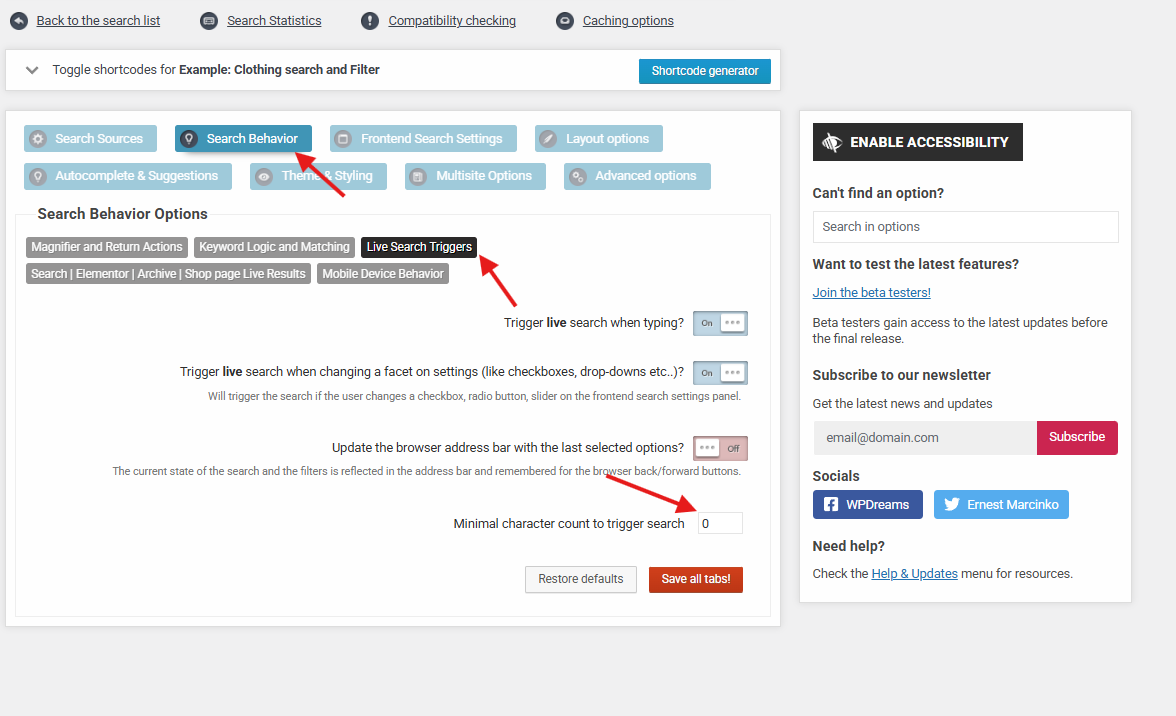
    This one is a very tough one, but I think I see the problem. As far as I can tell, you are trying to reatain the results opened, when the user closes the modal via the “Back to Results” button. However there is a setting for that here. When that option is turned off, the results will not close whenever the user clicks away from the container.

    Therefore you can simplify the closeModal function like so:

    
            function closeModal() {
                const $modal = $('#artwork-zoom-modal');
                $modal.attr('data-stage', '1');
                $modal.css('display', 'none');
                $('.artwork-modal-bg-stage1, .artwork-modal-bg-stage2').addClass('hidden').css('display', 'none');
                $('.artwork-modal-stage1, .artwork-modal-stage2').addClass('hidden').css('display', 'none');
                $('body').removeClass('modal-open overflow-hidden');
            }
    

    I’m almost a 100% sure that this is going to fix the issue, as the visibility was all over the place in the original closeModal function, which caused the problem with the isotope recalculation.

    in reply to: Searches Being Selective #56620
    Ernest MarcinkoErnest Marcinko
    Keymaster

    You cannot access this content.

    in reply to: Populating the Dropdown Select List configuration #56619
    Ernest MarcinkoErnest Marcinko
    Keymaster

    No worries, I am more than happy to help!

    ah, I think the key may be in this section? (this screenshot from our live site, where I’m exploring the plugin options so as not to disturb anything you may be working on in the dev site)
    Yes, that is the section for the custom field filter I made for the architects.

    In the dropdown, we’d like to see only the CalDaily labeled/type listings’ associated architects, and many Sold/afs listings are appearing. I’ve tried Advanced->Include/Exclude, but this doesn’t seem to have any effect. At the end of the current dropdown, even after the above step, “XY Architects” (as example) is still showing, even thought it is Sold and not a CalDaily listing. However when that architect is clicked, No Results appears, which is correct, I just need to figure out how to exclude XY Architects (and any other Sold or afs listings) from the dropdown entirely. A couple iterations I’ve tried on the dev site are screenshotted here.

    The way that it works at the moment is, if you open the filter settings, then you will see the value is set to {get_fields}, which means it will grab the values automatically from the database. It accepts an “exclude” argument, where you can specify a comma separated list of values to exclude from the automatically fetched list, like so:
    {get_values exclude="value1, value2"}

    The index is updated automatically whenever a post is added, updated, deleted etc.. The dropdown value is however not affected by the index, as it is pulled directly from the database. Any existing value that exists in the database should be there. In case you have any type of cache active, it may delay that a bit, but it is always directly fetched from the database itself.

    in reply to: Speed #56618
    Ernest MarcinkoErnest Marcinko
    Keymaster

    You cannot access this content.

    in reply to: Setting up pre-filters for an index #56617
    Ernest MarcinkoErnest Marcinko
    Keymaster

    Hi Seamus,

    It depends on what is the exact value stored in the field. If it’s a boolean, or a conversion of boolean to string “true” or “false”, then your code will not work, as this check fails:

        
        // Check if the field exists and is truthy (1, "1", true, "yes", etc.)
        if ( !empty($available) && $available !== '0' && $available !== 0 ) {
            return $post;
        }
    

    Assuming the value can be a boolean string, then try the one below, it covers all possible type coercions:

        
        if ( $available !== 'false' && $available ) {
            return $post;
        }
    
    in reply to: Programatically adding filters #56616
    Ernest MarcinkoErnest Marcinko
    Keymaster

    Hi!

    Well, these are indeed very specific, but it entirely depends on how these are implemented.

    I recommend looking at the frontend filters API. That contains information on how to add/alter filters on the search settings list.

    Ernest MarcinkoErnest Marcinko
    Keymaster

    All right, it must have been only a cache related issue then.

    in reply to: PHP fatal error #56598
    Ernest MarcinkoErnest Marcinko
    Keymaster

    You cannot access this content.

    in reply to: Only One Subject Being Displayed #56594
    Ernest MarcinkoErnest Marcinko
    Keymaster

    You cannot access this content.

    in reply to: Searches Being Selective #56593
    Ernest MarcinkoErnest Marcinko
    Keymaster

    You cannot access this content.

    in reply to: Populating the Dropdown Select List configuration #56590
    Ernest MarcinkoErnest Marcinko
    Keymaster

    You are welcome Scott!

Viewing 15 posts - 301 through 315 (of 18,413 total)