
Forum Replies Created
-
AuthorPosts
-
freerunner
ParticipantI see that you have not responded to this post at all, and it has been 14 days, or two weeks with no response. Do you have a fix for this or not? I have had nothing but problems with your plugin since the get go, and I really need this fixed. Also, if I delete your plugin and try to reinstall it, I get the same error that we were dealing with originally (the only way for me to fix that is to revert back to a saved version of the website), and you still have not explained to me how to fix the website from breaking when the plugin is first installed. I need these issues resolved or I will need to ask for a refund.
ParticipantGotcha. Thanks for your time. I really appreciate your help in helping me get everything figured out. Take care
ParticipantGotcha, that makes sense. Do you happen to have a tutorial for installing Adaptive Images on WordPress, or know of a good tutorial? Or what do you think of Adaptive-Images.com program? Thanks
ParticipantThanks for the quick response. I followed your tutorial on your site for setting up HTTPS with Cloudflare and WordPress, but for some reason there is still some conflicts on some cell phones. For instance, my wife and I Samsung Galaxy S3 show an HTTPS error and my dads S5 shows a green padlock, so I was thinking that if any extra HTTPS conflicts were corrected that maybe this would fix the mobile device HTTPS issue. What do you think?
ParticipantYou are correct, i had to reinstall the plugin since my website crashed on GoDaddy servers and now I am rebuilding the website on WP Engine servers. Your tutorial helped fix that issue. But what about the HTTPS issue? Thanks
ParticipantFYI, I am getting a green padlock on my desktop computer, but seem to be having an issue with my Samsung Galaxy S3 phone getting the padlock when your plugin is not active within the header of my website, using the mobile Chrome browser. i’m assuming that if these insecure links are fixed that it will fix the issue. Please advise, thanks
ParticipantI guess I was wrong, I am still having issues with HTTPS and it seems to be mostly coming from this plugin. According to whynopadlock.com I am getting these errors: Please help
Insecure URL: http://freerunner.wpengine.com/wp-content/plugins/ajax-search-pro/css/fonts/icons/icons.eot
Found in: https://squaretac.com/wp-content/plugins/ajax-search-pro/css/style1.cssInsecure URL: http://squaretac.com/wp-content/plugins/ajax-search-pro/css/fonts/icons/icons.eot
Found in: https://squaretac.com/wp-content/plugins/ajax-search-pro/css/style1.cssInsecure URL: http://freerunner.wpengine.com/wp-content/plugins/ajax-search-pro/css/fonts/icons/icons.eot?
Found in: https://squaretac.com/wp-content/plugins/ajax-search-pro/css/style1.cssInsecure URL: http://squaretac.com/wp-content/plugins/ajax-search-pro/css/fonts/icons/icons.eot
Found in: https://squaretac.com/wp-content/plugins/ajax-search-pro/css/style1.cssInsecure URL: http://freerunner.wpengine.com/wp-content/plugins/ajax-search-pro/css/fonts/icons/icons.woff
Found in: https://squaretac.com/wp-content/plugins/ajax-search-pro/css/style1.cssInsecure URL: http://squaretac.com/wp-content/plugins/ajax-search-pro/css/fonts/icons/icons.woff
Found in: https://squaretac.com/wp-content/plugins/ajax-search-pro/css/style1.cssInsecure URL: http://freerunner.wpengine.com/wp-content/plugins/ajax-search-pro/css/fonts/icons/icons.ttf
Found in: https://squaretac.com/wp-content/plugins/ajax-search-pro/css/style1.cssInsecure URL: http://squaretac.com/wp-content/plugins/ajax-search-pro/css/fonts/icons/icons.ttf
Found in: https://squaretac.com/wp-content/plugins/ajax-search-pro/css/style1.cssInsecure URL: http://freerunner.wpengine.com/wp-content/plugins/ajax-search-pro/css/fonts/icons/icons.svg
Found in: https://squaretac.com/wp-content/plugins/ajax-search-pro/css/style1.cssInsecure URL: http://squaretac.com/wp-content/plugins/ajax-search-pro/css/fonts/icons/icons.svg
Found in: https://squaretac.com/wp-content/plugins/ajax-search-pro/css/style1.cssInsecure URL: http://freerunner.wpengine.com/wp-content/plugins/ajax-search-pro//img/loading/newload1.gif
Found in: https://squaretac.com/wp-content/plugins/ajax-search-pro/css/style1.cssInsecure URL: http://squaretac.com/wp-content/plugins/ajax-search-pro/img/loading/newload1.gif
Found in: https://squaretac.com/wp-content/plugins/ajax-search-pro/css/style1.cssParticipantNever mind. I just followed your “Free SSL certificate with cloudflare for WordPress” tutorial and it seemed to fix the issue. However, I am now getting this problem again in Firefox:

I have used the customer CSS code provided in a previous response, but nothing seems to work. div[id*=ajaxsearchpro3] {
max-width: 243px !important;
}div.header-scrolling div.header-custom-block {
position: absolute !important;
}Please advise
-
This reply was modified 11 years, 8 months ago by
ParticipantThanks for getting this squared away for me again. What did you do to fix it, so I can do it myself if this ever happens again? Thanks
October 18, 2014 at 6:57 am in reply to: This plugin changes the whole look of my website when activated #2712ParticipantI don’t know what happened. All of the CSS code is the same, but I changed the coloration of the search bar, and now the search results are going below the page again (which than causes the scroll bar on the webpage to keep scrolling down forever). I tried clearing the cache and nothing seems to be working. Please advise
October 17, 2014 at 3:05 pm in reply to: This plugin changes the whole look of my website when activated #2711ParticipantThat works for me. Thanks.
October 17, 2014 at 2:48 pm in reply to: This plugin changes the whole look of my website when activated #2708ParticipantThat worked! Also, how come the search results for “Team Spartan” are showing old results for that page and giving a description of “No articles in shop, please rebuild cache”? Please advise
Here is a photo pointing to the issue (the date of the page is 10/15/2014):
 October 17, 2014 at 2:23 pm in reply to: This plugin changes the whole look of my website when activated #2704Participant
Awesome, the provided code seemed to fix the search results from shooting across the screen, but now there is a minor problem. The search results are going below the page profile so all of them cannot be seen. Please look at the picture provided:
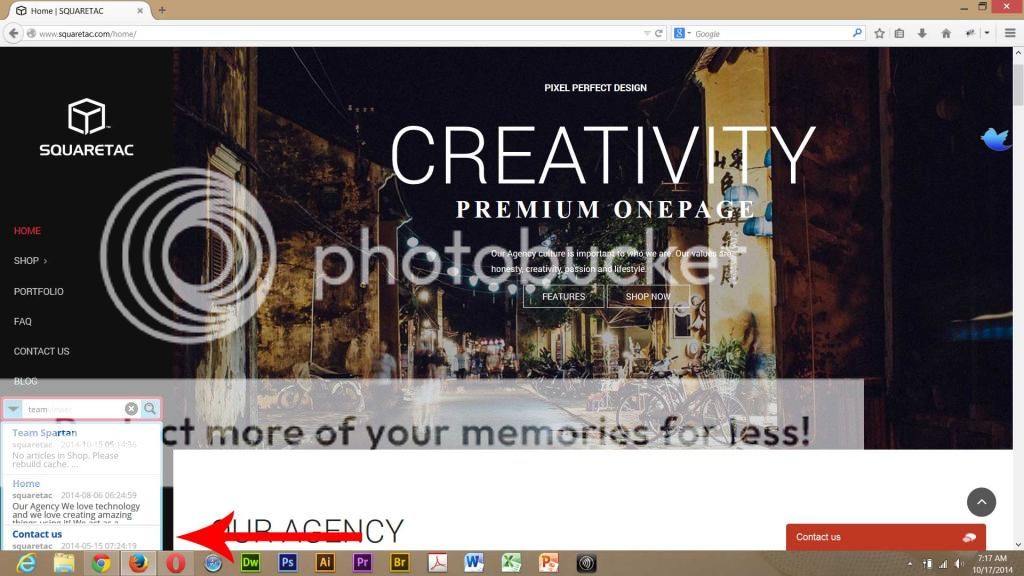
Thanks for your diligence in helping me get this fixed.
October 16, 2014 at 9:41 pm in reply to: This plugin changes the whole look of my website when activated #2702ParticipantInternet explorer gets rid of your live search capability, and really isn’t working all to well.
October 16, 2014 at 9:25 pm in reply to: This plugin changes the whole look of my website when activated #2701ParticipantSure. Windows 8.0, Firefox 33.0, screen resolution 1920 x 1080. Thanks
-
This reply was modified 11 years, 8 months ago by
-
AuthorPosts


