Forum Replies Created
-
AuthorPosts
-
Ernest Marcinko
KeymasterOh okay, there is still hope. It’s an external library, unfortunately the term level can’t be incorporated to the items so custom CSS is not possible there. The way it’s resolved currently is via added non-breakable space characters to increase indendation.
To change that a code edit is required unfortunately via filter templating. Please read that knowledge base just to have a bit of understanding how that works and follow the instructions below:1. Make these subdirectories your child theme root folder:
asp/filters/taxonomy/, so this path exists:wp-content/themes/{your-theme-name}/asp/filters/taxonomy/
2. Copywp-content/plugins/ajax-search-pro/includes/views/filters/asp-tax-multisearch.phpfile towp-content/themes/{your-theme-name}/asp/filters/taxonomy/asp-tax-multisearch.php
3. Open up the newly copied filewp-content/themes/{your-theme-name}/asp/filters/taxonomy/asp-tax-multisearch.php, it should contain this:<div class='asp_select_label asp_select_multiple'> <select aria-label="<?php echo asp_icl_t('Taxonomy select [' . $taxonomy . "] ($real_id)", 'Taxonomy select for ' . $taxonomy, true) ?>" class='asp_gochosen asp_goselect2' multiple data-placeholder="<?php echo !empty($filter->data['placeholder']) ? asp_icl_t("Multiselect placeholder [".$taxonomy."]" . " ($real_id)", $filter->data['placeholder']) : ''; ?>" <?php if (isset($filter->data['custom_name'])): ?> name="<?php echo $filter->data['custom_name']; ?>" <?php else: ?> name="<?php echo $filter->isMixed() ? "termset_single" : "termset[".$taxonomy."][]"; ?>" <?php endif; ?>> <?php foreach ( $filter->get() as $kk => $term ): ?> <?php if ( $term->id <= 0 ): ?> <option value="-1" class="asp_option_cat asp_option_cat_level-0" <?php echo $term->default ? 'data-origvalue="1"' : ''; ?> <?php echo $term->selected ? "selected='selected'" : ""; ?>> <?php echo asp_icl_t("Chose one option [".$taxonomy."]" . " ($real_id)", $term->label); ?> </option> <?php else: ?> <option class="asp_option_cat asp_option_cat_level-<?php echo $term->level; ?>" <?php echo $term->default ? 'data-origvalue="1"' : ''; ?> asp_cat_parent="<?php echo $term->parent; ?>" value="<?php echo $term->id; ?>" <?php echo $term->selected ? "selected='selected'" : ""; ?>> <?php echo str_repeat(" ", $term->level) . $term->label; ?> </option> <?php endif; ?> <?php endforeach; ?> </select> </div>4. On line 25:
<?php echo str_repeat(" ", $term->level) . $term->label; ?>There are 2 non-breakable characters to increase indentation per term level. If you add more it will increase it for each level:
<?php echo str_repeat(" ", $term->level) . $term->label; ?>5. After changing that and saving it should be apparent on the front-end.
As for the second issue, if you are on a page where the filters are preset (have initial value) via URL, then resetting will set it to that value.
KeymasterYes, it appears not the full code is added, the closing parentheses from the 3rd line “}” is missing on the website source so it doesn’t work. Please try it again, make sure to copy all 3 lines, then clear the cache and it should be apparent:
.results .item { pointer-events: none !important; }KeymasterHi Michel,
Surely!
I assume you mean a feature where the user is not redirected to the image, so they can’t download it right?
The easiest possible way to get around that is to completely disable that via a custom CSS:
.results .item {
    pointer-events: none !important;
}
Apply this code to your theme custom CSS field (if it supports it) or use the custom CSS field on the search plugin back-end. After clearing the cache the user will no longer be able to click on the result to download it.
If you need help adding this, let me know.
KeymasterHi!
Thank you very much for the details, it helps a lot!
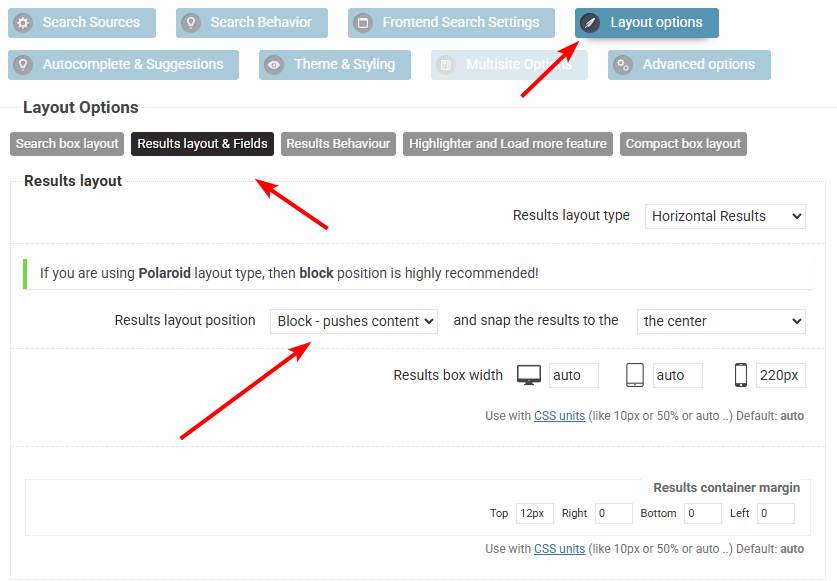
Can you please try to change the results layout on that search bar (ID=4) to block here? For some reason a the fixed potion floating gets miscalculated by an added top padding, but that should resolve the issue hopefully.
KeymasterHi Nancy,
I’m afraid no. The admin search works very differently, and I’m not sure if there is every going to be a feature to interfere with it.
KeymasterYou cannot access this content.
KeymasterHi,
Sure!
You have two options, one is to use this selector for each level:
.asp_ss .asp_option_cat_level-1 {}Or via a data attribute selector:
.asp_ss div[data-lvl="1"] {}So for example, if you want to add 30px of margin-left to level 3 taxonomy terms, then either:
.asp_ss .asp_option_cat_level-3 {
    margin-left: 30px !important;
}
..or:
.asp_ss div[data-lvl="3"] { margin-left: 30px !important; }KeymasterYou cannot access this content.
October 27, 2025 at 2:56 pm in reply to: Sorting by date and displaying number of results on results page #55873KeymasterHi!
I assume by custom results page you mean not the default results page, but a regular page with the loop grid to which the plugin redirects the results.
These are fully controlled by Elementor and I think they don’t have a counter/filter available for the loop grid on non-archive type pages. I tried to look these up, but this is the only thin I have found, from which I assume there is no such widget in core Elementor.
KeymasterYou cannot access this content.
KeymasterYou cannot access this content.
KeymasterI’m not sure about that text as it is generated by divi somewhere, and I’m fairly new to divi 5 myself.
This is the only article I was able to find, which suggests a custom 404 page template, but I don’t know if that is the way, you may have to ask divi support for the specific location.
KeymasterYou cannot access this content.
KeymasterYou cannot access this content.
KeymasterYou cannot access this content.
-
AuthorPosts