Forum Replies Created
-
AuthorPosts
-
Ernest Marcinko
KeymasterYou cannot access this content.
KeymasterYou cannot access this content.
KeymasterYou cannot access this content.
KeymasterYou cannot access this content.
KeymasterYou cannot access this content.
KeymasterThanks!
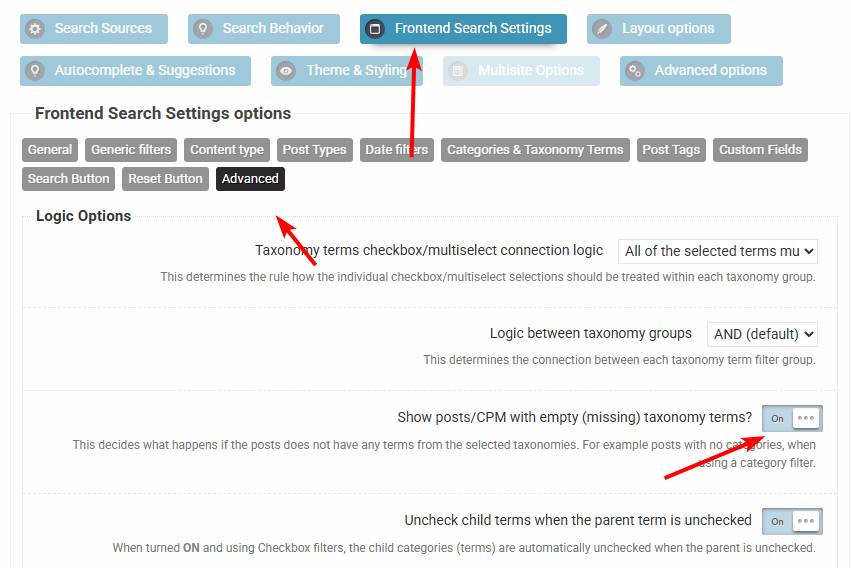
I suspect the item is likely not within any of the categories (Artist name media) in the filter. Can you please try with either adding the item to any of the filter or you can enable this option. That should resolve the issue.
KeymasterI see. You can place the plugin shortcode as a navigation item, if the theme uses a classic menu. If it uses the block editor, then simply put the ajax search pro block there.
KeymasterHi,
Well, that snippet does nothing like that, it modifies the search query by adding the product post type.
While this is outside of Ajax Search Pro, I will try to give you possible suggestions. I think the easiest way is to simply hide the magnifier via a custom CSS:
span.menu-bar-item:has(.icon-search) {
    display: none;
}
This will do the trick 🙂
KeymasterThank you!
The ordering seems to be by latest, although I don’t know which items should be displyed exactly – as both the filter and the index restrictions apply to that. Can you please point out which item is among the latest that should be displayed? As there is over 6k images, but only 360 are eligible for the search because of the index restrictions.
KeymasterYou cannot access this content.
KeymasterYou cannot access this content.
March 26, 2026 at 1:14 pm in reply to: need to view all css used by the plugin for easier custom styling #57168KeymasterHi,
The best way to tackle custom styling is using the browser developer tools generally as there is a lot of items in there, the list would be thousands of lines long. However if you need help with something specific, then let me know, I can help with that.
Here is an example of customizing all the styles in the single/multiselect drop-downs:
/* ============================================= */ /* AJAX SEARCH PRO - TAXONOMY SELECT DROPDOWN */ /* Generic styling for all asp_select2 dropdowns */ /* ============================================= */ div.ajaxsearchpro.searchsettings fieldset { /* 1. Main wrapper around the select */ .asp_select_label.asp_select_single { margin-bottom: 15px; } /* 2. The visible closed dropdown box */ .asp_select2-selection.asp_select2-selection--single { height: 48px; background: #ffffff; border: 2px solid #e0e0e0; border-radius: 8px; transition: all 0.25s ease; } /* 3. Hover effect on the closed box */ .asp_select2-selection.asp_select2-selection--single:hover { border-color: #bbbbbb; } /* 4. Focused / opened state of the closed box */ .asp_select2-container--focus .asp_select2-selection--single { border-color: #0066ff; box-shadow: 0 0 0 4px rgba(0, 102, 255, 0.15); } /* 5. Selected text inside the closed box */ .asp_select2-selection__rendered { color: #222222; font-size: 15px; font-weight: 500; line-height: 46px; padding-left: 16px; } /* 6. Dropdown arrow (closed state) */ .asp_select2-selection__arrow { right: 12px; } } /* ============================================= */ /* OPENED DROPDOWN PANEL STYLES */ /* ============================================= */ span.asp_select2-container { /* 7. The opened dropdown container */ .asp_select2-dropdown { border: 1px solid #96aff2; background-color: #c9dfff !important; border-radius: 8px; box-shadow: 0 6px 16px rgba(0, 0, 0, 0.12); margin-top: 4px; z-index: 9999; /* Ensure it appears above other elements */ } /* 8. Search input inside the opened dropdown (if enabled) */ .asp_select2-search--dropdown .asp_select2-search__field { padding: 10px 12px; border-bottom: 1px solid #eee !important; font-size: 15px; } /* 9. Results container */ .asp_select2-results { max-height: 300px !important; /* Adjust scrollable area height if needed */ } /* 10. List of options */ .asp_select2-results__options { padding: 6px 0 !important; } /* 11. Individual option items */ .asp_select2-results__option { padding: 10px 16px !important; font-size: 15px !important; color: #333333 !important; background-color: #c9dfff !important; } /* 12. Hover and highlighted (keyboard navigation) state */ .asp_select2-results__option:hover, .asp_select2-results__option--highlighted[aria-selected] { color: #f0f5ff !important; background: #206bdc !important; } /* 13. "Any ..." / default option styling */ .asp_select2-results__option[data-asp_select2-id*="--1"], .asp_option_cat[value="-1"] { font-weight: bold !important; color: #fefefe !important; background-color: #206bdc !important; } /* 14. Taxonomy category options (level 0) */ .asp_option_cat.asp_option_cat_level-0 { font-weight: 500 !important; } /* Optional: Child levels (if your taxonomy has hierarchy) */ .asp_option_cat_level-1 { padding-left: 28px !important; } } /* ============================================= */ /* MULTI SELECT STYLES */ /* ============================================= */ .asp_select2-container--flat .asp_select2-selection--multiple { .asp_select2-selection.asp_select2-selection--multiple { background: #ffffff; border: 2px solid #e0e0e0; border-radius: 8px; transition: all 0.25s ease; } .asp_select2-selection.asp_select2-selection--multiple:hover { border-color: #bbbbbb; } .asp_select2-container--focus .asp_select2-selection--multiple { border-color: #0066ff !important; box-shadow: 0 0 0 4px rgba(0, 102, 255, 0.15); } /* Selected choice tags (e.g. "Spanish") */ .asp_select2-selection__choice { background-color: #206bdc !important; background: #206bdc !important; border: 1px solid #206bdc !important; color: white !importan; border-radius: 6px; padding: 4px 10px 4px 12px; margin: 4px 4px 4px 0; font-size: 14px; font-weight: 500; } /* Remove button (×) on each tag */ .asp_select2-selection__choice__remove { color: #ef4444; margin-right: 6px; font-size: 16px; font-weight: bold; opacity: 0.8; } .asp_select2-selection__choice__remove:hover { color: #dc2626; opacity: 1; } /* Inline search field inside multi-select */ .asp_select2-search--inline .asp_select2-search__field { height: 32px; margin: 4px 0; padding: 0 8px; font-size: 15px; border: none; box-shadow: none; } }KeymasterMay I take a look at this somewhere? Can you please also add temporary back-end and (s)FTP details? I will do a debugging session to see what exactly is happening.
I tried to replicate the issue locally, but it works okay on my end. I suspect it is a specific configuration or a conflict of some sort.
KeymasterHi Nancy,
Sure!
I think you should keep it on for now. I believe it will not clear the cache if a product is sold out, as far as I know it will not trigger a change in the actual product itself.
KeymasterYou cannot access this content.
-
AuthorPosts