Forum Replies Created
-
AuthorPosts
-
March 24, 2026 at 1:03 pm in reply to: Custom post type / taxonomy approach multiselect dropdown (without search) #57155
Ernest Marcinko
KeymasterHi!
I noticed that I don’t have a multi-select dropdown option though – only multi-select/search option. Is there a way to apply a multi-select dropdown?
It is possible to disable the search feature via a small custom CSS snippet, so the input for the search gets ignored, and with that it stays a multi select without the search feature:input.asp_select2-search__field { display: none !important }I also noticed that the main category doesn’t seem to filter back after selecting the sub-category. I only have one item in place now, but I would expect that to show for both the parent and sub selected.
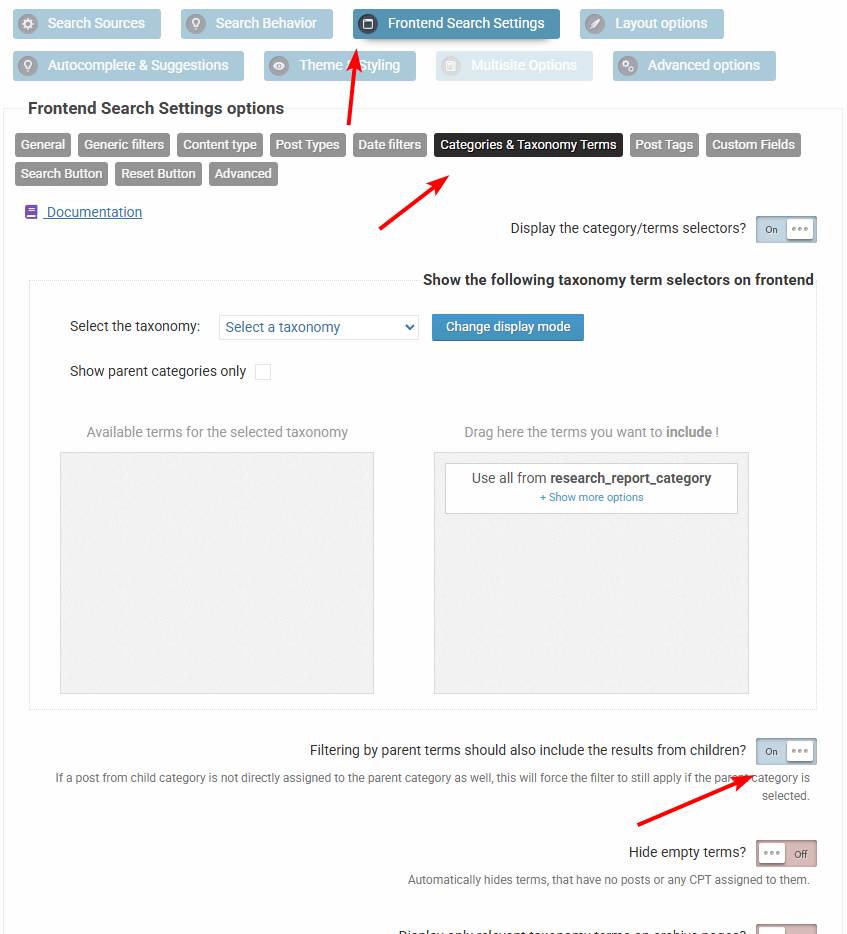
When the item is categorized in the editor, make sure it is placed both in the parent and sub categories, that is the best possible solution and is future proof. Other than that, you can also enable this option. When enabled, selecting a parent will include items from all children, even if the child has no parent category selected.
KeymasterYou cannot access this content.
KeymasterHi,
While currently there is no out of the box filter for that, it is still possible to achieve it via a custom field filter + a bit of a custom code.
Follow the steps below:
1. Create a drop-down custom field filter for a non-existint field
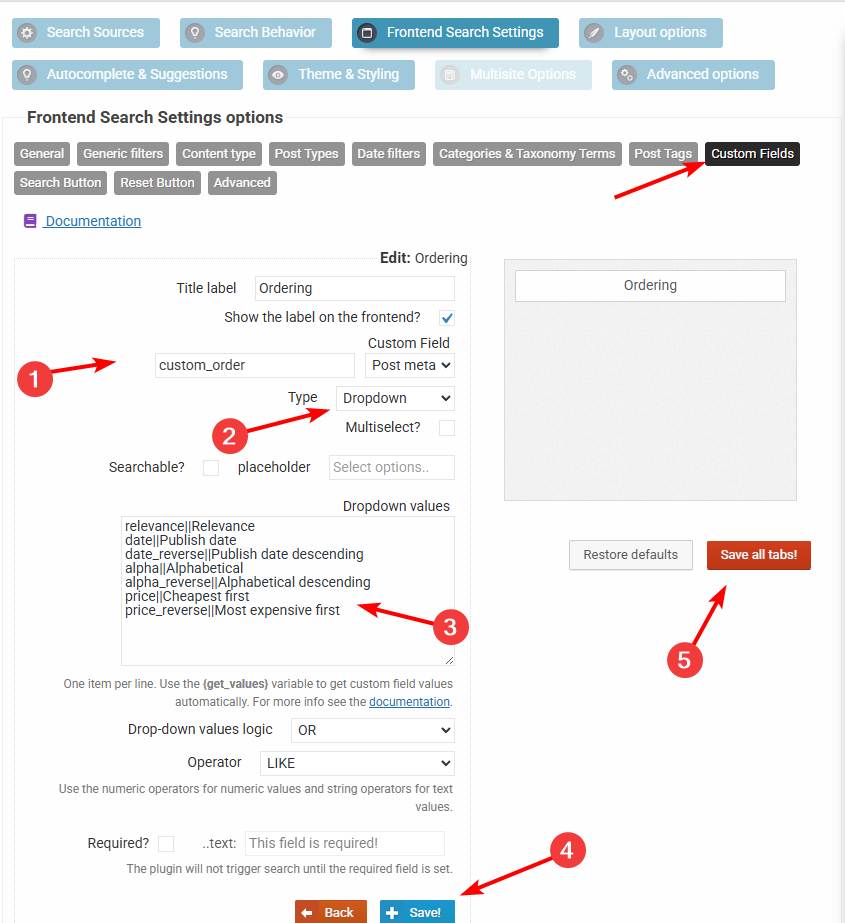
custom_orderwith these values (see this screenshot):date||Date ASC date_reverse||Date DESC2. Add this code via the Code Snippets plugin or to the functions.php file in your theme/child theme directory – make sure to have a full server back-up first for safety. For more details you can check the safe coding guidelines:
add_filter(
	'asp_query_args',
	function ( $args ) {
		// The values allowed in the the_ordering variable
		$allowed_orderings = array(
			'relevance',
			'id',
			'id_reverse',
			'date',
			'date_reverse',
			'alpha',
			'alpha_reverse',
			'price',
			'price_reverse',
		);

		$ordering = '';

		foreach ( $args['post_meta_filter'] as $k => $filter ) {
			if ( $filter['key'] === 'custom_order' ) {
				$ordering = $filter['value'];
				unset( $args['post_meta_filter'][$k] );
			}
		}

		if ( $ordering === '' || !in_array($ordering, $allowed_orderings, true) ) {
			return $args;
		}

		switch ( $ordering ) {
			case 'id':
				$args['post_primary_order'] = 'id DESC';
				break;
			case 'id_reverse':
				$args['post_primary_order'] = 'id ASC';
				break;
			case 'date':
				$args['post_primary_order'] = 'post_date DESC';
				break;
			case 'date_reverse':
				$args['post_primary_order'] = 'post_date ASC';
				break;
			case 'alpha':
				$args['post_primary_order'] = 'post_title ASC';
				break;
			case 'alpha_reverse':
				$args['post_primary_order'] = 'post_title DESC';
				break;
			case 'price':
				$args['post_primary_order']          = 'customfp ASC';
				$args['post_primary_order_metatype'] = 'numeric';
				$args['_post_primary_order_metakey'] = '_price';
				break;
			case 'price_reverse':
				$args['post_primary_order']          = 'customfp DESC';
				$args['post_primary_order_metatype'] = 'numeric';
				$args['_post_primary_order_metakey'] = '_price';
				break;
			case 'relevance':
			default:
				$args['post_primary_order'] = 'relevance DESC';
				break;
		}

		return $args;
	}
);
This will convert the custom field filter into a sorting filter. In case you need help with it, let me know 🙂
KeymasterHi,
The most likely cause is that the request is not reaching our remote server. I checked the logs, but there was no attempt of connection to the verification service, so it is likely getting blocked somewhere along the way. The license key is all right, I was able to verify it from test remote locations.
Can you please add temporary back-end and SFTP details? I would like to do a step-by-step debugging session by editing the plugin files to see what exactly happens when the request is sent. There is very likely an underlying error code hiding somewhere.
-
This reply was modified 4 months ago by
KeymasterHi!
While currently there is no out of the box filter for that, it is still possible to achieve it via a custom field filter + a bit of a custom code.
Follow the steps below:
1. Create a drop-down custom field filter for a non-existint field
custom_orderwith these values (see this screenshot):relevance||Relevance date||Publish date date_reverse||Publish date descending alpha||Alphabetical alpha_reverse||Alphabetical descending price||Cheapest first price_reverse||Most expensive first2. Add this code via the Code Snippets plugin or to the functions.php file in your theme/child theme directory – make sure to have a full server back-up first for safety. For more details you can check the safe coding guidelines:
add_filter(
	'asp_query_args',
	function ( $args ) {
		// The values allowed in the the_ordering variable
		$allowed_orderings = array(
			'relevance',
			'id',
			'id_reverse',
			'date',
			'date_reverse',
			'alpha',
			'alpha_reverse',
			'price',
			'price_reverse',
		);

		$ordering = '';

		foreach ( $args['post_meta_filter'] as $k => $filter ) {
			if ( $filter['key'] === 'custom_order' ) {
				$ordering = $filter['value'];
				unset( $args['post_meta_filter'][$k] );
			}
		}

		if ( $ordering === '' || !in_array($ordering, $allowed_orderings, true) ) {
			return $args;
		}

		switch ( $ordering ) {
			case 'id':
				$args['post_primary_order'] = 'id DESC';
				break;
			case 'id_reverse':
				$args['post_primary_order'] = 'id ASC';
				break;
			case 'date':
				$args['post_primary_order'] = 'post_date DESC';
				break;
			case 'date_reverse':
				$args['post_primary_order'] = 'post_date ASC';
				break;
			case 'alpha':
				$args['post_primary_order'] = 'post_title ASC';
				break;
			case 'alpha_reverse':
				$args['post_primary_order'] = 'post_title DESC';
				break;
			case 'price':
				$args['post_primary_order']          = 'customfp ASC';
				$args['post_primary_order_metatype'] = 'numeric';
				$args['_post_primary_order_metakey'] = '_price';
				break;
			case 'price_reverse':
				$args['post_primary_order']          = 'customfp DESC';
				$args['post_primary_order_metatype'] = 'numeric';
				$args['_post_primary_order_metakey'] = '_price';
				break;
			case 'relevance':
			default:
				$args['post_primary_order'] = 'relevance DESC';
				break;
		}

		return $args;
	}
);
This will convert the custom field filter into a sorting filter. In case you need help with it, let me know 🙂
KeymasterI’m not very familiar with themes in general unfortuantely, there is so many of them, but I am more than happy to suggest.
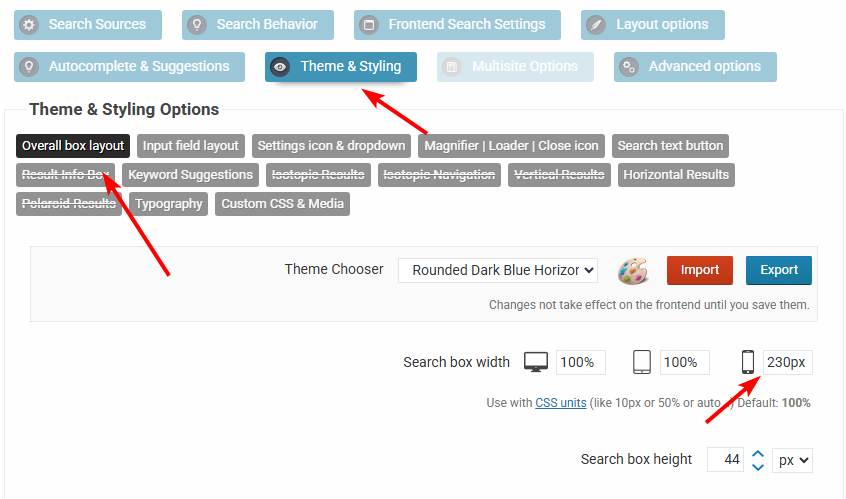
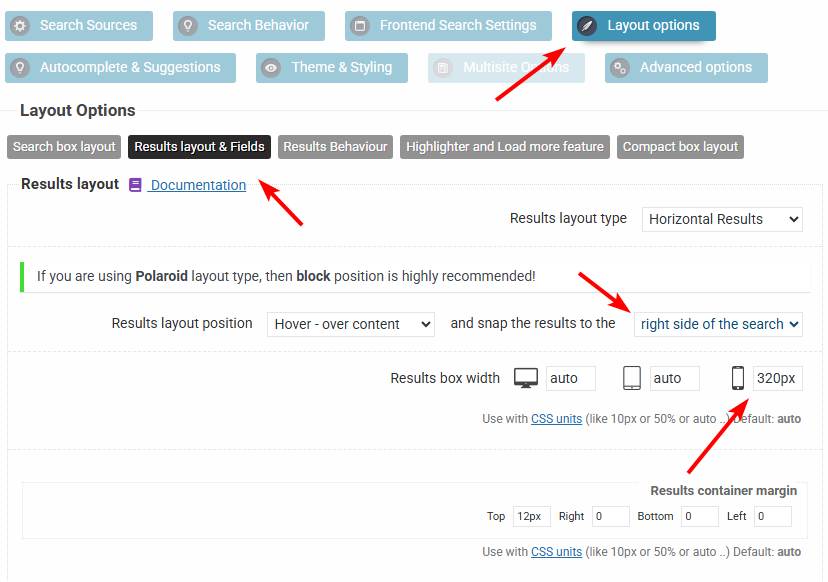
I think you may have it in the right position, it may only need a bit of adjustment. If you turn off the compact layout, then I would change the search bar width to a fixed 230px, and the results width to 320px for mobile and snapping to the right side, and that should give you a layout very similar to this.
KeymasterHi,
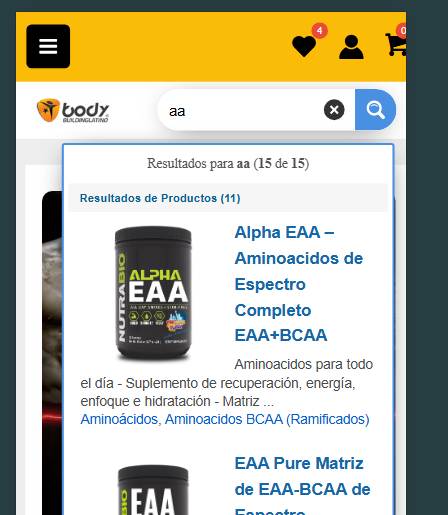
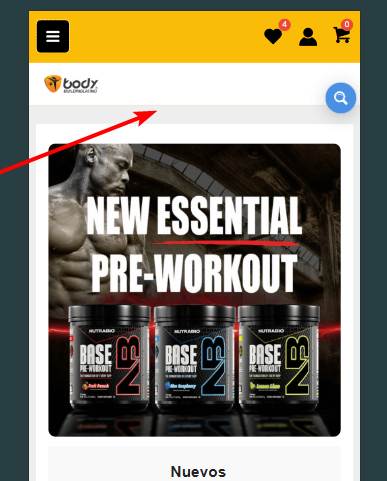
I see you have a compact search box, in most cases that works perfectly fine as it is always at hand and the user can initiate it anytime.
In you case you have a very nice header space, you could also use a full width search bar just between the header and the content. I would probably go with that instead of a compact search.
KeymasterHi,
Thank you! Unfortunately even after logging in I can’t access the page nor the back-end.
However I know what the issue is. The events manager uses custom fields to store the dates in
_event_startand_event_endfields. Please check this tutorial on how to set that up correctly.If you need help with that, then make sure to check the account permissions and I will do it for you.
KeymasterYou cannot access this content.
KeymasterHi,
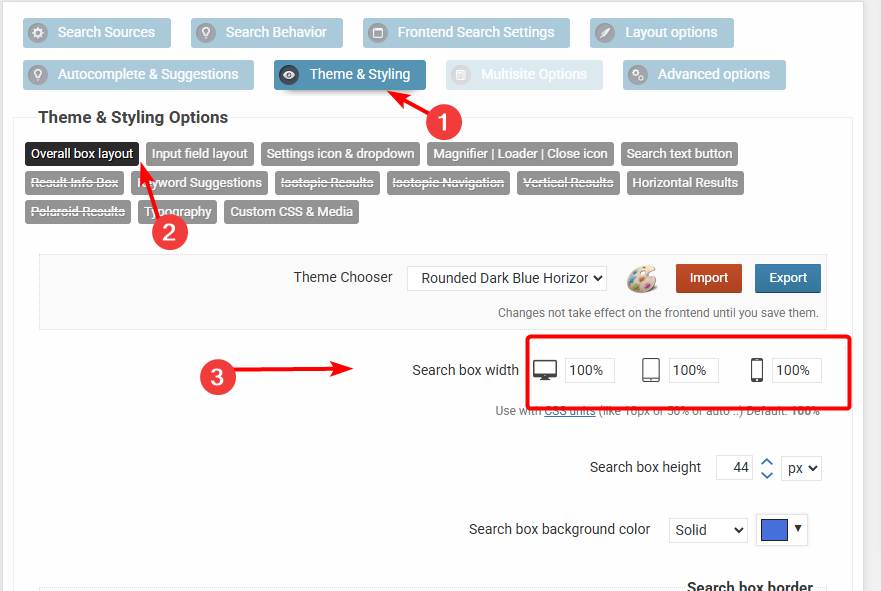
The search bar width can be set on the back-end. By default it’s 100%, so it fits the container element, you can change it here.
I hope this helps!
March 13, 2026 at 10:27 pm in reply to: When we add the serial number we get a connection error. #57123KeymasterYou cannot access this content.
March 13, 2026 at 10:01 pm in reply to: When we add the serial number we get a connection error. #57121KeymasterHi,
This happens if a very old version is installed, that is no longer able to connect to the secure verification server. Please make sure to manually install the newest update (download it from your purchases dashboard then install). After that it will be able to connect to the verification service.
KeymasterYou cannot access this content.
March 12, 2026 at 12:19 pm in reply to: Second search result gives “..” instead of the title of the vacancy #57116KeymasterHi,
Thank you for the details, it helped a lot.
I resolved the issue by installing the newest update 4.28.2. The version you had (4.26.6) was over 2 years old, so it was likely due to a bug that was already resolved in a newer version. Everything should be all right now 🙂
KeymasterYou cannot access this content.
-
This reply was modified 4 months ago by
-
AuthorPosts